Intent Signals Beyond Firmographics: A Reference
By Andrew Mark, Co-founder, Mir Tech
Published Updated 7 min read
On this page
A 40-person company with a perfect profile and no interest is a worse prospect than a 25-person company where three people read your pricing page this week. Firmographics tell you who could buy. Intent signals tell you who might be buying now.
Use this page as a lookup: what each kind of signal means, what weight to give it, and how to respond when an account acts.
Why a firmographic list stops working
A list built on industry, size and region produces one list that every rep and every competitor works from. The best-fit contacts get the most outreach, and most of it arrives at the wrong time.
Buyers also work out much of their shortlist before they talk to anyone. Gartner's 2025 survey of 632 B2B buyers found that 61% prefer a rep-free buying experience, and that 73% actively avoid suppliers who send irrelevant outreach. The first number says the research happens out of your sight. The second says a wrong guess has a cost.
The three kinds of signal at a glance
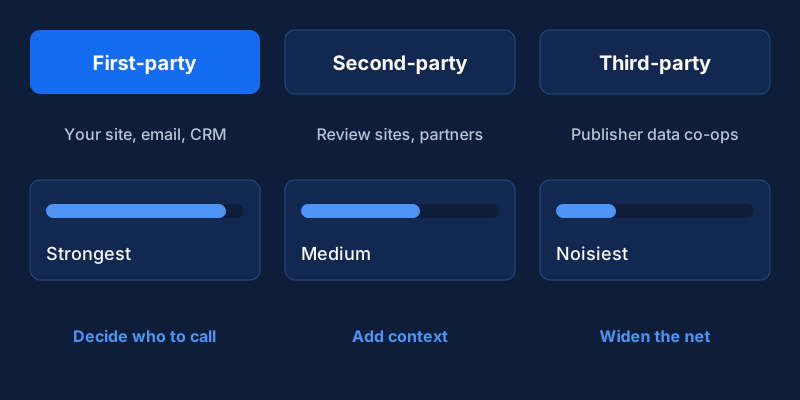
The pattern holds in almost every stack. The closer a signal is to your own site, the more it says about you in particular. The further away it is, the more it says about a topic.
First-party signals: the ones to build first
First-party signals come from your website, product, emails and events. The person was looking at you and nobody else, so this is the strongest evidence you have.
| Signal | What it often means |
|---|---|
| Pricing or plans page view | Comparing cost, close to evaluating |
| Integration or security documentation | A technical check, often late in evaluation |
| Comparison or "alternatives" page | Choosing between vendors |
| Several people from one company visiting | A buying group forming |
| Return visits over several days | Sustained interest, beyond a single visit |
| Demo or contact request | Explicit intent, so treat it as urgent |
| Case study or implementation guide download | Checking a decision before it is made |
Blog traffic counts for something, but much less. Someone reading a trends article is learning. Someone reading your onboarding guide is planning.
There is a catch. You only see people who find you, and an anonymous visit tells you little until you can tie it to a company. A form fill, a logged-in session, an email click or a reverse IP lookup can do that. Whichever you use, say so in your privacy notice. The data enrichment workflow covers the privacy basics for this kind of data.
Second-party and third-party signals: wider, weaker
Second-party intent comes from a partner that collects behavior on its own platform and shares it with you. Review sites are the usual source. G2 describes its buyer intent data as identifying companies researching your solution or category, or engaging with your competitors. That is closer to shopping than to general reading. The limits are coverage and cost: you only see platforms where you are listed, and the data usually names an account with no person attached.
Third-party providers collect content consumption across many sites and report which companies read about which topics. Bombora, for one, describes a data co-op of publishers and brands from which it derives intent. It can show that an account started researching a topic before they touched your site. It is also the noisiest signal. Topic interest is not vendor interest, and one analyst reading an article can look like a company-wide surge.
Ask any provider how the data was collected, whether individuals consented and how topics are matched. If the answer is vague, do not buy.
Our opinion is simple: do not buy third-party data until your team answers first-party alerts within a day. Paying for more signals when you ignore the ones you have buys more unread alerts.
A points model you can copy and change
A single page view means little. A cluster means more. For each account, look at fit (is it inside your ideal customer profile), breadth (how many people, from which functions) and recency (this week or three months ago). Then weight behavior above attributes.
The numbers below are an example, not a benchmark. The event rows match the lead scoring pipeline, which shows how to calculate them in SQL and write the result to your CRM. The fit and account-level rows are extra, added on top there.
| Signal | Type | Example points |
|---|---|---|
| In ICP industry and size band | Fit | +10 |
| Senior title engaged | Fit | +5 |
| Second and each later person from the same account | Account | +10 each |
| Demo or contact request | Event | +40 |
| Pricing page view | Event | +15 |
| Comparison page view | Event | +15 |
| Case study or integration guide download | Event | +10 |
| Webinar attended | Event | +10 |
| Third-party surge on a core topic | Third-party | +5 |
| Blog visit | Event | +2 |
Count only a recent window, such as 7 to 14 days, so old interest fades. A perfect-fit account that does nothing then scores low. An off-profile account where several people look at pricing scores high. That is the intent.
A hypothetical example
Take two imaginary accounts. The first matches your ICP exactly and has done nothing: it scores 10. The second sits just outside your size band, so it earns no fit points. Over five days a head of operations downloads an integration guide for 10 points. A finance manager opens the pricing page for 15, plus 10 as the second person. A third person views a comparison page for 15, plus 10 as the third person. The total is 60.
The second account gets the call today. The rep still checks fit before spending time, because a score cannot tell you whether a budget exists. It tells you where to look first.
Back-test before you trust the weights
Pull 20 to 30 closed-won deals and the same number of lost or stalled ones. For each, list what the account did in the 60 days before the first sales conversation. Look for signals that are common before wins and rare before losses. Also look for high scores that never converted, because they show where the model overvalues an action. On samples this small the check is rough, but it beats guessing. Repeat it each quarter.
What to do when a signal fires
The signal tells you when to reach out. It does not tell you what to say.
| Account state | Suggested action |
|---|---|
| Third-party surge only | Add to a watch list and run light marketing, with no direct outreach yet |
| Some first-party activity, no contact | Add to a sequence that names the topic and leaves the visit unmentioned |
| Cluster of high-value activity from several people | Alert the account owner and contact two or three people within a day or two |
| Demo or contact request | Reply the same business day, personally |
Write about the problem and leave the tracking out of the message. Compare these two openings:
I saw you looked at our pricing page three times this week.Teams moving from spreadsheets to a shared pipeline view often get stuck on
who owns the data. Is that on your list this quarter?The first reveals that you are watching. The second shows that you understand the situation. Use the signal to pick the topic and the contact, then write as you would to someone you had researched openly. When several people are active, a rep might write to the technical reader about integration and to the finance manager about total cost. Each message must make sense on its own.
Speed matters here, and so does ownership. Give every high-intent alert a named owner and a response time. An alert that nobody reads is only a notification. Lead routing by fit, territory and capacity covers how to assign them.
A minimal setup for a small team
You need four things: website analytics and a form tool that pass UTM and company data into the CRM, a CRM field for "last high-intent action" with its date, an alert to Slack or email when an account crosses your threshold, and a 15-minute weekly review of which alerts led to conversations and which were noise. For event-driven alerts beyond a single threshold, see the behavioral trigger system.
In a founder-led team the weekly review often sits with the founder. If that slows sales down, move the alerts to whoever owns first response and keep only the weekly check.
Where the model goes wrong
Internal traffic inflates scores, so filter out your own team, existing customers and job seekers. Third-party surges are leads to check, not facts to quote. Weights go stale without a quarterly review against won and lost deals. Privacy rules differ by region, so check your notices and consent setup for each market you sell into. The easiest trap to avoid is over-weighting blog visits: keep their points low.
Frequently asked questions
Do I need to buy intent data before I start?
No. Your own website, email and CRM activity is the most reliable signal you have, and it costs nothing extra. Buy third-party data only when you can answer first-party alerts within a day and you still lack accounts to work.
How many signals make an account worth contacting?
There is no universal number. Pick a threshold from the points table, then test it against closed-won deals. Two or three related actions from different people in one week usually deserve a look. One page view does not.
What if my site gets very little traffic?
Then each visit matters more, and a points model adds little. Skip the scoring, watch for a short list of actions (pricing, comparison, demo request) and have a person review them weekly. Email replies, event attendance and returning visitors count as signals too.