Sales Automation Pitfalls and How to Avoid Them
By Andrew Mark, Co-founder, Mir Tech
Published Updated 4 min read
On this page
A sequence has no judgment. It will email a prospect who just wrote "not now", then email again the next morning, because nobody told it to stop. Automation rarely fails loudly. It runs unattended, and the damage shows up months later as a weak domain reputation, a stale pipeline and annoyed prospects.
We think five failures cause most of that damage. Two more come up often, and we point to the pages that handle them: bad list data is a job for email list hygiene, and wrong personal details are a job for a sourced personalization workflow.
Automate only what already works by hand
If a manual process is unclear, automation will not clarify it. It repeats the confusion at speed, and activity numbers look healthy while nothing converts. The tell is many sends, few replies and no agreement in the team about why.
Run the outreach by hand with a small group first. Write down who you target, why they care and what you ask. Automate only the steps that are stable and repeated, and leave judgment calls with a person.
This is also why we would not buy a sequencing tool first. A new platform feels like progress, with its dashboard and template library, but it does not decide whom to contact, what to say or when to stop. A tool chosen before the process tends to make those decisions for you through its default timings and fields. Write the process first, then pick the tool that can enforce it. Ask whether it can require a person to approve a personalized line before step one, and whether it can share states with your CRM.
Give every sequence stop rules, and test them
A sequence without stop rules keeps writing to people who have already answered. The prospect says "not now" and gets another email the next day. A booked meeting still receives follow-ups. Write the rules before launch, and test each one.
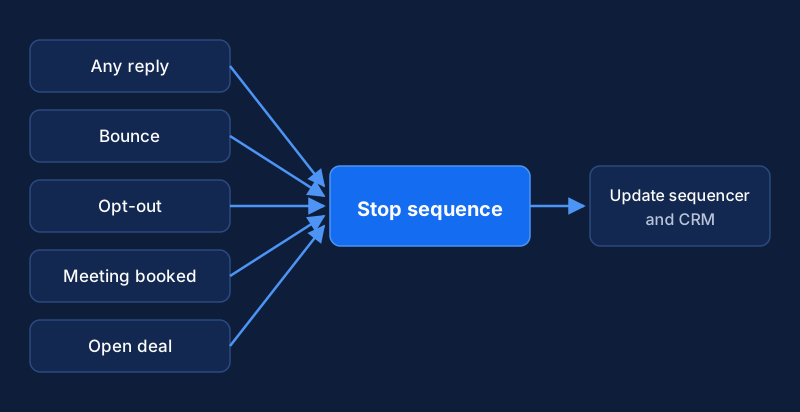
The events that should end a sequence are a reply of any kind, an opt-out, a bounce, a booked meeting, and an open deal or existing customer. Add a pause when a teammate has been in touch with the account recently. Opt-outs need extra care, because they must stop mail from every tool that can send it. The email compliance automation guide shows how to build that. The behavioral trigger system covers the opposite problem, which is when to hold back on reacting to a signal.
Stopping and pausing are different. A reply, an opt-out and a bounce end the sequence for good. A recent touch from a teammate is a pause, with a rule for when the sequence may resume and who decides. Writing both kinds down keeps a sequence from restarting on a contact that sales has already picked up by phone.
The sequencer and the CRM have to share these states. If one tool records a reply and the other keeps sending, the rule exists on paper only.
Make every step do a job
A sequence is a conversation spread over time. Over-sequencing turns it into pressure: too many touches, too close together, with nothing new in them. You see "just checking in" messages, rising opt-outs and replies that are annoyed instead of interested. Tools make adding steps cheap, and more steps feel like more effort.
Give each step one job. It adds a new fact, a new angle or a useful resource, and the gap before the next step leaves the prospect time to answer.
Step 1: A specific observation and one small question
Step 2: A useful resource on the same problem
Step 3: A different angle, such as a common mistake in their situation
Step 4: A polite close that leaves the door open
Stop:   any reply, opt-out, bounce or booked meeting
The number of steps and the gaps between them are yours to test. What matters is that no step copies the one before it.
Count meetings and replies, not sends
When a team is judged on emails sent, it sends more emails, because that is what the metric rewards. Activity is easy to count, and outcomes take more work to track.
Track a short list instead: replies split into interested, not now and opt-out, meetings that happened, opportunities created, and the reasons prospects give for saying no. Read a sample of the actual replies as well as the totals, because tone tells you more than a count. A rising share of annoyed replies is an early warning that a sequence is too long or too loud. Open rates are a weak signal at best. Mail privacy features and image blocking distort them, and an open does not mean interest.
Name an owner for every automation and every reply
Automations that nobody owns drift. A list goes stale, a sequence keeps running after the offer changes, and a broken integration drops replies. The sign is that nobody can say which sequences are active, who built them or what they say.
Keep an inventory of every active sequence. A row needs the name, the owner, the target list, the date of the last review and a note that the stop rules were tested. Name one owner for each and put a review date on it. Pause anything that has neither. The same rule covers the inbox. A slow reply to an interested prospect undoes the work that earned it, so set a response time and name who owns the replies. Never auto-answer an interested prospect.
Ownership is the first fix we would make. It leads to the inventory, the inventory shows which sequences lack stop rules, and cleaner replies make outcome tracking possible.
Test your stop rules with a seed contact
Before the next launch, add a contact you control to the sequence. Reply from that address and confirm that no step after the reply goes out. Then opt out from a second seed contact and confirm that every tool that can send mail has the address suppressed. If either test fails, fix that before anything else on this page.
Frequently asked questions
How many follow-ups are too many?
There is no universal number. The test is whether each message adds something new and whether the recipient has shown any interest. A short sequence with new information in every step beats a long one that repeats the same ask. If you cannot say what a step adds, remove it.
How often should we review our automations?
Review each active sequence on a fixed schedule, such as monthly, and review it at once if bounces, complaints or opt-outs rise. Give each automation one named owner and a review date. Pause anything that has neither.