Your Churn Problem Is a Data Problem: A CS Leader’s Framework for Predictive Analytics
Introduction: The Alarming Silence Before the Churn Notification
It’s a story every Customer Success leader knows by heart. An account you considered "healthy" or "stable" suddenly goes dark. Then, the email arrives with a subject line that makes your stomach clench: "Notice of Non-Renewal." You and your team are blindsided. Frantically, you dig through the CRM, searching for clues. The notes from the last Quarterly Business Review (QBR) seemed positive. There were no major outstanding support tickets. The Net Promoter Score (NPS) was a passive but acceptable 8. Yet, they’re gone. This is the failure that keeps us awake at night, the feeling of flying completely blind while a key revenue account heads for the exit.
This is not a minor inconvenience; it is a significant financial drain. For B2B SaaS companies, the average annual churn rate hovers between 5% and 7%. While that figure might seem manageable on a spreadsheet, it represents a constant, grinding loss of revenue, customer knowledge, and market reputation.
The fundamental problem is that most Customer Success teams are built to be reactive. We operate on lagging indicators. A poor NPS score, a sudden spike in support tickets, or a customer's total silence during renewal discussions are not warnings; they are post-mortems. By the time you observe these signals, the decision to leave has often already been made. You are no longer in the business of retention; you are in the business of desperate, last-minute resuscitation, which rarely succeeds. This reactive stance is incredibly expensive. We know that acquiring a new customer is 5 to 25 times more expensive than retaining an existing one. Every unexpected churn is a direct and substantial blow to your company’s bottom line.
I am going to lay out the exact, five-step system my team built to get ahead of this problem. We made a deliberate shift from reacting to customer sentiment to proactively predicting customer behavior. We engineered a system to identify the real, subtle signals of churn risk 30 to 60 days before a customer even thinks about drafting that non-renewal notice. This isn't theoretical. This is the operational playbook that changed our entire approach to customer management and turned our CS department into a predictable revenue-protection engine. The impact of such a system is difficult to overstate. A mere 5% increase in customer retention can increase profitability by 25% to 95%. This is the system that gets you there.
Step 1: Uncover Your True Leading Indicators
Before you can predict the future, you must learn to read the present correctly. The first and most critical step is to shift your entire team's focus from lagging indicators to leading indicators. The distinction is simple but profound. A lagging indicator is the result. Churn rate, lost revenue, and a low customer satisfaction (CSAT) score are all lagging indicators. They tell you what has already happened. They are autopsy reports. A leading indicator is a behavioral signal that precedes the result. It is the earliest, faintest whisper of a customer struggling to achieve value, losing momentum, or becoming disengaged. Leading indicators are your diagnostic tools.
To find these indicators, we mapped our customer journey and identified key data points across three primary sources. You must look for changes in behavior, as these deviations from the norm are your earliest warnings.
1. Product Usage Data This is the most truthful data source you have. What customers do within your product is far more predictive than what they say in a survey. We ignore vanity metrics like "total logins" and focus on metrics that prove value realization. Key indicators for us include:
- A 30% or more drop in login frequency: We monitor the 7-day and 30-day rolling average of active users. When the 7-day average falls significantly below the 30-day baseline for two consecutive weeks, it’s a major flag. It shows a recent and sustained drop in engagement.
- Abandonment of core features: Every product has a set of "sticky" features that correlate directly with long-term retention. We identify these features by analyzing the behavior of our most successful, long-term customers. When a newer account fails to adopt these features within the first 90 days or a previously active account stops using them, we know they are not embedding our solution into their core workflows.
- Shrinking ratio of active-to-provisioned seats: For any per-seat SaaS model, this is a powerful indicator. If a customer is paying for 100 seats but only 50 have logged in over the past 30 days, you have a 50% "shelf-ware" problem. At renewal, they will not see the value in paying for licenses that go unused and will look to downsize their contract, if not churn entirely.
2. Engagement and Relationship Data This data lives in your email, your meeting notes, and your CRM. It reflects the health of the human relationship between your team and the customer's.
- A new executive stakeholder or champion loss: This is one of the single biggest predictors of churn. The new executive has no history with you, no political capital invested in the decision to buy your product, and is often looking to make their mark by bringing in their own preferred vendors. The signal isn't just the personnel change itself; it's the lack of a warm introduction from your old champion to the new leader. Silence here is a five-alarm fire.
- A sudden drop-off in CSM email responses: We track email response rates from our key contacts. If a stakeholder who typically responds within 24 hours suddenly takes five business days or more to reply, or stops replying altogether, their priorities have shifted away from your partnership.
- Declining meeting attendance: When key decision-makers repeatedly decline or delegate their attendance at QBRs or strategic calls, they are non-verbally communicating that they no longer see value in the conversation.
3. Commercial Data This data provides clues about the customer's financial and contractual intentions long before the official renewal date.
- Resistance to QBRs: Pushing back on a scheduled QBR once can be a simple scheduling conflict. Pushing it back multiple times, or questioning the need for it, is a sign that they do not want to discuss strategy because they do not envision a long-term future with your product.
- Unprompted requests for contract details: An inquiry from the procurement or legal department about contract terms, termination clauses, or usage reports six months ahead of renewal is rarely a sign of proactive planning. It is a clear signal that they are building a business case to evaluate competitors.
- Increased scrutiny on invoices or budget: A sudden new level of questioning around line items or a new insistence on proving ROI for every dollar spent often precedes a budget cut where your solution is deemed a "nice-to-have," not a "must-have."
These indicators are not universal. You must identify what matters for your specific business. For our enterprise collaboration software, a decline in "shared project spaces created" or a drop in the comment-to-creation ratio is a major red flag. For one of our clients in the data analytics space, the most predictive leading indicator is the "number of dashboards shared with C-level executives." For a marketing automation platform, it could be a sustained drop in email campaign open rates, indicating their own customer engagement is suffering. The critical task is to identify the core value-delivering actions within your product and monitor them obsessively.
Step 2: Engineer a Practical Customer Health Score Model
Once you have identified your leading indicators, you need a system to consolidate them into a single, actionable metric. This is the purpose of a customer health score. A health score is not just one number; it is a weighted composite of your most critical indicators, designed to give you an at-a-glance understanding of customer risk and opportunity.
My approach avoids unnecessary complexity. I have seen teams spend more than a year trying to build a perfect, 50-factor predictive model, only to end up with a system no one on the front lines understands or trusts. The goal is not academic perfection; it is operational actionability. We need to consolidate multiple, disparate data inputs into a single score, often visualized as red, yellow, green, or on a 0–100 scale.
1. Centralize Your Data This is the foundational, unglamorous, and absolutely non-negotiable first step. You cannot score what you cannot see. Your product usage data, support ticket history, survey responses, and CSM activity logs must be brought together into a single location. Whether you use a dedicated customer success platform like Gainsight or Planhat, or pipe data from various sources into a central data warehouse like Snowflake or BigQuery, centralization is essential. Attempting to manage this with spreadsheets is a recipe for failure. It is manual, error-prone, and impossible to scale.
2. Weight Each Indicator Not all indicators are created equal. A drop in product usage is often more predictive of churn than a single passive NPS score. Weighting allows you to assign a relative importance to each indicator based on its historical correlation with churn.
This process is both an art and a science.
- Start with a Hypothesis: We began by gathering our most experienced CSMs, a product manager, and a data analyst in a room. We asked a simple question: "If you were on a desert island and could only know three things about a customer to predict their renewal, what would they be?" The qualitative insights from this exercise formed the basis of our initial weighting hypothesis.
- Validate with Historical Data: We then tested our hypothesis. We took the last 50 customers who had churned and a control group of 100 who had renewed. We manually pulled the data for our chosen indicators for the 90-day period leading up to their renewal (or cancellation) date. The patterns were undeniable. We found that 88% of churned accounts had experienced a champion change in the preceding six months, compared to only 12% of renewed accounts. This gave us the empirical evidence we needed to assign a heavy weight to that specific indicator.
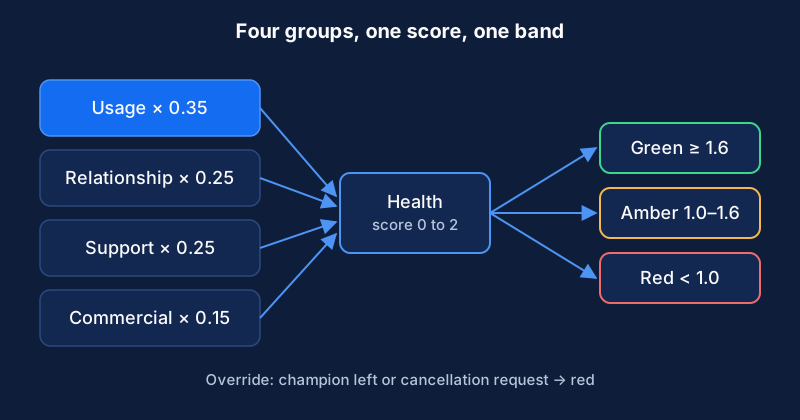
A simple starting model for a B2B SaaS company might look something like this:
- Product Adoption Score (40%): A composite score based on login frequency, core feature usage, and active user ratio.
- Support Ticket Trends (25%): Measures ticket volume, severity, and time-to-resolution. A high volume of severe, unresolved tickets is a major risk.
- Customer Sentiment (20%): A blended metric from NPS/CSAT surveys and CSM pulse checks (a subjective score entered by the CSM after key interactions).
- Executive Engagement (15%): Tracks the frequency and quality of interactions with executive buyers and key decision-makers.
You will not get the weighting perfect on day one. Start with your best-informed hypotheses, launch the model, and commit to refining it every quarter as you collect more data on its predictive accuracy.
3. Define Clear Thresholds and Tiers Finally, you translate the weighted inputs into a simple score and create clear, unambiguous thresholds for action. A 0-100 scale is common and easy to understand. For my team, we established the following tiers:
- Healthy (Green: 80-100): These accounts are showing all the signs of success. They are likely to renew, are prime candidates for expansion, and should be approached for case studies or referrals. The CSM's role here is to provide strategic guidance and ensure continued value realization.
- At-Risk (Yellow: 50-79): This is your early warning system. These accounts have one or more negative leading indicators. They require proactive investigation and course correction from the CSM. This is not a panic button, but a check-engine light demanding attention.
- Critical (Red: Below 50): This is an all-hands-on-deck situation. These accounts display multiple, severe negative indicators and are at high risk of churning. A "critical" status should trigger an immediate, pre-defined intervention playbook involving the CSM, their manager, and often an executive sponsor.
This three-tiered system gives the entire organization a common language for discussing customer risk and ensures that resources are allocated effectively.
Step 3: Integrate Health Data into Daily CS Workflows
A predictive model that lives exclusively in a business intelligence dashboard is an academic exercise. It is where data goes to die. For a health score to have any real impact, it must be woven into the fabric of your team's daily operations. An effective model lives where your team works, which for most CS teams is the CRM and their dedicated customer success platform.
1. Embed Health Scores in Your CRM We made it a rule: no CSM should have to hunt for the health score. We piped the score and its component data directly onto the main account object in our Salesforce and HubSpot instances. This was not just a single number in a field. We built a custom visual component that, at a glance, shows every CSM:
- The current health score, color-coded for immediate recognition (green, yellow, red).
- A 90-day trend line, showing whether the account's health is improving, declining, or stable.
- The top positive and negative drivers, listing the specific indicators that are contributing most to the current score. For example: "Negative: Login frequency dropped by 40% in the last 30 days," or "Positive: Executive sponsor attended QBR last week."
This immediate, contextual information on the account page transformed our CSMs' ability to prepare for calls and strategize their engagement.
2. Create Specific, Automated Alerts Human monitoring is not scalable or reliable. We built automated alerts to ensure no warning sign was ever missed. When an account's score crosses a threshold, an action is triggered automatically. For instance, when a score drops from "Healthy" (e.g., 82) to "At-Risk" (e.g., 75), an immediate task is created and assigned to the CSM in our customer success platform.
Crucially, the alert is not generic. It contains the essential context. The task description reads: "Alert: Acme Corp's health score dropped from 82 to 75. Primary Driver: Active user-to-provisioned seat ratio fell from 85% to 60%. Assigned Playbook: 'User Adoption Risk'." This specificity allows the CSM to immediately understand the problem and know the precise first step to take, without wasting 30 minutes digging through multiple dashboards to diagnose the issue.
3. Drive Prioritization with Data This is where the system fundamentally changes how a CS team operates. The old way of managing a book of business was often alphabetical, by renewal date, or by which customer was "the squeaky wheel." This is reactive and profoundly inefficient.
Our new workflow is driven entirely by health data. My team starts each day with a view of their portfolio sorted by health score, from lowest to highest. This dictates their entire work plan.
- Critical (Red) Accounts: These are the first priority. The CSM's initial block of time is dedicated to executing the high-urgency intervention playbooks for these accounts.
- At-Risk (Yellow) Accounts: This is the proactive heart of the CSM's week. They work through this list, investigating the score drivers and engaging customers with targeted, value-added outreach.
- Healthy (Green) Accounts: These accounts are managed with a lighter, more strategic touch. The focus is on long-term goals, identifying expansion opportunities, and securing advocacy, rather than day-to-day fire-fighting.
This data-driven prioritization ensures that our team's most finite and valuable resource, their time and expertise, is consistently applied to the accounts that need it most. It transforms the CSM role from a reactive relationship manager into a proactive, strategic risk manager and portfolio optimizer.
Step 4: Execute Intervention Playbooks for At-Risk Accounts
An alert without a corresponding action plan is just noise. It creates anxiety without providing a solution. To make our health scoring system effective, we developed specific, mandatory playbooks for our CSMs to execute based on the precise reason for the health score decline. These are not loose suggestions; they are standard operating procedures. This consistency ensures that every at-risk account receives a rapid, methodical, and high-quality response, eliminating guesswork and variability in our treatment of risk.
Here are two examples of the playbooks we implemented:
Example Playbook for 'Adoption Drop' (Triggered by a significant decline in product usage)
This playbook is initiated when an account's usage of core features or its active user count drops below a pre-defined threshold. The goal is to quickly diagnose the root cause and re-engage the user base by reinforcing the product's value.
- Day 0: Analyze & Hypothesize. Within four business hours of the alert, the CSM must use our analytics tools to investigate precisely which features are being underutilized and which user cohorts have dropped off. They cross-reference this with the customer's original business goals documented in the CRM to form a hypothesis. (e.g., "Hypothesis: The marketing team stopped using the campaign reporting feature after their team lead, our primary power user, went on leave.")
- Day 1: Prepare Value-Reinforcement Outreach. The CSM prepares a short, targeted value-reinforcement presentation or email. It is not a generic training deck. It specifically highlights how the underutilized features can help the customer achieve their stated business goals. For example, "Three ways our reporting dashboard can help you hit your Q3 pipeline generation target."
- Day 1-3: Schedule an 'Optimization Session'. The CSM reaches out to their key contact to schedule a call. They never frame it as, "I noticed you stopped using our product." Instead, the positioning is proactive and value-focused: "I was reviewing your team's progress towards [Business Goal] and had a few ideas for how to accelerate that. Do you have 20 minutes next week for a quick strategic optimization session?"
- Day 3-7: Execute and Follow-up. The CSM conducts the targeted session, focusing only on the features relevant to the customer's immediate goals. They follow up with a summary and a link to a relevant tutorial video, and create a task to re-check that account's usage metrics in 14 days to confirm the intervention was successful.
Example Playbook for 'Champion Loss' (Triggered when a key contact or executive sponsor leaves)
The departure of a champion is a moment of maximum vulnerability for an account. A swift, strategic response is critical to re-establishing your footing and building a relationship with the new stakeholder. A study from Sturdy has shown that teams that act on executive change signals within the first 48 hours have a 33% higher chance of retention.
- First 24 Hours: Identify and Research. The CSM’s top priority is to identify the former champion's replacement. They use LinkedIn Sales Navigator, check company press releases, and ask their remaining contacts at the account. Once identified, they research the new stakeholder's background, previous roles, and public statements to understand their priorities.
- First 24 Hours: Internal Alignment. The CSM immediately notifies the Account Executive and their own manager via a dedicated Slack channel. They collaborate to create a one-page "State of the Relationship" brief that summarizes the history, key wins, value delivered to date, and any known risks. This ensures everyone is working from the same script.
- Within 48 Hours: Initiate Contact. The CSM initiates contact with a tailored introduction. The goal is to secure a 30-minute introductory meeting within the first ten business days. The message references the value delivered to their predecessor and frames the meeting as an opportunity to understand the new leader's objectives and ensure the partnership is aligned with their vision.
- First Meeting: Re-run Discovery. The primary goal of the first meeting is to listen, not to present. The CSM should spend 80% of the time asking questions: "What are your top priorities in your first 90 days?" "What does success look like for your team this year?" "What's your initial perception of our platform?" You must re-establish the value proposition from scratch and earn the trust of the new stakeholder. Do not assume any prior knowledge or goodwill.
By codifying these responses, we arm our CSMs with a proven strategy for every common risk scenario, enabling them to act with speed, confidence, and precision.
Step 5: Measure Your Save Rate and Prove Your ROI
As a Customer Success leader, your responsibility extends beyond managing your team; you must prove the financial impact of your organization to the CFO and the board. A predictive churn system is a powerful tool, but its value must be quantified in the language of the business: revenue. We report on two primary metrics to demonstrate the clear, undeniable ROI of our proactive efforts: the Save Rate and the Net Revenue Retention (NRR) of remediated accounts.
1. Define and Track Your 'Save Rate' The Save Rate is our core operational metric. It measures the direct effectiveness of our intervention playbooks. We define it very clearly:
- Save Rate: The percentage of accounts that were flagged as 'At-Risk' or 'Critical' and subsequently returned to a 'Healthy' status within 90 days of a playbook being initiated.
We chose a 90-day window because it's long enough for an intervention to take hold and for us to see a sustained behavioral change in product usage and engagement. This isn't about a temporary bump in a metric; it's about a genuine return to a healthy trajectory. We track this metric on a cohort basis every month and report on it in our departmental reviews. While it can vary by industry and customer segment, our internal benchmark is to maintain a save rate above 80%. This metric proves to the organization that our team's activities are directly and successfully mitigating churn risk.
2. Calculate the ROI with NRR Cohort Analysis The Save Rate is an excellent operational metric, but the CFO wants to see the impact on the dollar. To do this, we perform a cohort analysis that compares the NRR of accounts that received an intervention against the historical NRR of similar accounts that churned before this system existed.
Here is how we present the data:
- Cohort A (The Control Group): We look back 12-18 months, before our predictive system was in place. We identify a group of accounts with similar characteristics (e.g., ARR, industry, size) that ultimately churned. By definition, the NRR for this cohort is 0%.
- Cohort B (The Intervention Group): We then take the cohort of 'At-Risk' accounts from the last 12 months where we successfully executed a playbook and moved them back to 'Healthy' status. We calculate the NRR for this specific group. Not only did these accounts not churn (avoiding a 0% NRR), but many of them went on to renew flat or even expand, resulting in an NRR often exceeding 100%.
The delta between these two cohorts is the ROI. A B2B SaaS company that implemented a similar data-driven approach with the JourneyTrack platform saw a 21% reduction in churn in the first 90 days and a 1.6x improvement in revenue retention year-over-year. When we can walk into a financial review and state, "Our proactive intervention program saved 45 accounts last year, protecting $4.2M in ARR that historically would have churned," the conversation changes completely.
Presenting this data transforms Customer Success from a perceived cost center into a proven and predictable revenue-protection and growth engine. This is how you secure more budget, more headcount, and a more strategic seat at the executive table. In the world of SaaS, where an NRR above 120% can lead to 2-3 times higher valuation multiples, you are no longer just saving customers. You are actively building the enterprise value of your entire company.
Related Content
Your Pipeline Coverage Is a Vanity Metric. Focus on Velocity for Predictable Revenue.
RevOps leaders: Stop chasing a bloated pipeline. Learn why velocity metrics like cycle time and conversion rates are the true drivers of predictable revenue. We show you how to measure and improve them.
Technical Architecture: A Unified Customer Touchpoint Tracking System
A technical guide for systems architects to map and track all customer touchpoints using a CDP, CRM, and analytics for complete journey visibility.