Track the Customer Journey: Events, Identity and Consent
By Shuk Huay Koh, Founder, Mir Tech
Published Updated 5 min read
On this page
A customer reads a blog post, opens a newsletter, joins a webinar, talks to sales, signs up, asks support a question and renews. Each step happens in a different tool, and each tool knows one piece of the story. A journey view joins those pieces into one timeline per person and per account.
Three decisions decide whether that timeline is useful: the tracking plan, how you resolve identity, and how you handle consent. The rest is plumbing. You need a website, a CRM, an email tool and one person who owns the data, not a data team.
Once the timeline exists, it feeds practical B2B attribution, account health scoring and behavioral triggers. It also answers questions single tools cannot. What did the customers we won touch before they talked to sales? Where do prospects stall between first visit and first meeting? What did a customer do in the weeks before they renewed or left?
The tracking plan is a contract
Start on paper. A tracking plan lists every event you collect and the rules for naming and describing it. It is the agreement between marketing, sales, product and whoever writes the code. A spreadsheet is fine.
For each event, record the name, the exact moment it fires, the properties that travel with it (source, plan, page_path) and who owns it. Pick one naming pattern. Object plus past-tense action works well: Demo Booked, Pricing Page Viewed. Then map events to a small set of stages. For B2B, a workable set is Visitor, Known, Engaged, Opportunity, Customer and Advocate. Define each stage in the plan, for example Engaged after two content visits in thirty days and Opportunity when a deal exists.
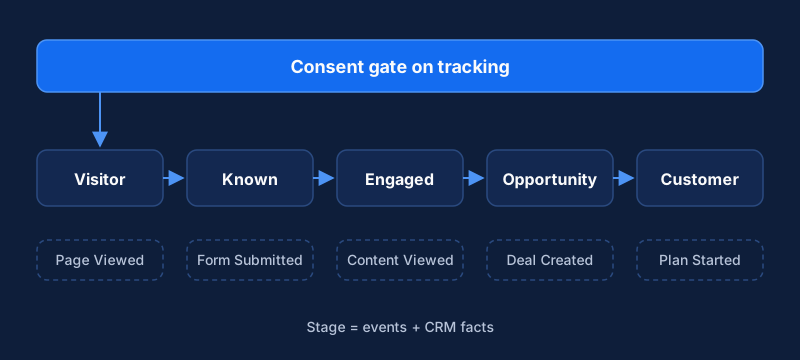
Keep the plan short. Thirty well-named events everyone understands beat three hundred nobody trusts. Fewer stages with clear definitions beat many that nobody agrees on.
When you instrument the site and product, test every event in your tool's debugger. The usual faults are duplicate events (often from single-page apps), mixed names such as demo_booked and Demo Booked, and missing properties. Some visitors block scripts, so expect data loss and do not claim precision you lack. Server-side events, such as a form processed on your backend or a subscription created, are more reliable than browser events. Use them for the events that matter most.
Identity is the hard part
Most journey tracking is an identity problem. Decide up front which identifiers exist and where each lives.
| Identifier | What it is | Typical source |
|---|---|---|
| Anonymous ID | A random ID for an unknown visitor | Set by the tracking library in the browser |
| User ID | A stable ID for a known person | Your product or CRM database |
| Useful for matching, but it changes | Forms, CRM, email tool | |
| Account or company ID | Groups people into a customer | CRM |
Use a stable database ID as the key for a known person. Segment's guidance on its Identify call recommends database IDs over emails or usernames, because emails and usernames can change. The same logic applies in other tools.
Resolution then runs in three moves. The library gives each visitor an anonymous ID and attaches it to events. Segment's documentation notes that its web and mobile libraries automatically use anonymous IDs to keep track of users as they navigate your website or app. When someone submits a form, logs in or clicks a tracked email link, you call identify with the known ID and traits such as email and company, and most tools then tie the earlier anonymous activity to that person. Merge rules differ between tools, so check yours. Finally you send a company ID with the person. Match on a stable company identifier from the CRM and use email domain only as a fallback, because people use personal addresses and consultants work with several firms.
Prefer a missed merge to a wrong one. A bad merge is harder to undo, so use matching rules you can explain. One browser may serve several people. The same person may use a work and a personal address, so treat emails as attributes and the stable ID as the key. A visitor on a phone and a laptop looks like two people until they identify themselves, and part of the early journey stays invisible.
To connect the other tools, sync CRM contact creation, lifecycle changes, meetings and deal stages into the journey tool, plus email sends, clicks and replies. Write key facts back to the CRM: first-touch source, last content engaged with, date of the last product action. Name an authority for every field. The CRM owns deal stage and the analytics tool owns page views, or two tools will overwrite each other.
Consent comes before collection
Tracking that ignores consent creates legal risk and erodes trust. Requirements depend on where your visitors are, so check the rules for your audience and take legal advice on edge cases.
Some points hold nearly everywhere. Collect consent before tracking where the law requires it. In the EU and UK that generally covers non-essential cookies and similar technologies. If you serve Malaysian customers, the Personal Data Protection Department publishes the Personal Data Protection Act 2010 and its guidance. The Act has been amended since, so read the current text. Make withdrawal easy: under the GDPR, it shall be as easy to withdraw as to give consent.
Then pass the state to your tools. Google tags offer consent mode, and Google's documentation explains that consent defaults are set before any config or event commands, and an update is sent when the user interacts with the banner. It does not store the choice, so you must persist it and resend it on later pages. Store consent with the profile too: what the person agreed to, and when, available to every tool that sends messages.
Collect only what you use. Every property you do not need is liability without benefit. And handle deletion requests with a process, not a scramble: know which tools hold personal data and how to remove a person from each.
Check it against five real customers
Dashboards hide problems that a hand check finds. Choose five recent customers, rebuild each journey by hand from emails, calendar invites and CRM notes, and compare it with what the system shows. If the timeline of a customer you know well looks wrong, it is wrong for everyone else too.
The common failures have clear causes:
- Journeys that start at the form fill mean anonymous history is not merging. Check that identify runs in the same browser session and that the anonymous ID persists across pages.
- Counts that differ between tools need one definition per metric and one named source. Expect small gaps from blockers and bot filtering.
- Contacts with no account need a better account-matching rule and a backfill from CRM data.
- Consent changes that do not take effect usually mean a call-order problem. Defaults must be set before tracking fires.
- Events that stop arriving need a monitor that alerts when a key event's volume drops to zero.
The system decays unless someone looks after it. Review the plan every quarter, remove events nobody uses, route every new event through the data owner, and write down the identity rules so the team understands the numbers. When the data is stable, pipeline automation shows how to connect it to routing and follow-up.
Related Content
Leading Indicators of Churn and a Simple Health Model
How small customer success teams can spot churn risk early using leading indicators and a simple, spreadsheet-sized health model they can run weekly.
Pipeline Velocity: The Formula and How to Use It
A worked example of the pipeline velocity formula for founders and sales leads, showing how stage conversion and cycle time reveal where deals slow down.
Personalize Website and Email Content by Segment
A practical guide for B2B teams to personalize web and email content by segment: plan variants, add fallbacks and test against a control group.