Gated or Ungated? A Distribution Plan for Your Ebook
By Andrew Mark, Co-founder, Mir Tech
Published Updated 6 min read
On this page
A B2B ebook costs real time: interviews with experts, writing, design, review. Then the promotion plan often fits in one sentence, and the file fades after a single email and a few posts. The questions below are the ones that decide whether it reaches buyers, in the order you meet them. For the general channel mechanics behind the answers, see the content distribution playbook.
Should we gate it?
A form in front of the file is a cost for the reader. You pay it back in contact details, so the asset has to be worth the exchange.
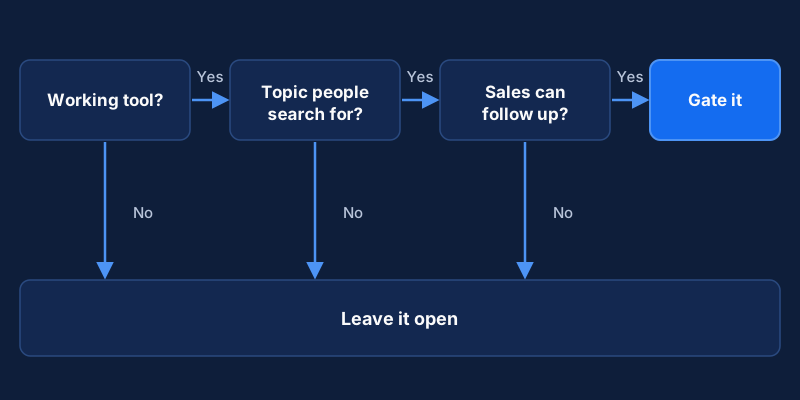
Gate it when it is a working tool, such as a checklist, template pack, benchmark or step-by-step guide that someone will use at their desk. The topic should be one people actively search for, so visitors arrive with intent. And you need the capacity to handle the leads: someone replies, and the data lands in your CRM.
Leave it open when the goal is trust or reach, for example a point-of-view piece you want founders to share. Leave it open when your audience is small and known to you, because a form blocks people you want. Also leave it open when sales will send it to prospects, since a prospect who must fill in a form for something you emailed them gets a poor impression.
Our recommendation: gate a tool and leave an opinion piece open. Most ebooks are the second kind, and teams gate them out of habit. An open asset can still earn leads if it carries a clear call to action and you track visits to the pages it links to.
A hybrid often works. Publish the ideas as open articles, one per chapter, and gate the packaged version: the full PDF, the templates, the worksheet. Write the decision and the reason down. When the numbers disappoint, you can then ask whether the plan was wrong or the execution was.
What should the landing page say?
If you gate the ebook, the page decides whether the plan works. Name the outcome the reader wants, in their words. "A plan for your first 50 outbound accounts" tells a buyer more than "Our Ultimate Guide". Add three to five bullets on what the reader will be able to do afterward, and a preview such as the table of contents or two pages, which answers the question "is this worth my email address?"
Keep the form to name and work email unless someone on your team will use another field within a week. You can enrich later. Remove the site menu, since the page has one job, and add a short quote from a named reviewer or contributor in place of a row of logos you cannot explain.
If you cannot write the headline as an outcome, the ebook may be too broad. The customer research guide shows how to find the words your buyers use.
What should we plan before writing?
Treat the ebook as a source and list the pieces you will cut from it. For a five-chapter ebook that means a blog post per chapter, each with its own keyword and a link to the full asset. It means carousels and short posts built on the sharpest framework or number in each chapter, and graphics that still make sense when copied out of the document. A webinar can follow the ebook's structure, and sales gets two or three sentences and a link they can paste into an email.
Some choices live in the document itself and cost little while you write. Make each chapter stand alone, with an opening line that restates its problem, so a reader who lands on chapter three from a post is not lost. End with one clear action, such as a worksheet or a short call, because a closing page with five links gets none of them clicked. Credit the contributors and link every statistic to its source, which makes the asset easier to share and easier for a salesperson to quote. A changelog line on the last page ("Updated October 2026: replaced two examples") shows the asset is maintained and gives you a reason to relaunch it.
If the ebook sits behind a form, export one ungated version, such as the first chapter or a one-page summary, so sales can send it without asking prospects to register.
How do we get sales using it?
An ebook helps most when salespeople know what is inside. A week before launch, walk them through the table of contents and ask which chapters answer questions they hear on calls. The answers tell you which chapter to promote first and which objection the next edition should address.
Give each person two or three sentences and a link for the situations where the ebook helps, in the style described in the sales playbook guide. A rep who has sent the right chapter to five prospects will tell you more about the asset than a download count.
What changes about distribution for an ebook?
Email, social, communities and partners work as they do for any asset. Three things are specific to an ebook.
In launch week, email your list with a line written for each segment, have the founder and contributors share it in their own words, and brief sales and customer success with a short message and the link. In weeks two to eight, publish the chapter posts one at a time, each ending with a link to the full asset, and pitch your sharpest finding to a newsletter or community as an insight and not a promotion. If you run LinkedIn ads, test one audience and one message first and judge it by cost per qualified contact instead of cost per download.
After the launch window, keep the ebook linked from related posts and sales sequences, and review it once or twice a year. Update dates, examples and sources, and note the update in the file.
What happens after someone downloads it?
A download shows interest in a topic and does not signal intent to buy. Treat the first two weeks as a chance to be useful. Deliver the file at once and ask one open question about the reader's situation. A few days later, send the chapter article that goes deepest on a point from the ebook. About a week in, share an example of the approach in practice or an invitation to a live session. About two weeks in, make a direct, low-pressure offer to talk.
Subject: Here is the {{ebook_title}} you asked for

Hi {{first_name}},

Here is the link: {{download_url}}

One question, if you have a minute: what is the hardest part of
{{topic}} for your team right now? I read every reply.

{{sender_name}}
Watch behavior and not only opens. A reply, a click on a case study or a registration for a session is a better sign than an opened email. Pass those to sales with context: what the person downloaded, what they clicked and what they said. The segment automation framework describes how to route contacts by what they do.
Which numbers tell us it worked?
Choose a few before launch and write them down. Count visits to the landing page by source, the page's conversion rate compared with your own earlier assets (a benchmark from a different audience misleads), qualified contacts counted separately from total downloads, conversations started within a set period, and which derivative posts bring readers back to the asset.
If downloads are high and conversations are low, look at who is downloading and what the follow-up says. If downloads are low, look at the headline, the preview and the traffic sources.
Put the gate decision, the derivative list, the follow-up sequence and the name of the person who replies on one page. Three months on, that page lets you tell whether the plan or the execution needs to change.
Related Content
Content Distribution Playbook: One Core Piece, Many Channels
How small B2B teams can turn one strong piece of content into posts, emails, talks and sales assets, with a distribution plan you can run weekly.
B2B Webinar Strategy: Plan, Promote, Repurpose
How founder-led B2B teams can plan webinars around pipeline, promote them to the right accounts, follow up by behavior and repurpose each session.
Personalize Website and Email Content by Segment
A practical guide for B2B teams to personalize web and email content by segment: plan variants, add fallbacks and test against a control group.