Build an Account Health Score Pipeline With Alerts
By Andrew Mark, Co-founder, Mir Tech
Published Updated 10 min read
On this page
Nobody opens a health dashboard on the morning a champion goes quiet. What gets noticed is a message in Slack that says an account moved from amber to red, why it moved, and who owns it.
That message is the product of a small pipeline: collect signals, model one row per account per day, score it, and alert on the change. If you have not yet decided what to measure, read leading indicators of churn and a simple health model first. This guide builds the same model, with the same weights, as SQL.
A competent analyst or engineer can have a first version running in a few days. Most of that time goes into making account IDs match across tools. The scoring itself is the easy part.
The shape of the pipeline
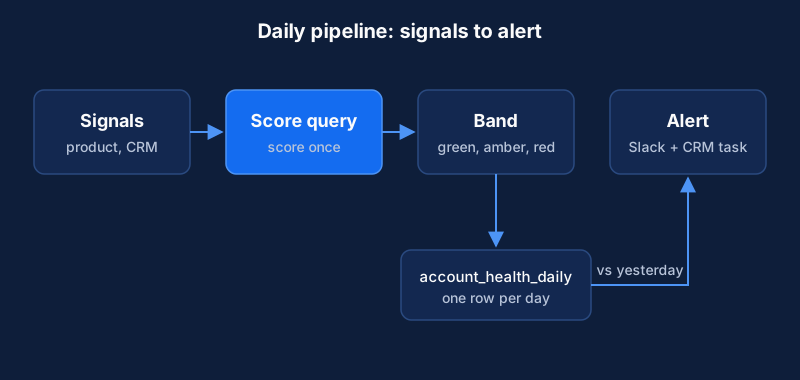
Keep the first version boring: one warehouse, one scoring query, one alert channel. Add sophistication after people trust the alerts. We would also advise against a vendor's opaque "AI health score" at this size. If nobody can read why an account turned red, nobody will act on it.
Lighter setup
A small team without a warehouse can get most of the value with less. Keep one row per account in a spreadsheet or in your CRM. Fill the signal columns by hand or from a scheduled export. Apply the same 0, 1 and 2 scores with spreadsheet formulas or CRM workflow rules, then use a Zapier or Make automation to post to Slack and create a CRM task when the band changes. The logic stays the same and only the place it runs changes. That is the idea behind repeatable workflows: write the rules once and let the tools run them.
What you need
The examples use BigQuery, dbt and Slack, but each has equivalents.
- A data warehouse: BigQuery, Snowflake, Postgres or similar. BigQuery can run queries on a recurring schedule, which is enough for a daily score.
- A source of product events, or daily aggregates per account.
- Your CRM, with account records, the owner field and renewal dates.
- A helpdesk and a billing tool. Both are optional at first.
- A transformation tool. dbt is a common choice, and plain scheduled SQL works for version one.
- A chat tool for alerts.
If each tool tracks accounts under a different ID, solve that before anything else. A shared account ID is the most important prerequisite here.
Step 1: Define the signals and the decision
Write down the decision each alert should support before you write any SQL. A pipeline without a decision becomes a dashboard nobody opens.
For each signal, record the question it answers ("Is the account using the core feature?"), the source system, the amber and red thresholds, and who acts when it changes. Start with four to six signals. A sensible first set covers usage trend, core-feature use, champion engagement, open support issues and time to renewal.
Step 2: Collect the source data
Load each source into the warehouse as raw tables, with no transformation on the way in. A raw copy lets you rebuild when your logic changes.
Use your analytics tool's warehouse export for product events, or a customer data tool. The event design is covered in customer journey tracking. For the CRM, support and billing, use a managed connector or a scheduled export that includes ticket creation date, status and last update. Name tables consistently (raw_events, raw_crm_accounts, raw_tickets) and record the load time on each so you can test freshness later.
Step 3: Model one row per account per day
Create staging models that rename columns and fix types. Then build a mart that joins them on the shared account ID. Store a daily snapshot rather than only the latest value. You need the history to see trends and to test the model later.
| Column | Meaning |
|---|---|
account_id | Shared identifier across all tools |
snapshot_date | The day the row describes |
active_users_30d | Distinct users with activity in the last 30 days |
active_users_prev_30d | The same count for the 30 days before that |
core_feature_events_30d | Count of the core action |
days_since_champion_reply | From CRM or email data |
open_tickets_over_14d | Tickets open for more than two weeks |
days_to_renewal | From the CRM contract date |
champion_left | True if the CRM shows the main contact has left |
cancellation_requested | True if the account has asked to cancel |
Step 4: Calculate the health score
Keep the scoring query readable. Someone on the team should be able to read it and say why an account is red.
It uses the four groups and weights from the churn post: 0.35 usage, 0.25 relationship, 0.25 support and 0.15 commercial. Each group scores 0, 1 or 2. Usage takes the weaker of core-feature use and the active-user trend. Commercial looks at renewal proximity, and it drops only when a renewal is close and another group is already weak.
The query treats missing data as bad news. A null count becomes zero and a null reply age becomes 999 days, so an account whose data failed to load turns red or amber and does not pass as healthy. It computes health_score once and reads it again for the band.
with signals as (
  select
    account_id,
    snapshot_date,
    -- Missing data scores as bad: a null count is treated as zero,
    -- and a null reply age as "very long ago".
    coalesce(core_feature_events_30d, 0) as core_events,
    coalesce(active_users_30d, 0) as active_now,
    active_users_prev_30d as active_before,
    coalesce(days_since_champion_reply, 999) as champion_silence_days,
    coalesce(open_tickets_over_14d, 0) as old_tickets,
    coalesce(days_to_renewal, 999) as days_to_renewal,
    coalesce(champion_left, false) as champion_left,
    coalesce(cancellation_requested, false) as cancellation_requested
  from account_daily_snapshot
),
sub_scores as (
  select
    *,
    least(
      case
        when core_events = 0 then 0
        when core_events < 10 then 1
        else 2
      end,
      case
        when active_now = 0 then 0
        when coalesce(active_before, 0) = 0 then 1
        when active_now < 0.7 * active_before then 0
        when active_now < active_before then 1
        else 2
      end
    ) as usage_score,
    case
      when champion_silence_days > 42 then 0
      when champion_silence_days > 21 then 1
      else 2
    end as relationship_score,
    case
      when old_tickets > 1 then 0
      when old_tickets = 1 then 1
      else 2
    end as support_score
  from signals
),
with_commercial as (
  select
    *,
    case
      when days_to_renewal <= 90
        and least(usage_score, relationship_score, support_score) < 2 then 0
      when days_to_renewal <= 180
        and least(usage_score, relationship_score, support_score) < 2 then 1
      else 2
    end as commercial_score
  from sub_scores
),
scored as (
  select
    *,
    0.35 * usage_score
      + 0.25 * relationship_score
      + 0.25 * support_score
      + 0.15 * commercial_score as health_score
  from with_commercial
)
select
  account_id,
  snapshot_date,
  health_score,
  case
    when champion_left or cancellation_requested then 'red'
    when health_score >= 1.6 then 'green'
    when health_score >= 1.0 then 'amber'
    else 'red'
  end as health_band,
  rtrim(concat(
    case when champion_left then 'champion has left; ' else '' end,
    case when cancellation_requested then 'cancellation requested; ' else '' end,
    case when usage_score = 0 then 'core use or active users at zero or falling fast; ' else '' end,
    case when relationship_score = 0 then 'champion silent for six weeks or more; ' else '' end,
    case when support_score = 0 then 'several old support tickets; ' else '' end,
    case when commercial_score = 0 then 'renewal within 90 days with other flags; ' else '' end
  ), '; ') as reasons
from scored
Apart from least, the SQL is standard, and BigQuery, Snowflake, Postgres and DuckDB all support that function. We tested it in DuckDB against synthetic rows. A row with every signal null scored 0.80 and landed in red. A row with only the champion signal missing scored 1.50 and landed in amber. Every number in the query is a placeholder, so set the cut-offs from your own data and expect to change them.
To see how the pieces interact, take a hypothetical account with 25 core-feature events, 40 active users against 60 in the previous period, a champion who last replied 30 days ago, no old tickets and a renewal in 80 days. Usage scores 0, because 40 is below 0.7 times 60, and that drags the weaker-of rule down even though core-feature use is healthy. Relationship scores 1 and support scores 2. Commercial scores 0, because the renewal is inside 90 days and usage is weak. The total is 0.35 × 0 + 0.25 × 1 + 0.25 × 2 + 0.15 × 0 = 0.75, so the account is red, with reasons for usage and renewal. The query returns the same 0.75 for this row.
Two outputs deserve a closer look. The override rule forces red for a departed champion or a cancellation request, whatever the score says. The reasons column lists the weak groups in plain words, because an alert that says "red" and nothing else wastes the owner's time.
Write the result to a table such as account_health_daily, one row per account per day. The alert step reads it.
Step 5: Schedule and test the pipeline
Run the models once a day, after the source loads finish. BigQuery has scheduled queries, and with dbt you can use the scheduler you already run.
Add tests early. dbt ships with four generic data tests: unique, not_null, accepted_values and relationships. Use them to check that:
account_idis unique persnapshot_dateand never nullhealth_bandonly takes the values green, amber and red- every account in the snapshot exists in the CRM accounts table
- the source tables loaded within the last day
Alert on failed runs and failed tests. A stale score is worse than no score, because people trust it.
Step 6: Send alerts and create tasks
Alert on changes, not on states. A morning message that lists every red account trains people to ignore it. A message when an account moves from green to amber, or from amber to red, gets read.
This query finds the accounts that moved down a band since their previous stored row:
with ranked as (
  select
    account_id,
    snapshot_date,
    health_band,
    reasons,
    lag(health_band) over (
      partition by account_id order by snapshot_date
    ) as previous_band
  from account_health_daily
)
select
  account_id,
  previous_band,
  health_band as new_band,
  reasons
from ranked
where snapshot_date = (select max(snapshot_date) from account_health_daily)
  and previous_band is not null
  and case health_band when 'green' then 2 when 'amber' then 1 else 0 end
    < case previous_band when 'green' then 2 when 'amber' then 1 else 0 end
It uses lag over each account's history, so a missed day does not hide a change. Accounts with no earlier row are skipped. To alert on recoveries too, flip the final comparison. We tested this query in DuckDB on the same rows. It returned the four accounts that dropped and ignored the one that recovered.
For Slack, create an app with an incoming webhook. Slack's documentation says that creating a webhook gives you a unique URL to which you send a JSON payload. Anyone who has the URL can post to the channel, so keep it in your secrets manager and not in the query or the repository.
A useful alert carries the account name and owner, the old and new band, the reasons in plain words and a CRM link.
Account: {{account_name}}   Owner: {{owner}}
Moved from amber to red
Reasons: no core-feature use in 30 days; champion silent for 6 weeks
Renewal in {{days_to_renewal}} days
Then create a CRM task for the owner with a due date. Chat messages scroll away. A task stays in the owner's list until someone closes it.
Route alerts by owner or segment. One shared channel for every account is fine for a team of three and stops working at about ten.
Step 7: Review and recalibrate
Hold a quarterly review. For every account that renewed or churned, look at its band 30 and 60 days earlier. If churned accounts were mostly green, you are missing a signal. If many red accounts renewed with no intervention, your thresholds are too tight and the alerts will lose credibility. If owners rarely act on amber, either the amber playbook is unclear or the alert carries too little information.
Record the outcome of every alert in the CRM task. That record is the labeled data you need if you ever want a statistical model.
Failure modes you will meet
Unmapped accounts. An active account shows zero usage because the product and the CRM use different identifiers. The query treats missing data as bad news, so it appears red. Keep one mapping table in one place and add a relationships test so unmapped accounts fail loudly.
New accounts that look sick. With no history, a trend signal reads as a decline. Leave accounts in their first weeks out of trend rules and score them on onboarding milestones instead.
Alert fatigue. If owners mute the channel, the rules are too noisy. Alert on band changes only, set a minimum gap between repeat alerts for one account, and look at which rules produce alerts nobody acts on.
Silent failure. Add a freshness test and a final step that posts a message if the run did not finish by a set time. Treat silence as a failure.
Vendor export changes. Vendors rename fields. Keep the staging layer thin so a change touches one model, and watch your ingestion tool's logs for schema changes.
Judge the system by behavior and not by score accuracy. Owners should read the alerts and act in the agreed time, every red alert should have a recorded outcome, and the quarterly review should change a threshold or a playbook. Once the alerts are trusted, you can pair them with a behavioral trigger system to send a customer-facing message, such as a usage tips email. Do not start there.
Implementation steps
- Define the signals and the decisionChoose four to six leading indicators, write down the action each health band triggers, and name the owner for every alert.
- Collect the source dataSend product events, CRM account data, support tickets and billing status into one warehouse using an ingestion tool or scheduled exports.
- Model one row per account per dayBuild staging and mart models that join the sources on a shared account ID and produce a daily snapshot of every signal.
- Calculate the health scoreConvert each signal to a coarse sub-score, apply weights and override rules, and store the score, the band and the reasons.
- Schedule and test the pipelineRun the transformation daily, add tests for unique keys, missing values and freshness, and alert on failures.
- Send alerts and create tasksPush changes in band to a Slack channel through an incoming webhook and create a task in the CRM for the account owner.
- Review and recalibrateCompare scores with renewal and churn outcomes every quarter, and adjust weights, thresholds and alert rules.
Related Content
Leading Indicators of Churn and a Simple Health Model
How small customer success teams can spot churn risk early using leading indicators and a simple, spreadsheet-sized health model they can run weekly.
Build Event-Triggered Emails and Alerts from User Behavior
Turn product and website events into timely emails and sales alerts. A tool-agnostic note on events, identity, trigger rules and guardrails.
Build a Competitor Signal Feed with Alerts and Review
Implementation guide for a monitored competitor signal feed: choose sources, detect meaningful changes, route alerts to Slack, and run a weekly review.