Reliable Webhooks Between GTM Tools: A Build Guide
By Shuk Huay Koh, Founder, Mir Tech
Published Updated 8 min read
On this page
A webhook integration usually works in the demo. In month three, the enrichment tool sends the same event twice, a CRM update arrives before the record it belongs to, or your endpoint is down for ten minutes during a deploy and nobody notices. The code that handles those cases is longer than the code that handles the happy path.
This guide is for whoever has to connect a CRM, an enrichment tool, a sequencer or a form tool and keep them in sync. You need to be able to write a small web service. The patterns are the same on a serverless function, a container or a workflow tool.
Before you start
You need admin access to each tool, so you can register endpoints and read signing secrets, and a secrets store, because signing secrets and API keys do not belong in the repository. You also need a queue, a table for processed event IDs and a staging endpoint reachable from the internet. Stripe's webhook documentation suggests a tunneling tool for local testing.
On the queue: SQS or Pub/Sub if you already run them, but a Postgres-backed job table is enough for the volumes most GTM stacks produce. We would pick the boring table over a new piece of infrastructure.
Four problems cause nearly every incident, and each has a standard fix.
| Problem | What you see | Fix |
|---|---|---|
| Forged or tampered requests | Records change that nobody triggered | Verify a signature on every request |
| Slow handler | Sender marks deliveries as failed and retries | Acknowledge fast, process from a queue |
| Duplicates | Two tasks, two emails, double counts | Idempotent consumer keyed on event ID |
| Out-of-order or missed events | CRM says one thing, outreach tool says another | Version checks and scheduled reconciliation |
Step 1: Decide which system owns each field
Write down the events you will exchange and who owns each field, before any code. Lifecycle stage may belong to the CRM, email status to the sequencer and firmographics to the enrichment tool.
Without that, you get loops. The CRM changes a field, which fires a webhook, which updates the outreach tool, which fires a webhook back to the CRM. Tag every write your integration makes with its source, and ignore inbound events that you caused yourself.
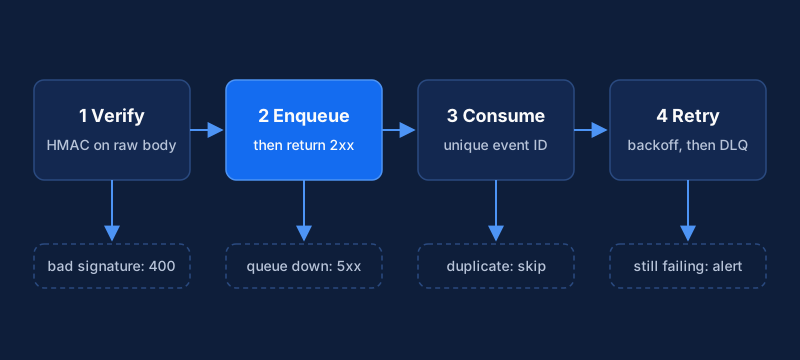
Step 2: Verify the signature on the raw body
Every serious sender signs its requests. The details differ by vendor, so read each tool's docs. Two schemes cover most of what you will meet.
GitHub sends an HMAC-SHA256 of the payload in the X-Hub-Signature-256 header. Stripe signs the timestamp plus the payload and puts the timestamp and signature in the Stripe-Signature header, so you can also reject old requests.
Two rules matter more than the algorithm. Sign and verify the exact bytes you received, because both vendors warn that a framework which parses and re-serializes the body will break verification. And compare signatures in constant time. Python's documentation recommends hmac.compare_digest over == when checking a digest against an externally supplied value.
import hashlib
import hmac
import time

TOLERANCE_SECONDS = 300


def verify_timestamped(secret: str, header: str, body: bytes) -> bool:
    """Stripe-style header: t=<unix>,v1=<hex>[,v1=<hex>]"""
    timestamp: str | None = None
    signatures: list[str] = []
    for item in header.split(","):
        key, _, value = item.strip().partition("=")
        if key == "t":
            timestamp = value
        elif key == "v1":
            signatures.append(value)
    if timestamp is None or not signatures:
        return False
    try:
        age = abs(time.time() - int(timestamp))
    except ValueError:
        return False
    if age > TOLERANCE_SECONDS:
        return False
    signed = timestamp.encode() + b"." + body
    expected = hmac.new(secret.encode(), signed, hashlib.sha256).hexdigest()
    return any(hmac.compare_digest(expected.encode(), s.encode()) for s in signatures)


def verify_body_only(secret: str, header: str, body: bytes) -> bool:
    """GitHub-style header: sha256=<hex>"""
    expected = "sha256=" + hmac.new(secret.encode(), body, hashlib.sha256).hexdigest()
    return hmac.compare_digest(expected.encode(), header.encode())
A vendor that signs only the body gives you no built-in replay protection. Add your own: store event IDs (Step 4) and reject anything you have already seen.
Step 3: Acknowledge fast and enqueue
Senders wait a limited time. GitHub expects a 2xx within 10 seconds and treats anything slower as failed. Stripe tells you to return a successful status before any complex logic and to process events through an asynchronous queue, so a spike does not overwhelm your hosts.
The endpoint therefore does three things: verify, enqueue, respond. It does not call the CRM, enrich anything or send email.
import asyncio
import json
import os

import boto3
from fastapi import FastAPI, HTTPException, Request

app = FastAPI()
sqs = boto3.client("sqs")
QUEUE_URL = os.environ["EVENTS_QUEUE_URL"]
SECRET = os.environ["WEBHOOK_SECRET"]


@app.post("/webhooks/enrichment")
async def receive(request: Request) -> dict[str, bool]:
    body = await request.body()  # raw bytes, before any parsing
    header = request.headers.get("x-signature", "")
    if not verify_timestamped(SECRET, header, body):
        raise HTTPException(status_code=400, detail="invalid signature")
    try:
        json.loads(body)
    except ValueError:
        raise HTTPException(status_code=400, detail="invalid json")
    await asyncio.to_thread(
        sqs.send_message, QueueUrl=QUEUE_URL, MessageBody=body.decode()
    )
    return {"ok": True}
If the enqueue itself fails, return a 5xx. The sender retries, and that is what you want.
Step 4: Make the consumer idempotent
Assume every event can arrive more than once. Stripe's documentation says so directly and recommends logging the event IDs you have processed and skipping repeats. It also warns that delivery order is not guaranteed, so do not rely on arrival order or on timestamps with one-second resolution.
A unique key in Postgres does the job. Insert the event ID and apply the change in the same transaction. If the change fails, the insert rolls back and a retry can try again.
CREATE TABLE processed_events (
  source      text        NOT NULL,
  event_id    text        NOT NULL,
  received_at timestamptz NOT NULL DEFAULT now(),
  PRIMARY KEY (source, event_id)
);
def handle(conn, source: str, event: dict) -> None:
with conn.transaction():
row = conn.execute(
"INSERT INTO processed_events (source, event_id) VALUES (%s, %s) "
"ON CONFLICT DO NOTHING RETURNING event_id",
(source, event["id"]),
).fetchone()
if row is None:
return # duplicate, already applied
apply_event(conn, event)Two caveats follow. Calls to outside systems cannot be rolled back, so make them idempotent too: upsert by a stable key and do not create a new record each time. And guard against stale updates so an old event cannot overwrite a newer one. Rows that were never synced have a null timestamp, so the condition must accept null as well.
UPDATE contacts
SET lifecycle_stage = %(stage)s, source_updated_at = %(updated_at)s
WHERE id = %(id)s
  AND (source_updated_at IS NULL OR source_updated_at < %(updated_at)s);
When a vendor offers no reliable version field, treat the event as a nudge. Fetch the current record from the API and write that, as Stripe suggests for out-of-order events.
Step 5: Retry with backoff and a dead-letter queue
Retries live in two places: when you send, and when you consume.
When your integration calls another tool's API or sends a webhook, retry network errors and the status codes that signal a temporary problem, and nothing else. A 400 will not succeed on the fifth attempt. Use exponential backoff with jitter, and respect Retry-After when the server sends it.
import random
import time

import httpx

RETRYABLE = {408, 429, 500, 502, 503, 504}


def post_with_retry(
    url: str, payload: dict, headers: dict, max_attempts: int = 6
) -> httpx.Response:
    last_error: Exception | None = None
    for attempt in range(max_attempts):
        delay = min(60.0, 2.0**attempt) * random.uniform(0.5, 1.0)
        try:
            resp = httpx.post(url, json=payload, headers=headers, timeout=10)
        except httpx.TransportError as exc:
            last_error = exc
        else:
            if resp.status_code not in RETRYABLE:
                resp.raise_for_status()  # other 4xx errors fail fast
                return resp
            last_error = httpx.HTTPStatusError(
                f"retryable status {resp.status_code}",
                request=resp.request,
                response=resp,
            )
            retry_after = resp.headers.get("Retry-After", "")
            if retry_after.isdigit():
                delay = max(delay, float(retry_after))
        if attempt < max_attempts - 1:
            time.sleep(delay)
    assert last_error is not None
    raise last_error
On the consumer side, let the queue do the work. With SQS you set a redrive policy whose maxReceiveCount decides how many times a message is delivered before it moves to a dead-letter queue. Set it high enough to ride out a short outage, and give the dead-letter queue a longer retention period than the source queue. Then alert on anything that arrives there. A dead-letter queue nobody watches is a slower way to lose data.
Step 6: Reconcile on a schedule
Webhooks are a fast path, not a guarantee. Senders retry for a limited time, and some leave recovery to you. Stripe retries live-mode deliveries for up to three days, while GitHub's guidance is to redeliver missed webhooks yourself after an outage.
A reconciliation job closes the gap. Once an hour or once a night, depending on how much drift you can tolerate, ask each tool's API for records changed since the last successful run and push them through the same idempotent handler. Keep the raw payload of every event for a few weeks. When something looks wrong, you can replay it and skip the guessing.
Step 7: Test the failure cases
Before launch, send your staging endpoint the inputs that production will eventually produce:
- The same event twice, one second apart.
- Two events for one record in reverse order.
- A payload with a valid body and a wrong signature.
- A correctly signed request with an old timestamp.
- A valid event while the queue is unreachable, to check you return a 5xx.
- A poison message that always fails, to confirm it lands in the dead-letter queue and raises an alert.
Add monitors while you are there: queue depth, age of the oldest message, dead-letter count, signature failures and the share of requests that return non-2xx. Those five tell you most of what you need.
Reading the symptoms
Signatures that fail only in production mean something changes the body. Look for a proxy, middleware or framework that parses JSON before your handler reads it. Also check that you use the secret for the right endpoint and environment, since some vendors issue a different secret per endpoint.
Timeouts reported by the sender mean your handler does real work. Move it behind the queue.
Duplicates that survive the idempotency table point at the key. Some tools send two distinct events for one change, and Stripe notes that for those cases you identify duplicates by the object ID plus the event type. If two tools fight over a field, go back to Step 1.
Once events flow reliably, you can build on them: lead scoring that reacts to product and email activity, and enrichment triggered by new records. For the wider picture of connecting website, content and outreach, see pipeline automation. If you build senders rather than receivers, the open Standard Webhooks project publishes guidelines that save your consumers from guessing.
Implementation steps
- Decide which system owns each fieldList every event you will exchange and name one system of record per field, so two tools never overwrite each other.
- Verify the signature on the raw bodyCompute the HMAC of the exact bytes received, compare in constant time, and reject stale timestamps.
- Acknowledge fast and enqueueReturn a 2xx as soon as the event is verified and stored on a queue. Do the real work in a separate consumer.
- Make the consumer idempotentRecord each event ID in a table with a unique key and skip events you have already processed.
- Retry with backoff and a dead-letter queueRetry transient failures with exponential backoff and jitter. Move events that keep failing to a dead-letter queue and alert on it.
- Reconcile on a scheduleRun a job that pulls recent changes from each tool's API and repairs anything the webhooks missed.
- Test failure cases before launchSend duplicate, out-of-order, stale and badly signed events to a staging endpoint and confirm each is handled.