System Architecture: Implementing User Action-Triggered Messaging
System Overview & Objectives
I have designed this system to create a direct and automated communication channel with our users. This channel is not based on broadcast schedules but is triggered by their specific behaviors within our application. The core principle is to respond to user actions with relevant, contextual messages in a timely manner, moving away from generic, one-size-fits-all communication.
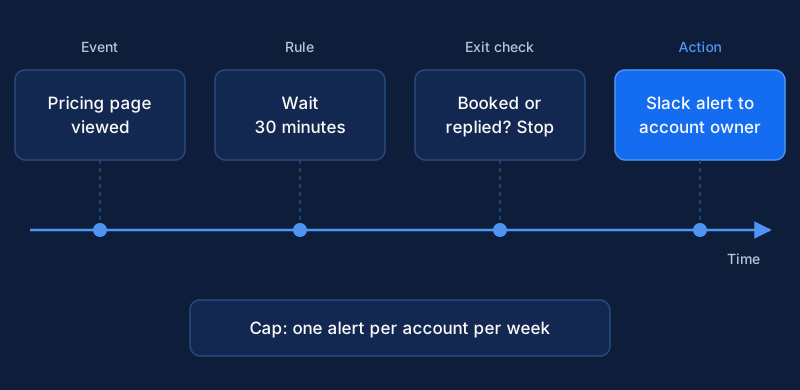
The primary objective is to deliver timely, relevant, and personalized messages to increase user engagement and guide them through key workflows. For example, when a user engages with a new feature for the first time, we can send a message with tips on how to get the most out of it. When they visit our pricing page but do not upgrade, we can follow up with information that addresses common questions. This initial build represents the minimum viable product for our event-driven communications strategy. It is intentionally streamlined to establish a functional foundation that we can build upon with confidence.
This architecture connects three core components. The first is an event-tracking service, which acts as the system's eyes and ears, capturing user actions as they happen. The second is an automation platform, which serves as the brain, ingesting these actions and executing pre-defined logic. The final component is a transactional email provider, which functions as the mouth, handling the reliable delivery of our messages. Each component is a best-in-class solution for its specific function, and together they form a robust and scalable system.
The total estimated setup and initial testing time for this system is three hours. This is an efficient process, but it requires focus and attention to detail. My instructions will guide you through each stage, from initial configuration to final validation, ensuring a successful deployment.
Prerequisites & Tooling
Before we begin the implementation, you must ensure all prerequisites are met. Failure to do so will cause significant delays. The most critical requirement is that you must have administrative access to all three required platforms. If you do not have the necessary permissions to add code snippets, generate API keys, or modify settings, you will need to acquire this access before starting.
Here is the specific tooling required for this system:
- Event-Tracking Platform: We will use a service like Segment or Mixpanel. For the purposes of this guide, I will reference Segment. You need an active account and the ability to add tracking snippets, known as a 'source', to our application's codebase. The documentation for implementing a source is critical reading, as a correct implementation is the bedrock of this entire system. You can find detailed instructions in the Segment Source Documentation.
- Automation Platform: A tool like Customer.io or HubSpot is required. This platform will act as our central hub for logic and workflow management. It must be capable of ingesting events from our tracking service and building conditional workflows based on that data. I will be using Customer.io in my examples.
- Email Provider: We need a dedicated transactional email service such as SendGrid or Postmark. These services are optimized for deliverability and provide detailed analytics. You must have an account and the ability to generate API keys for integration. I recommend reviewing the API key management section of your chosen provider. For SendGrid, you can consult their API key documentation.
- Domain Authentication: This step is non-negotiable for achieving good email deliverability. Before sending a single email, we must configure Sender Policy Framework (SPF) and DomainKeys Identified Mail (DKIM) records in our DNS settings for the sending domain. These records are a form of email authentication that prove to recipient servers like Gmail and Outlook that we are a legitimate sender and not a spoofer or phisher. Implementing these standards is a recognized best practice for any organization that sends email. Without proper SPF and DKIM, our carefully crafted messages are highly likely to land in the spam folder, defeating the purpose of this system. This is a fundamental aspect of building a reputable sender identity. Following best practices for DKIM, such as key rotation, will further strengthen our sending reputation over time. Consistent application of these authentication methods is a core tenet of modern email strategy.
Step-by-Step Implementation Protocol
Follow this protocol precisely to ensure the system is configured correctly. Each step builds upon the last, forming a complete data and communication flow.
Step 1: Define and Instrument Core User Events
The first action is to define the user behaviors we want to track. My team will identify the 3-5 user actions most critical to our current business goals. These could be actions like Signed Up, Project Created, Team Member Invited, Billing Page Viewed, or Document Signed. We will follow a consistent and clean naming convention, such as 'Object Action', to maintain clarity as we add more events later. A consistent naming convention is crucial for data governance and long-term maintainability. It is a best practice that ensures analytics data remains understandable and actionable.
We will then instrument these events in our application's code using our chosen event-tracking platform's library. The implementation requires two key calls. First, a userId must be passed in an identify call whenever a user signs up or logs in. This call associates all subsequent actions with a specific person, not an anonymous visitor. Properly identifying users is the most important step for creating a complete user profile. The identify call lets you tie a user to their actions and record traits about them.
Subsequently, we will use track calls for the specific actions we defined. The track call is how you record actions your users perform. Along with the event name (e.g., 'Project Created'), we will pass relevant properties that can be used for message personalization. For a Project Created event, this might include projectName, projectType, or planLevel. This data will be invaluable for making our messages feel personal and relevant.
Step 2: Configure Event-Tracking Integration
With events flowing from our application, we must direct them to our automation platform. Inside the Segment dashboard, we will navigate to the 'Destinations' section and add Customer.io as a new destination. We will select the 'Customer.io Actions' destination, which offers the most modern and flexible integration. From there, we will use the 'Quick Setup' option.
This configuration process requires two key pieces of information from our Customer.io workspace: the 'Site ID' and an 'API Key'. I will retrieve these credentials from the 'Integrations' section of the Customer.io account settings. Once entered into Segment, this creates the data pipeline that forwards user identity information and tracked events from Segment to Customer.io in near real-time. This connection is what enables the automation platform to "see" what users are doing. Customer.io's official documentation provides a detailed walkthrough of this setup. This integration is foundational to triggering workflows based on real-time user behavior.
Step 3: Connect the Automation Platform to the Email Provider
Next, we must authorize our automation platform to send emails through our chosen email provider. Within the Customer.io workspace, I will navigate to 'Workspace Settings' and select 'Email'. Here, we will find the option to 'Add Custom SMTP Server'. We will select SendGrid from the list of providers. The configuration will require us to input the necessary credentials. This is typically a dedicated API key generated from our SendGrid account. I will create a new key with 'Full Access' to Mail Send permissions specifically for this integration.
A critical part of this step is to enable two-way communication. We don't just want to send emails; we want to know what happens to them. We must configure SendGrid's Event Webhooks to post data back to a unique URL provided by Customer.io. This step is detailed in Customer.io's documentation on using a SendGrid account. This webhook will send data about deliveries, opens, clicks, bounces, and spam complaints back to Customer.io, allowing us to track the performance of our messages and maintain a clean sending list.
Step 4: Build the Automation Workflow
Now I will construct the core logic for our first automated message. Within Customer.io, we will create a new campaign. The first and most important element of the campaign is the trigger. The trigger defines what starts the workflow. For this initial setup, the trigger will be a user performing a specific event, for instance, an event named 'Visited Pricing Page'.
Once the trigger is set, we define the workflow, which is the sequence of actions that follow. The primary action will be to send a specific email. However, we will not send it immediately. I will add a 'Time Delay' of 1 hour after the trigger event. This delay prevents the message from feeling intrusive or robotic, giving the user time to continue their session without immediate interruption. We can also use 'Time Windows' or 'Delivery Windows' to ensure our messages only arrive during appropriate hours, such as 9 AM to 5 PM on weekdays, respecting our users' time. Customer.io's workflow builder is a powerful tool for designing these user journeys. Using delivery windows can significantly improve the user experience.
Step 5: Author and Personalize Message Templates
Finally, with the logic in place, we will write the email copy. To achieve personalization, we will use the Liquid templating language, which is supported by Customer.io. Liquid allows us to insert dynamic content based on user attributes or event data. For a 'Signed Up' event, we can use the user's name stored from the identify call to create a warm welcome: 'Welcome, {{customer.first_name | capitalize}}'. The capitalize filter ensures their name is properly formatted.
For our 'Visited Pricing Page' event, we can reference data passed along with the track call itself. If the event included a property like plan_name, our email could say: 'I noticed you were looking at our {{trigger.plan_name}} plan.' This level of context shows the user we are paying attention and makes the message far more relevant than a generic sales email. Customer.io provides a visual editor that simplifies the use of Liquid for personalization. After a thorough review of the workflow logic, the trigger conditions, and the message content, we will activate the campaign.
System Validation and Troubleshooting
A system is not complete until it has been validated. To validate this entire flow, I will perform the target action myself using a dedicated test account. We must then verify each stage of the data flow to confirm the system is operating as expected. This methodical check ensures we can pinpoint any issues before real users enter the workflow.
- Check 1 (Event Tracker): The first point of validation is the event-tracking platform. After I perform the action (e.g., visit the pricing page), I will confirm the
trackcall appeared in Segment's 'Event Tester' within the destination settings. This tool provides a real-time view of events being sent to a destination. It shows the exact payload sent from Segment and the HTTP response received from the destination's API. A successful '200 OK' response here confirms the data left Segment correctly. - Check 2 (Automation Platform): Next, I will log in to Customer.io. I will navigate to my test user's profile and check the 'Activity Log'. I must confirm that the same event appeared in this log moments after it was sent from Segment. The Activity Log is the source of truth for what data Customer.io has received about a user. If the event is present, the connection from Step 2 is working perfectly. If it is not, the most likely causes are a faulty connection configuration or incorrect API keys.
- Check 3 (Workflow Entry): With the event confirmed in Customer.io, I need to verify that it correctly triggered the campaign. Within the campaign's 'Journeys' tab, Customer.io provides a visual log of every user who has entered the workflow and their current status. I should see my test user ID in this log, likely waiting at the 1-hour time delay we configured in Step 4. If the user did not enter the workflow, the trigger conditions in the campaign are likely misconfigured and do not match the incoming event name or properties.
- Check 4 (Email Delivery): Finally, after the time delay has passed, I will confirm the email was sent from the automation platform and, most importantly, received in my test inbox. If the email was sent but not received, the first place I will investigate is the SendGrid activity logs for any bounce reports. If a bounce occurred, it often points to a problem with our domain authentication (SPF/DKIM) that needs to be resolved. Poor deliverability is almost always linked to authentication issues, making it a critical area to re-verify during troubleshooting.
Expected Results & Success Metrics
Upon successful completion of the 3-hour setup and validation process, we will have a fully functional, end-to-end system. This system will be capable of sending one automated, personalized email based on one specific user action. The immediate result is a live, automated communication flow that we can monitor and analyze. This is a significant first step in building a more responsive and intelligent relationship with our users.
Long-term success will not be measured by simply sending emails but by monitoring their performance. We will track key metrics for every automated message, including open rates, click-through rates, and the ultimate conversion rate of users who receive the message versus a control group that does not. This comparison is essential for proving the value of our work. Industry benchmarks suggest an average open rate between 20-25% for many sectors, which gives us a starting point for evaluation. These benchmarks can vary by industry and audience, so we will focus on our own baseline and incremental improvement. Tracking these statistics over time is essential for optimizing our strategy.
This initial implementation serves as the foundational blueprint for all future automated communications. My team will expand on it methodically. We will add more event triggers, build more sophisticated workflows with conditional branching, and introduce other communication channels, like in-app messages or SMS. Each new addition will follow the exact protocol laid out in this guide, ensuring that our system remains robust, maintainable, and effective as it scales.
Related Content
System Guide: Automating Post-Sale Customer Success Handoffs
I will show you how to build a system that automatically triggers customer success workflows from your CRM when a deal closes, ensuring a seamless handoff.
System Guide: Automating Email Compliance for GDPR, CAN-SPAM, and CASL
My technical guide for automating email compliance. This system integrates an email provider, preference management, and data governance tools in five steps.
System Architecture: Real-Time Fluid Audience Segmentation
A technical guide for architects on implementing real-time, fluid audience segments using a CDP, automation platform, and analytics for dynamic marketing.