Audience and Suppression Sync: Email, Ads, LinkedIn
By Shuk Huay Koh, Founder, Mir Tech
Published Updated 5 min read
On this page
A prospect unsubscribes from your newsletter on Monday. On Wednesday they see your retargeting ad. On Friday a sequence step lands in their inbox because the sequencer never heard about Monday. Nothing is broken in any single tool. The tools just do not agree on who this person is.
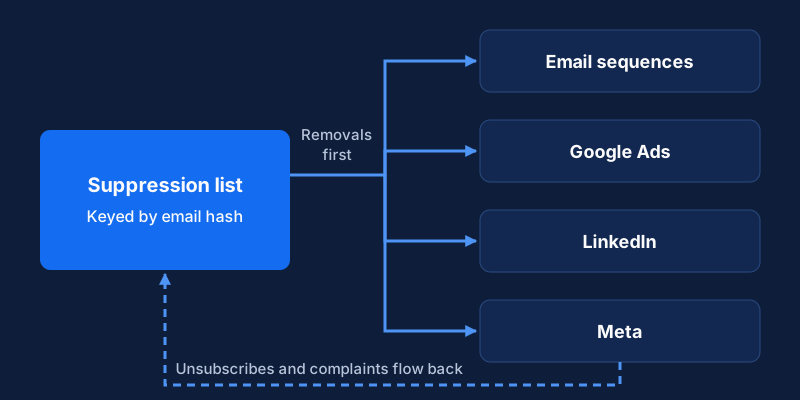
The fix is one list of people you must not reach, held in one place and pushed to every channel before anything else. Audiences (who you want to reach) can lag by a day. Suppression cannot.
One source of truth for contact status
Choose one table or CRM object that answers three questions for every contact. Is the person subscribed, and if not, since when and why? Are they a customer or in an open deal? Are they on a do-not-contact list for any reason? Everything else is a copy. When two tools disagree, the source of truth wins, and fixes flow in one direction only. If you lack a reliable contact record, start with customer journey tracking for identity matching.
The CAN-SPAM guide from the FTC says you must honor an opt-out request within 10 business days, and that you cannot sell or transfer the address of someone who opted out. Treat that as a legal ceiling and aim for the same day. Other regimes, including GDPR, have their own rules, so check with whoever advises you. Email compliance automation covers the email side.
Platforms change membership in different ways
How you edit a list after the first upload differs by channel, and that shapes the design.
| Channel | How membership changes | Notes from the docs |
|---|---|---|
| Email provider | Suppression list, unsubscribe group or contact status field | Emits unsubscribe and spam events by webhook |
| Google Ads Customer Match | Replace the list, or use "Remove specific customers" | Memberships expire after 540 days, so refresh regularly |
| LinkedIn Matched Audiences | Upload a new CSV list | A list-upload segment can't add or remove users dynamically, and processing can take up to 48 hours |
| Meta Custom Audiences | Add users, or DELETE to the audience's users endpoint | Data must be SHA-256 hashed after normalizing |
Google's help page on removing data from a Customer Match list walks through the removal option. LinkedIn is the one that surprises people. A list upload is a snapshot, so you rebuild and re-upload, and for a few days the old list may still serve. For suppression there, use a campaign-level exclusion audience that you refresh often. LinkedIn contact lists also need a minimum audience of 300 matched members, so a small exclusion list may not work alone. Fold it into a larger exclusion segment.
Hash identifiers once
Ad platforms match on hashed email addresses, and small formatting differences cause misses. LinkedIn says to lowercase the address, remove whitespace and generate a SHA-256 hex hash. Meta says to trim whitespace and lowercase before hashing and supports only SHA-256. Google's Customer Match formatting page has per-field rules to read before you upload phone numbers or names.
Write one function and use it everywhere.
import hashlib


def hash_email(email: str) -> str:
    normalized = "".join(email.split()).lower()
    return hashlib.sha256(normalized.encode("utf-8")).hexdigest()
Store the hash beside the email in your source table. Hashed emails can still identify people, so give them the same retention and access rules as the raw list.
Capture suppression from every channel
Suppression often starts outside your CRM: an unsubscribe click, a spam complaint, a reply of STOP to a text. Each needs a webhook that writes to the source of truth first.
SendGrid's event webhook reports unsubscribe, group_unsubscribe, bounce and spam report events, with an sg_event_id you can use for deduplication, and other providers have equivalents. Twilio's advanced opt-out handles STOP, UNSUBSCRIBE and CANCEL by default. After that, messages to the number fail with error 21610, so your own system must still record the status or you will keep trying. Manual flags, replies that say "remove me" and bounced addresses from the sequencer belong in the same table. Receive all of these with the patterns in reliable webhooks between GTM tools: verified signatures, a queue and an idempotent consumer. A missed unsubscribe is the worst event to lose.
Build the exclusion as a view
Each audience is a query against the source of truth, and the master exclusion is a view that every one of them anti-joins.
-- Master exclusion: everyone who must not be targeted by any outbound or paid audience
CREATE OR REPLACE VIEW audience_master_exclusion AS
SELECT email_hash
FROM contacts
WHERE do_not_contact
   OR email_status IN ('unsubscribed', 'complained', 'bounced')
   OR is_competitor
   OR is_employee;
The view is keyed by email_hash, the value from the hashing step, so it works for every platform. Segment queries such as those in rule-based audience segments join on the same column. Build prospect audiences from contacts, anti-join this view on email_hash, and a person can never enter an audience while on the list. Keep customers and open deals out of prospecting audiences the same way.
Push removals before additions
Order matters, and it is the one rule we would not bend. Each run should compute today's membership, compare it with yesterday's snapshot, send removals and exclusions to every platform, and only then send additions. Record what you sent and what each platform answered. A platform that fails halfway then leaves you with a missed addition, which costs a day of reach. The reverse order would leave a person who should be suppressed in an active audience.
Platforms process uploads asynchronously, so check the job status or response each one returns and alert on errors instead of assuming success.
Check the loop with seed contacts
Once a day, compare counts. Your table might say 4,200 people are in the prospect audience while the platform reports a lower matched number, because platforms match only part of what you send. Watch the trend. A sudden drop usually means a broken upload, and a sudden jump usually means a broken rule.
Create a few test records with email addresses you control: one subscribed, one unsubscribed, one customer, one in an open deal. Confirm that each appears or disappears in every platform on the schedule you expect. Repeat after any change to the rules or integrations. When a customer data platform and a CRM disagree, decide which one wins and make the other a copy, because two writers to the same field will drift.
Related Content
Reliable Webhooks Between GTM Tools: A Build Guide
How to receive and send webhooks between CRM, enrichment and outreach tools without losing, forging or double-processing events.
Build a Competitor Signal Feed with Alerts and Review
Implementation guide for a monitored competitor signal feed: choose sources, detect meaningful changes, route alerts to Slack, and run a weekly review.
Practical B2B Attribution: UTMs and Self-Reported Data
A practical attribution setup for B2B teams with long sales cycles and few deals: UTMs, self-reported source, CRM fields and where multi-touch stops helping.