10 min read

System Architecture: Dynamic Content Personalization via CDP and CMS Integration

WorkflowAdvancedCDPcontent-management

System Overview and Objectives

I designed this system to deliver tailored web content to distinct user segments in real time. The architecture's primary function is to replace generic content with variants defined by user data from our Customer Data Platform (CDP). This approach moves us away from a one-size-fits-all digital experience and toward a more dynamic, responsive model that adapts to the individual user.

The workflow is orchestrated through three core components. The first is a CDP for user segmentation. We will use Segment with the Personas add-on to build and enrich user profiles. The second is a headless Content Management System, Contentful, for housing the different content variants. Its composable nature is ideal for this task. The third is an analytics platform, Google Analytics 4, which we will use for its powerful event-based measurement framework. Together, these tools form a closed loop for personalization, from audience definition to content delivery and performance analysis.

Our primary objective is to increase conversion rates and user engagement by presenting more relevant information. We will target users based on firmographic, role-based, or behavioral signals that my team has identified as critical. A key example of this is a segment of trial users who have not yet activated a specific feature. By serving them content that highlights the value of that feature, we hypothesize we can improve activation rates and, ultimately, paid conversions. The system is built for this level of specific, high-impact targeting.

Prerequisites and Tooling

Successful implementation of this personalization architecture requires careful preparation and a specific set of technical skills and permissions. Failure to meet these prerequisites will impede or block progress.

Administrative access to all selected platforms is mandatory for my team. This is not negotiable. We need this level of permission to configure APIs, manage webhooks, and control the flow of data between systems. Specifically for Segment, this includes the ability to generate a Profile API token, which is essential for our middleware to retrieve user traits. For Contentful, we need rights to define and modify the content model. For Google Analytics 4, we require permissions to configure custom dimensions and events.

My team must possess a specific set of technical competencies. Proficiency in API integration is paramount, as the entire system is connected through API calls. Strong server-side logic skills, specifically in Node.js, are required to develop the middleware function that will serve as our decision engine. On the front end, expertise in client-side JavaScript is necessary to handle the rendering of the personalized content. Finally, a deep understanding of content modeling within a headless CMS is critical to creating a flexible and scalable structure in Contentful.

The core tools for this project are:

  • Segment with the Personas add-on: This is our source of truth for user identity and audience segmentation. It will collect user data and compute the traits that determine which content variant a user sees.
  • Contentful: As our headless CMS, Contentful will store both default content and all personalized variants. Its API-first approach makes it the ideal repository for this workflow.
  • Google Analytics 4 (GA4): We will use GA4 to measure the impact of our personalization efforts. Its event-based model and custom dimensions are perfect for A/B testing personalized variants against a control group.
  • AWS Lambda: This will host our serverless middleware function, providing a scalable, cost-effective, and low-maintenance decision engine.

Before any code is written, a clear data dictionary must be finalized and approved. This document defines the exact user traits and events that will trigger personalization. It must include the precise, case-sensitive trait names, such as plan_level, last_login_date, or company_size, that my team will use in all Segment identify calls. Without this foundational document, our segmentation efforts will be inconsistent and unreliable.

Implementation Protocol (9 Steps)

My team will execute the following nine steps to build, integrate, and deploy the personalization system. Adhering to this sequence is critical for a smooth and successful implementation.

Step 1: Define Personalization Segments and Attributes

The first step is to translate our business objectives into technical definitions within Segment Personas. I will use the Personas UI to build the required audiences. For example, to create a segment named 'Enterprise Finance Users', I will configure an Audience based on incoming identify traits. The logic will be a combination of rules, such as industry is exactly 'finance' AND company_size is greater than 1000. This audience will later be used as the key to retrieve the correct content variant.

Step 2: Configure CDP Data Collection

With the segments defined, my team will ensure the necessary data is being collected. We will implement the Segment analytics.js script across the target website. We will then instrument the site to ensure that all necessary user identification and event tracking calls are firing correctly. A critical component is the analytics.identify() call, which populates the user profiles with the traits we defined in Step 1. An example of this call would be: analytics.identify('USER_ID', { industry: 'finance', company_size: 2500 });. We will use the Segment debugger to validate that these calls are being received with the correct data structure.

Step 3: Establish the CMS Content Model

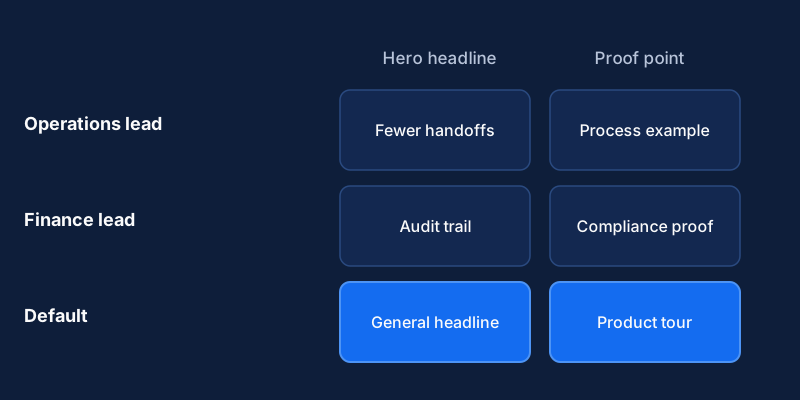
Next, I will architect the content model within Contentful to support personalization. I will create a new content type named Personalized Component. This content type will include standard fields required for the component, such as a headline, body text, and an image. The most important field will be a special JSON object field that I will name variants. This field is designed to hold key-value pairs. The key for each pair will be the machine-readable name of the Segment Persona Audience (e.g., enterprise_finance_users), and the value will be a Contentful entity reference, linking to another entry that contains the actual content for that specific variant. This model provides a clear and scalable way to manage personalization within Contentful.

Step 4: Create Content Variants in the CMS

Once the content model is established, our content strategists can begin populating the CMS. For each component that requires personalization, they will first create the default version. Then, they will create separate, new Contentful entries for each targeted segment variant. After creating the variants, they will return to the main Personalized Component entry and link these variant entries within the variants JSON object field, matching each variant to its corresponding audience key.

Step 5: Integrate the CDP with the Analytics Platform

To measure the impact of our work, we must connect our data sources. I will configure Google Analytics 4 as a destination within the Segment platform. This allows Segment to forward event data to GA4. We will send a custom event named Variant Presented from our middleware. This event will include crucial parameters like test_name (e.g., 'Homepage Hero Q1') and variation_name (e.g., 'enterprise_finance_users' or 'control'). Inside the GA4 interface, I will then register test_name and variation_name as new event-scoped custom dimensions. This step is essential for enabling cohort-based performance analysis and A/B testing.

Step 6: Develop the Personalization Logic Middleware

I will architect a lightweight serverless function using AWS Lambda to serve as the system's decision engine. This function, exposed via an API Gateway endpoint, will perform the following sequence of operations:

  1. Receive a request from the client containing a user identifier.
  2. Make an authenticated GET request to the Segment Profile API (https://profiles.segment.com/v1/spaces/SPACE_ID/collections/users/profiles/user_id:USER_ID/traits) to fetch the user's computed traits and audience memberships.
  3. Determine the highest-priority audience the user belongs to for the requested component.
  4. Execute a query against the Contentful GraphQL API to fetch the Personalized Component entry. The query will be constructed to request the default content and any variant that matches the user's audience from the previous step.
  5. Return the appropriate content JSON (either the specific variant or the default) to the client application.

The function's logic will handle cases where a user belongs to multiple audiences or no audiences, always falling back to the default content.

Step 7: Implement Client-Side Rendering Logic

My front-end development team will now modify the client-side application. Instead of querying the Contentful Delivery API directly for a given component, the application will now make a request to our new personalization middleware's API Gateway endpoint, passing the user's identifier. Upon receiving the JSON response from the middleware, which will contain the correct content variant for that specific user, the front-end code will render the component as usual. This change abstracts the personalization logic away from the client, keeping the front end clean and focused solely on rendering.

Step 8: Configure a Control Group

To prove the efficacy of this system, establishing a control group is non-negotiable. I will configure the middleware to assign a random portion of users to a control group. While the split can vary, a 50/50 split between the personalized experience and the control is often the most statistically sound approach for a new test. Users assigned to the control group will always be served the default content, regardless of their Segment audiences. This provides a stable, unbiased baseline against which we can measure the performance of our personalized variants in GA4.

Step 9: Deploy, Monitor, and Validate

After deploying the full solution, my team will immediately begin monitoring the system. We will watch AWS CloudWatch logs for the Lambda function to check for any execution errors or unexpected behavior. Concurrently, we will use browser developer tools to validate that the correct content variants are being served to users in different segments. Finally, we will check the GA4 Realtime report to confirm that our Variant Presented event, along with its custom dimension parameters, is flowing into our analytics platform as expected. This initial validation ensures the system is operating correctly from end to end.

Troubleshooting Common Issues

Even with careful planning, issues can arise. Here is my protocol for diagnosing and resolving the most common problems we might encounter with this personalization system.

Issue: Incorrect Segment Identification

If we observe that users are not being placed into the correct segments, my first action will be to inspect the identify calls in the Segment platform's debugger. The most common cause is a mismatch between the trait names or values being sent and the definitions configured in the Segment Personas Audience builder. I will verify that the casing, spelling, and data types match the audience rules exactly. Correcting the instrumentation on the website to send the proper data will typically resolve this.

Issue: Default Content Served to All Users

This symptom usually points to an error in the middleware logic or a problem with API authentication. My first step is to check the AWS CloudWatch logs for the Lambda function. I will look for specific error messages, such as 401 or 403 status codes from the Segment Profile API or the Contentful Delivery API, which indicate an invalid API key. If there are no authentication errors, I will run test invocations of the Lambda function directly in the AWS console with hardcoded user identifiers known to be in specific segments. This process allows me to isolate and debug the decision logic within the function.

Issue: High Latency

If the personalized content loads slowly, it creates a poor user experience. I will first analyze the CloudWatch metrics for our Lambda function, specifically the p99 execution duration. We must keep this latency under 200ms to prevent user abandonment. If the bottleneck is repeated calls to the Segment Profile API, the solution is to introduce a caching layer. We can use Amazon ElastiCache (with Redis) to store Segment Profile API responses for active users with a short Time To Live (TTL), such as 5 minutes. This dramatically reduces the number of external API calls for users navigating the site, thereby decreasing latency.

Issue: Analytics Data Discrepancies

If the data in our GA4 reports appears inaccurate or incomplete, the issue is almost always a configuration mismatch. My first step will be to navigate to the GA4 Admin panel and review the Custom definitions section. I will confirm that the custom dimension names I created (test_name, variation_name) are an exact, case-sensitive match for the event parameter names being sent from our middleware. To validate the event structure before it reaches GA4, I will use the GA4 'DebugView'. This tool allows me to inspect the raw event data from my own browser session in real time, ensuring the events are formatted correctly.

Expected Results and Performance Metrics

The ultimate purpose of this system is to drive measurable business outcomes. We will evaluate its success against a clear set of primary and secondary metrics.

The primary success metric for this system is a statistically significant increase in conversion rates for personalized segments when compared to the control group. This is the definitive measure of impact. All results must be validated through a rigorous A/B comparison. We will build custom GA4 Exploration reports to analyze conversion events, filtering the data by our variation_name custom dimension to isolate the performance of each audience segment against the 'control' cohort.

In addition to conversions, my team will monitor a set of secondary metrics. These include higher click-through rates (CTR) on personalized calls-to-action, increased time on page for targeted segments, and lower bounce rates. These metrics serve as leading indicators of user engagement and help us understand the user's reaction to the content. The same GA4 Exploration report used for conversion analysis will be configured to display these engagement metrics, providing a comprehensive view of performance.

The final operational outcome is a fully automated, scalable system for content personalization. This architecture reduces the burden on my engineering team to build bespoke solutions for every new marketing campaign. It establishes a repeatable framework that empowers the marketing and content teams to design, implement, and measure future personalization experiments with a high degree of autonomy. This increases our organizational velocity and allows us to test and learn much more rapidly.

Related Content