10 min read

System Guide: Automating Post-Sale Customer Success Handoffs

WorkflowBeginnerCRMautomation-platform

System Overview: Automating the Deal-to-Onboarding Handoff

I designed this system to eliminate the manual work and potential errors that occur during the critical transition from our sales team to my customer success team. The handoff from a signed deal to a successful onboarding is one of the most fragile points in the customer lifecycle. When handled poorly, it leads to delays, lost context, and a frustrating initial experience for our new customers. This automated workflow is my solution to ensure that never happens.

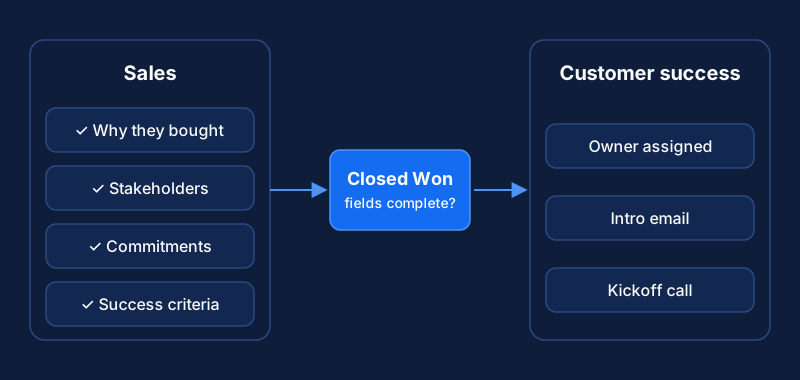
The core principle is simple: when a deal is marked as 'Closed-Won' in our Customer Relationship Management (CRM) platform, such as a Salesforce Opportunity or a HubSpot Deal, that action serves as a trigger. It automatically initiates a precise sequence of events in our central automation platform, like Zapier or Workato. This workflow acts as the digital connective tissue between our departments, executing tasks instantly and without human intervention.

First, the workflow establishes a new customer account within our dedicated Customer Success (CS) platform, for example Gainsight or Catalyst. More importantly, it populates that new account with essential context pulled directly from the CRM. This process ensures my Customer Success Managers (CSMs) have all the necessary information from day one. They no longer need to chase down sales representatives for deal notes, contact information, or key business outcomes the customer is trying to achieve. This immediate availability of information is fundamental to a proactive and successful partnership.

By automating this entire process, we achieve a consistent, repeatable, and error-free handoff every single time. The total estimated setup time for this entire workflow is approximately two to three hours. This investment of time depends on the complexity of your specific data mapping and any conditional routing rules you wish to implement, but it pays dividends immediately by fortifying a crucial stage of our customer journey.

Prerequisites and Required Access

Before we begin the implementation, we must ensure you have the correct permissions and have completed the necessary preparatory work. Attempting to build this workflow without proper access will only lead to connection errors and delays. I require you to verify each of the following prerequisites.

  • Administrative CRM Access: You must have administrative access to our CRM. For a system like Salesforce, this means your user profile or an assigned permission set must include the 'API Enabled' and 'Modify All Data' permissions (Salesforce Help). These permissions are essential for the automation platform to monitor for changes and read the necessary data from any record (Salesforce Developer Docs). Without API access, our tools cannot communicate (Plauti Blog). It is critical to use credentials that have the authority to view all the fields we intend to sync (Reco.ai Blog).

  • Automation Platform Permissions: You require an account with permission to build and manage workflows in our automation platform. In a tool like Zapier, this means you must have a 'Member' role or higher. For Workato, your user role must have 'Recipe life cycle management' privileges. These permissions allow you to create new workflows, establish connections to other applications, and manage their ongoing execution.

  • Administrative CS Platform Credentials: You will need administrative credentials for our CS platform to allow the automation tool to create accounts and contacts. For a platform like Gainsight, this process involves generating an API access key. You can typically do this from an administrative page like the 'Connectors 2.0' section and then use those credentials to authenticate the connection (Gainsight Support).

  • Defined Data Mapping: This is a critical planning step that you must complete before starting the technical configuration. I require you to formally identify and document the specific CRM fields that must be transferred to the CS platform. At a minimum, this list should include Account Name, Primary Contact Name, Primary Contact Email, Deal Size (ARR/MRR), and Subscription Tier. Most importantly, you must include any custom fields that contain critical notes from the sales process, such as 'Customer's Business Goals' or 'Implementation Notes'.

  • Confirmed API Availability and Scopes: Finally, confirm that the APIs for each platform are enabled and that you have the necessary credentials or scopes prepared. For a CRM like HubSpot, this often involves setting up a private app. When creating this app, you must grant it the correct permissions, known as scopes, to perform its tasks. For this workflow, the necessary scopes would include crm.objects.deals.read to see the new deal and crm.objects.contacts.write to create the associated contact in the destination system (HubSpot API Docs). You can find guides on how to create these apps and manage their scopes in the platform's developer documentation (APIDeck Blog, Workato Docs).

Implementation: A 5-Step Configuration Guide

Follow these five steps methodically to build, test, and activate the automated handoff workflow. We will configure the trigger, authenticate our platforms, map the data fields, assign the new account, and conduct a full end-to-end test.

Step 1: Configure the CRM Trigger

The first step is to define the specific event that will initiate our entire workflow. In the automation platform, I will establish a new workflow. The trigger event must be a status change on the primary deal object in our CRM.

For a Salesforce integration using Zapier, the trigger I select is 'Updated Record' on the Opportunity object (Zapier Salesforce Integrations). For a HubSpot integration using Workato, the equivalent trigger is 'New/updated record' for the Deal object (Workato Docs).

A trigger that fires on every update is too broad. We must add a filter to ensure the workflow runs only at the precise moment a deal is won. I will add a filter condition to the trigger step that checks the deal's status field. The workflow will only proceed if the 'Stage' field exactly equals 'Closed-Won'. This precision prevents the workflow from running prematurely or on deals that have been lost or are still in negotiation (Prolocity Blog).

Step 2: Authenticate Platform Connections

With the trigger defined, we must grant the automation platform secure access to our other systems. I will add connection steps for both our CRM and our CS platform. This is typically handled through a secure protocol like OAuth 2.0, which allows you to grant access without sharing your direct username and password, or via generated API keys.

For the CS platform connection, such as connecting Zapier to Gainsight, you will be prompted to enter specific credentials. This will require the Subdomain for our Gainsight instance and a valid Access Key that we generated during the prerequisite phase (Gainsight Support).

After entering the credentials for each platform, we must use the 'Test Connection' feature. This test confirms that the credentials are valid and that the permissions are sufficient for the actions we plan to perform later in the workflow (Zapier Gainsight Integrations). A successful test is mandatory before proceeding.

Step 3: Map CRM Data Fields

This step is where we transfer the customer context. I will add a new action step to our workflow, selecting the 'Find or Create an Account' action (or its equivalent) for our CS platform. Inside this action's configuration, we will map the data fields from the CRM trigger to the corresponding fields in the CS platform.

This mapping is a direct translation of data. For example, we will map:

  • Salesforce Opportunity.Account.Name to Gainsight Company.Name
  • HubSpot Deal.Amount to Catalyst Account.ARR
  • Salesforce Opportunity.Primary_Contact__r.Email to Gainsight Person.Email

I will use the data mapping document we created during the prerequisites to ensure every critical field is accounted for. This systematic approach ensures no information is lost during the handoff (Checklist Guro).

Step 4: Create the Customer Contact and Assign CSM

A new account in the CS platform is not useful without an associated contact and a clear owner. Immediately following the account creation step, I will add another action to 'Create a Person' or 'Create a Contact' in the CS platform. Here, we will map the contact details (Name, Email, Title) from the CRM's contact object associated with the deal.

Next, I will add a conditional logic step to automatically assign the new account to the correct CSM. In Zapier, this is done using a feature called 'Paths'. In Workato, this is done with conditional actions. This logic will inspect data from the CRM deal to make a routing decision. For example:

  • Path A: If Deal.Amount is greater than $50,000, assign the account to a CSM on the Enterprise team.
  • Path B: If Deal.Territory is 'EMEA', assign the account to a CSM on the European team.

This automated assignment logic eliminates another manual step and ensures the new customer is routed to the correct team member immediately.

Step 5: Activate and Test the Workflow

With all steps configured, the final stage is to activate the workflow and conduct a thorough test. It is absolutely critical that we do not perform this test in our live production environment.

My team will use a dedicated testing environment, such as a Salesforce Sandbox, to validate the entire process (Technomap Blog). A sandbox is a copy of your production environment that allows you to test new configurations without impacting real customers or data (Zenatta Blog).

The testing procedure is as follows:

  1. Create a new test Opportunity or Deal in the sandbox CRM.
  2. Populate all the fields that we mapped in Step 3 with test data.
  3. Move the deal's stage to 'Closed-Won'.
  4. Navigate to the CS platform and verify that a new account and contact have been created within a few minutes.
  5. Scrutinize every mapped field to confirm that the data is accurate and correctly formatted.
  6. Confirm that the account was assigned to the correct CSM based on the routing logic.

Only after this test is passed without errors will we deploy the workflow in our production environment.

Approved Tool Stack

To execute this system, we rely on a specific stack of integrated tools. Each platform serves a distinct and essential purpose in the overall workflow.

  • Customer Relationship Management (CRM): This is the system of record for all our sales activities and customer data. We use platforms like Salesforce or HubSpot.
  • Automation Platform: This is the central system that connects our applications and executes the workflow logic. We use platforms like Workato or Zapier.
  • Customer Success (CS) Platform: This is the destination system where my CSMs manage the customer lifecycle, track health, and drive adoption. We use platforms like Gainsight or Catalyst.

Troubleshooting Common Issues

Even with careful configuration, you may encounter issues. Below are the most common problems my team has observed and the precise steps to resolve them.

Issue: Workflow Does Not Trigger

If you move a deal to 'Closed-Won' and nothing happens, the issue is almost always in the trigger configuration or the platform's connection. First, verify that the deal stage name in the CRM (e.g., 'Closed-Won') exactly matches the value specified in the trigger's filter. A slight misspelling or difference in capitalization will cause the filter to fail. Next, check the automation platform's run history or task log (Zapier Help). This log will show you if the trigger event was received and why it may have been stopped or filtered (Verse.io Help). It may also reveal an underlying API connection error that needs to be addressed (Switch Automation Blog).

Issue: Data Is Missing or Incorrect in the CS Platform

If the account is created but is missing data or contains the wrong information, the problem lies in the data mapping from Step 3. I will have you open the workflow editor and review the field mapping in the 'Create Account' action. Ensure that the source CRM fields you selected actually contain data for the test deal you are using. Use the 'Test' feature within the automation platform to pull in sample data from the trigger. This allows you to see exactly what information the CRM is sending and confirm you are mapping the correct source fields to the correct destination fields in the CS platform.

Issue: Duplicate Accounts Are Created

If the workflow is creating a new account for an existing customer, it means the action step is not configured to check for existing records. To fix this, you must adjust the action in Step 3. Instead of using a simple 'Create Account' action, you must use an 'Upsert' or 'Find or Create' function (Workato Blog). Configure this step to use a unique identifier, like the Account ID or Company ID from the CRM, to search the CS platform first. If a record with that unique ID already exists, the workflow will update it; if not, it will create a new one. This is a best practice for all data synchronization workflows (Workato Docs, Workato Upsert Docs).

Issue: Authentication Errors

Authentication errors typically appear in the workflow's task history and indicate that the automation platform can no longer access the CRM or CS platform. The most common cause is an expired or revoked API key, or the deactivation of the user account tied to the connection. The solution is to go into the source or destination platform, regenerate the API keys or update the credentials, and then update the connection's configuration within the automation platform (Xivia Blog).

Expected Results and Success Metrics

Upon successful implementation of this system, the benefits will be immediate and measurable. We are not just building a technical connection; we are fundamentally improving how my team operates and how our customers perceive us from their very first interaction post-sale.

The primary result is that every 'Closed-Won' deal in the CRM will create a corresponding, fully populated account in our CS platform within minutes. This represents a complete elimination of the manual handoff process. We will measure this by tracking 'Handoff Completion Time', defined as the time elapsed from the moment a deal is marked 'Closed-Won' in the CRM to the moment the account is created and assigned to a CSM. This metric should drop from days or hours to under five minutes.

We also expect a dramatic reduction in data entry errors. Manual data transfer is prone to mistakes that can take time to correct and create confusion. We will track this by measuring the 'Rework Rate', which I define as the percentage of new customer accounts requiring manual data correction by a CSM after the automated transfer. This rate should approach zero.

Ultimately, this system enables my CSMs to begin their onboarding process immediately with all necessary context (RevenueOps LLC Blog). This proactive engagement improves the initial customer experience and accelerates their journey toward achieving their goals with our product (RevPartners Blog, Baton Blog). We will measure the business impact of this through key performance indicators like 'Time to First Customer Value' (TTV) and new customer onboarding satisfaction scores.

Related Content