Automate Email Unsubscribes and Consent Records
By Andrew Mark, Co-founder, Mir Tech
Published Updated 8 min read
On this page
At 9:01 a prospect clicks unsubscribe. At 9:02 your sequencer sends them step three, because the sequencer never heard about the click. That gap is the failure this guide closes.
It describes how to build the plumbing: unsubscribe handling, consent records and suppression sync. It is not legal advice. Email law depends on where the sender and recipient are, who the recipient is and what the message is for. If you are unsure whether you may email a group of people, ask a qualified lawyer before you send. What follows draws on the regulators' own published guidance, linked where it is used. Laws change, so check the current text.
The rules that shape the build
CAN-SPAM in the United States
The FTC's CAN-SPAM compliance guide covers commercial email, and it is blunt about B2B: "The law makes no exception for business-to-business email." Four requirements drive the design.
You must honor an opt-out "within 10 business days", and the mechanism must keep working for at least 30 days after you send. You cannot charge a fee or require any step beyond a reply email or visiting "a single page on an Internet website." Each message must include "your valid physical postal address", and header information and subject lines must not mislead. Finally, you stay responsible when another company sends for you: you "can't contract away your legal responsibility." You also must not sell or transfer the addresses of people who opted out, except to a company you hired to help you comply.
The FTC says each separate email in violation can carry penalties of up to $53,088, so check the guide for the current figure.
GDPR and PECR in the EU and UK
Two layers apply. Data protection law (GDPR) governs how you process personal data, and separate electronic-marketing rules govern the email itself. In the UK those are the Privacy and Electronic Communications Regulations (PECR).
The ICO's guidance on electronic mail marketing says you "must not send marketing emails or texts to individuals without specific consent." There is an exception for existing customers who bought, or negotiated to buy, a similar product or service. For it you must have offered a simple opt-out when you collected their details, and you must offer one in every message. The ICO also says you can email any corporate body, and recommends keeping a "do not email or text" list of businesses that object. It adds that "Sole traders and some partnerships are treated as individuals", so the type of recipient matters.
Where you rely on consent, Article 7 of the GDPR says the controller "shall be able to demonstrate that the data subject has consented" and that "It shall be as easy to withdraw as to give consent." That is why you keep records, and why unsubscribing should take one step. Other countries have their own rules, so check each market you email.
Mailbox providers
Gmail and Yahoo add technical requirements for bulk senders, including one-click unsubscribe and fast handling of opt-outs. The cold email deliverability guide explains them in full. For this build, one result matters. In the US, the provider windows (2 days at Yahoo, 48 hours in Google's recommendation) are much shorter than the 10 business days in CAN-SPAM. Build to the shorter window.
What you are building
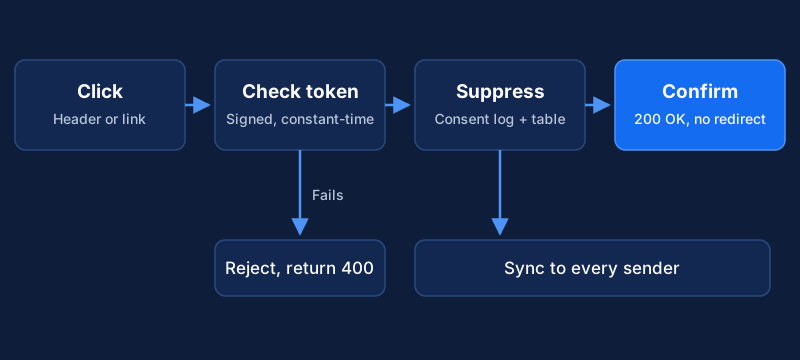
Four parts make up the system: a consent log, an unsubscribe service that receives opt-outs from the header, the footer link and replies, a suppression table, and a sync job that pushes the table to every sending tool. You need a database, a small web service you control, and access to your email provider's API. If your provider handles RFC 8058 natively, you may only need Steps 2, 5 and 6.
Step 1: Map the rules to your audiences
Before you build, write a short table. For each audience, record the country, whether recipients are individuals or companies, the legal basis you rely on and the rule that follows.
| Audience | Basis you record | What the system must do |
|---|---|---|
| Newsletter subscribers who signed up | Consent | Log the consent event and the wording shown |
| Existing customers | Existing-customer exception where it applies | Offer opt-out at collection and in every email |
| Cold outreach to companies | Depends on country and recipient type | Include opt-out in every message and honor it at once |
The third row is where you need advice, not a template. The answer differs by country and by whether the recipient counts as a company or an individual.
Step 2: Create an append-only consent log
Treat consent as a history. Never overwrite a row. Add a new one for every change, so you can show what was true on any date.
CREATE TABLE consent_events (
    id            BIGSERIAL PRIMARY KEY,
    email_address TEXT NOT NULL,
    purpose       TEXT NOT NULL,     -- newsletter, product_updates, outreach
    action        TEXT NOT NULL,     -- granted, withdrawn, opted_out, bounced
    basis         TEXT,              -- consent, existing_customer, legitimate_interest; NULL for withdrawals and opt-outs
    source        TEXT NOT NULL,     -- form URL, import name, header_unsubscribe, footer_link
    wording       TEXT,              -- exact text or a version id of what the person saw
    occurred_at   TIMESTAMPTZ NOT NULL DEFAULT now()
);
Capture who, what, when, how and the exact wording they saw, and keep each version of the form text so wording can point to it. Collect only the extra personal data you can justify and protect. Leave checkboxes unticked, make purposes specific, and make withdrawal as easy as the way in.
Step 3: Build the unsubscribe endpoint
One endpoint serves two callers. A mail client sends an automatic request, and a person clicks a link and sees a page.
RFC 8058 defines the automatic request. Its specification says the List-Unsubscribe header "MUST contain one HTTPS URI", and the List-Unsubscribe-Post header must carry the single pair List-Unsubscribe=One-Click. The mail receiver then sends an HTTPS POST to that URI. The request "MUST NOT include cookies, HTTP authorization, or any other context information", so the URL alone has to identify the person. The RFC also tells senders not to use HTTPS redirects, because browsers have often turned redirected POSTs into GETs, and advises an opaque, hard-to-forge identifier in the URI that the server verifies.
A minimal handler:
export async function POST(req: Request): Promise<Response> {
  const token = new URL(req.url).searchParams.get("t");
  const contact = token ? verifySignedToken(token) : null; // HMAC check (constant-time compare), returns email or null
  if (!contact) return new Response("Invalid link", { status: 400 });

  await db.insert("consent_events", {
    email_address: contact,
    purpose: "all",
    action: "opted_out",
    basis: null, // an opt-out has no legal basis to record
    source: "header_unsubscribe",
  });
  await db.upsert("suppression_list", { email_address: contact, reason: "unsubscribe" });

  return new Response("OK", { status: 200 }); // no redirect
}
When you write the real version, apply these rules. Answer the POST with success and no redirect, and never ask the person to log in. Make the token a signed, unguessable value rather than a plain email address, and compare the HMAC signature in constant time, for example with crypto.timingSafeEqual in Node, so response timing does not leak it. Make the handler idempotent, so the same request twice does not fail. Serve a GET page too, for the visible footer link, with a plain confirmation or a simple preference choice. Process replies that say "unsubscribe" if you include a mailto alternative.
We would treat every opt-out as global by default. Offer per-topic choices on the page only, with "all" as the obvious option. Someone who clicked unsubscribe in a hurry wants the mail to stop, not a menu.
Step 4: Add RFC 8058 headers to outgoing mail
Your sending tool must add the headers to every marketing or outreach message:
List-Unsubscribe: <https://mail.example.com/u?t={{signed_token}}>, <mailto:unsubscribe@example.com>
List-Unsubscribe-Post: List-Unsubscribe=One-Click
The {{signed_token}} placeholder is a per-recipient value that your tool fills in. Check how your provider names its merge fields. The RFC requires a valid DKIM signature that covers both headers, and says receivers should not offer one-click unsubscribe for a message that lacks it. Ask your provider whether it signs these headers or how to configure that. Then send a test to a Gmail address and confirm that the unsubscribe option appears and works.
Keep a visible unsubscribe link in the footer as well, and your postal address if CAN-SPAM applies to you. Put both in the template so nobody can forget them. And do not use one-click unsubscribe to ask questions. The point is that it works at once.
Step 5: Propagate suppression everywhere
An opt-out that reaches only one tool is a compliance failure waiting to happen. The same person may sit in your email provider, your sequencing tool, your CRM and an old import.
Use the suppression table from the list hygiene guide, with these additions. Write opt-outs to the consent log and the suppression table in one transaction. Run a sync every hour, or trigger it by event, to push new rows to each sending tool. Filter every audience against your own table before a send. Alert on any row whose synced_at is still empty after a few hours. Aim for minutes or hours, not days. If an outside agency or tool sends for you, give them the suppression list too.
Step 6: Test and audit on a schedule
Before launch, test the full path with an address you control. Send a message and check the original headers for both unsubscribe headers and a DKIM pass. Use the mail client's unsubscribe button, and check that the consent log has a new row and the suppression table has the address. Check that your sending tool and CRM both suppress it. Then try to add the address to a campaign audience. It must be blocked.
After that, review sync failures monthly, and check the endpoint's uptime and the consent wording on a schedule. If the endpoint goes down, mail clients cannot unsubscribe people and may report spam instead, so monitor it like any production service.
Questions that come up
What if someone replies "stop" instead of clicking?
Treat it as an opt-out. Match common phrases such as "unsubscribe", "stop" and "remove me", suppress the address with the source reply, and have a person review replies that are ambiguous. This path is the slowest and the one most setups forget, so test it first.
Do I record a legal basis for cold outreach to companies?
Record the one you rely on, in the basis column, and keep a pointer in wording to the document where you assessed it, if you wrote one. The system does not decide whether you may email someone, and it does not replace a privacy notice, a data processing agreement or a lawyer.
Can I delete a person's data and still keep them suppressed?
Usually you need to keep a minimal record, such as the email address and the reason, or you cannot honor the opt-out. How that fits a deletion request depends on your jurisdiction, so ask a lawyer and write the answer into your retention policy.
Does this cover SMS, phone or LinkedIn?
No. Those channels have separate rules. The consent log and suppression table still help, but the legal requirements differ.
Get legal advice on whom you may email, and use this system to prove you honor people's choices. It lets you answer "when did this person opt out, and did we stop?" with a record.
Implementation steps
- Map the rules to your audiencesList where your recipients are and whether each audience needs prior consent, a legitimate-interest basis, or only an opt-out. Get legal advice for anything unclear.
- Create an append-only consent logRecord every consent, withdrawal and opt-out as a new row with the person, purpose, time, source and the exact wording or version shown.
- Build the unsubscribe endpointAccept an HTTPS POST with no login or cookies, identify the person by a signed token, write the opt-out to the log and return success. Add a visible link that opens a simple page.
- Add RFC 8058 headers to outgoing mailSend List-Unsubscribe and List-Unsubscribe-Post headers, sign them with DKIM, and keep a visible unsubscribe link in the footer.
- Propagate suppression everywherePush each opt-out to your email provider, sequencer, CRM and any other tool that sends, within hours, and check every audience against it before a send.
- Test and audit on a scheduleTest the full flow with a seed address before launch, then review consent wording, sync failures and the log on a regular schedule.
Related Content
Build Event-Triggered Emails and Alerts from User Behavior
Turn product and website events into timely emails and sales alerts. A tool-agnostic note on events, identity, trigger rules and guardrails.
Build an Account Health Score Pipeline With Alerts
An implementation guide for small CS teams: model health signals in a warehouse, calculate a daily score, and send alerts to Slack and your CRM.
Build a Competitor Signal Feed with Alerts and Review
Implementation guide for a monitored competitor signal feed: choose sources, detect meaningful changes, route alerts to Slack, and run a weekly review.