Rule-Based Audience Segments That Update Automatically
By Andrew Mark, Co-founder, Mir Tech
Published Updated 7 min read
On this page
A static list starts going stale the moment you export it. Someone changes jobs, someone becomes a customer, someone views your pricing page for the third time, and the list does not know. Rule-based segments fix this by describing who belongs, then recomputing membership as the data changes.
The same pattern works with a customer data platform, a CRM with active segments, or a warehouse and a few scripts. The steps below use generic terms and name specific tools only where the details matter.
A segment is a question plus an action
A segment is a saved question about your contacts or accounts, together with a decision about what happens when the answer changes. A segment without an action is just a report, so write both down.
| Part | Example |
|---|---|
| Name | high_intent_prospect |
| Entity | Contact (or account) |
| Conditions | Lead score of 80 or more, not a customer, viewed pricing in the last 7 days |
| Exit rule | Score drops below 60, becomes a customer, or goes 14 days with no activity |
| On entry | Notify the owner, start a follow-up sequence |
| On exit | Stop the sequence |
| Owner and review date | Who maintains it, and when it is next reviewed |
HubSpot's help documentation makes the distinction clear: active segments (formerly active lists) update their members automatically as records meet or stop meeting the criteria, while static segments do not. Everything in this guide is about building the active kind, in whichever tool you use.
Step 1: Inventory the signals you trust
Rules are only as reliable as their inputs. Before you write one, list the signals available to you.
Profile fields cover role, company size, industry, country and lifecycle stage. Behavior covers page views, form submissions, email engagement and product events. Computed values include lead score, days since last activity and sessions in a window. Relationship state covers customer, open deal and do-not-contact.
For each, note where it comes from, how often it updates and whether you trust it. Drop patchy signals. A segment built on a field that is empty for half your contacts excludes half your market without telling you. If the weak point is the data, build the lead scoring pipeline or enrich the fields first.
A lighter setup works too. With no warehouse or CDP, build the same definitions as active segments in your CRM and let its workflows start and stop sequences on entry and exit. Keep the definition file as documentation, and use a spreadsheet, Zapier or Make for anything the CRM cannot do. You lose history queries but keep the main benefit: rules decide membership, and people do not.
Step 2: Write segment definitions as data
Keep definitions in one version-controlled file, not scattered across tool UIs. It gives you review, history and a single place to see what exists.
segments:
  - key: high_intent_prospect
    entity: contact
    owner: growth
    purpose: Route fast-moving prospects to a human follow-up
    review_by: 2027-01-15
    enter_when:
      - lead_score >= 80
      - is_customer = false
      - event: pricing_page_viewed
        within_days: 7
    exit_when:
      any:
        - lead_score < 60
        - is_customer = true
        - no_activity_days > 14
    on_enter: notify_owner, start_sequence_followup
    on_exit: stop_sequence_followup
Entering at 80 and leaving at 60 is deliberate, and step 6 explains why. The YAML does not have to be executable. As documentation alone, it forces the questions that vague segments avoid.
Step 3: Choose real-time or scheduled evaluation
Fresher is not always better. Real-time evaluation costs more to build and monitor, and most segments do not need it. We would default to scheduled and promote a segment to real time only when a delay loses a conversation.
| Use real-time when | Use scheduled when |
|---|---|
| A person should get a message within minutes | A daily or hourly refresh is acceptable |
| The trigger is a single event, such as a form fill | The rule needs history across weeks |
| The cost of a delay is a lost conversation | The cost of an error is a bad send to thousands |
Some platforms make the choice for you. Twilio Segment's audience builder, for example, creates audiences as real-time computations by default, but funnel audiences can only be computed in batch, and you cannot convert an existing audience from one mode to the other. Check the constraints of your tool before you design around a mode.
Step 4: Compute membership
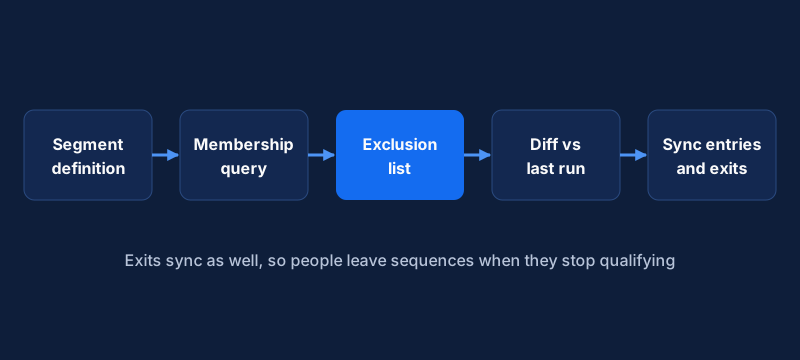
If you use a CDP or CRM, build the rule in its audience or list builder and make sure the conditions match your definition file. If you work from a warehouse, each segment becomes a view. Here is the high-intent rule as SQL:
CREATE OR REPLACE VIEW segment_high_intent_prospect AS
SELECT c.contact_id
FROM contacts c
WHERE c.lead_score >= 80
  AND NOT c.is_customer
  AND EXISTS (
    SELECT 1
    FROM events e
    WHERE e.contact_id = c.contact_id
      AND e.name = 'pricing_page_viewed'
      AND e.occurred_at >= now() - interval '7 days'
  )
  AND NOT EXISTS (
    SELECT 1 FROM audience_master_exclusion x WHERE x.email_hash = c.email_hash
  );
The last clause is the one people forget. Every segment that sends anything should exclude contacts who unsubscribed, complained or must not be contacted. Build that exclusion once and join it everywhere. The view is keyed by email_hash, the same hashed address the ad platforms receive, so store that column on contacts. Syncing audiences and suppression across channels goes into how to maintain it.
Step 5: Diff and sync enters and exits
Do not push the full membership every time. Compare the current run with the last one and send only the changes. Store each run's membership in a table so you can compute the difference.
import os

import httpx

BRAZE_URL = os.environ["BRAZE_REST_URL"]  # your workspace's REST endpoint
BRAZE_KEY = os.environ["BRAZE_API_KEY"]
BATCH = 75  # a /users/track request allows 75 objects combined


def diff(previous: set[str], current: set[str]) -> tuple[set[str], set[str]]:
    return current - previous, previous - current  # entered, exited


def sync(segment_attr: str, entered: set[str], exited: set[str]) -> None:
    changes = [(uid, True) for uid in entered] + [(uid, False) for uid in exited]
    for i in range(0, len(changes), BATCH):
        chunk = changes[i : i + BATCH]
        body = {
            "attributes": [
                {"external_id": uid, segment_attr: value} for uid, value in chunk
            ]
        }
        resp = httpx.post(
            f"{BRAZE_URL}/users/track",
            json=body,
            headers={"Authorization": f"Bearer {BRAZE_KEY}"},
            timeout=30,
        )
        resp.raise_for_status()
This example writes a boolean custom attribute to Braze. Its /users/track documentation says a request can hold up to 75 objects combined across attributes, events and purchases, and that each object takes a single primary identifier. Your messaging tool will have its own limits, so read its API page and set the batch size from there. Wrap the call with the retry logic from reliable webhooks between GTM tools, because a failed batch should not silently leave people in the wrong state.
Sending both entries and exits is the point. If a tool only ever hears about additions, people stay in sequences long after they stopped qualifying. Twilio Segment's Engage audiences, for instance, send Audience Entered and Audience Exited events to event destinations, so the external audience can be updated.
Rate-limited destinations may sync more slowly than the rest. Segment's documentation says destinations such as Facebook Custom Audiences and Google remarketing lists sync at a frequency of roughly one to six hours. Do not promise real-time behavior in an ad channel.
Step 6: Add hysteresis and cooldowns
Without guardrails, people flicker in and out of segments around a threshold. A lead score of 79 becomes 81, then 79 again, and each crossing fires a message.
Three habits stop this. Use separate entry and exit thresholds: enter at 80, exit at 60, and the gap absorbs normal noise. Hold someone in the segment for a minimum time, such as seven days, before they can exit and re-enter. Add a cooldown on messages, so a person who received the high-intent follow-up does not receive it again for a set number of weeks, whatever the segment says.
Also limit how many segments can message the same person in a week. When three rules fire at once, decide which wins and suppress the rest.
Step 7: Monitor, troubleshoot and review
Segments rot. People leave, rules get copied and forgotten, and nobody remembers why a segment exists. Record membership counts for every run and alert when a segment changes size sharply, because a big jump usually means a broken rule or a data issue and rarely a real shift in your market. Track failed requests, retries and the age of the last successful sync. Keep a few seed contacts that you move in and out of segments on purpose, and after any rule change confirm the entry and exit reach the messaging tool. Give every definition a review date and an owner. If nobody can say what a segment is for, retire it.
When something breaks, work from the symptom:
- A person should be in a segment and is not. Check each condition on their record one at a time. A missing event or an empty field is the usual cause. Most CDPs have a profile view with the person's event history and computed values.
- Counts differ between your table and the messaging tool. Look at failed batches first. Then check identity: the tool may have merged or split profiles, so one external ID maps to several records.
- People still get messages after they stopped qualifying. The exit event is not being sent, or the sequence is not tied to segment membership. Check the exit path as carefully as the entry path.
- Updates arrive late. Measure the delay at each hop: event capture, evaluation, queue, API call. The slow hop is often the scheduled job.
Begin with two or three segments that each trigger a clear action, such as high intent, new customer onboarding and at-risk accounts. Build the exit path alongside the entry path, and review the results after a month before you add more. Customer journey tracking shows how the same events become a timeline per contact.
Implementation steps
- Inventory the signals you trustList the fields and events you can rely on, where each comes from and how fresh it is, before writing any rule.
- Write segment definitions as dataDescribe each segment in a version-controlled file with its conditions, owner, purpose and the action taken on entry and exit.
- Choose real-time or scheduled evaluationUse real-time for segments that trigger time-sensitive messages and scheduled queries for everything else.
- Compute membershipImplement each rule as a warehouse query or a native audience in your CDP or CRM, joined to a master exclusion list.
- Diff and sync enters and exitsCompare current membership with the previous run and send only the changes to the messaging tool in batches.
- Add hysteresis and cooldownsUse different thresholds for entering and leaving, and limit how often a person can re-trigger the same message.
- Monitor membership and deliveryAlert on sudden size changes and failed syncs, test with seed contacts, and review every segment on a schedule.
Related Content
Build a Competitor Signal Feed with Alerts and Review
Implementation guide for a monitored competitor signal feed: choose sources, detect meaningful changes, route alerts to Slack, and run a weekly review.
Build an Account Health Score Pipeline With Alerts
An implementation guide for small CS teams: model health signals in a warehouse, calculate a daily score, and send alerts to Slack and your CRM.
Build Event-Triggered Emails and Alerts from User Behavior
Turn product and website events into timely emails and sales alerts. A tool-agnostic note on events, identity, trigger rules and guardrails.