Build a Competitor Signal Feed with Alerts and Review
By Shuk Huay Koh, Founder, Mir Tech
Published Updated 7 min read
On this page
Larkspur Payroll does not exist. We invented it to walk through a competitor signal feed, so every detail here is made up and no number is a real result. Larkspur sells payroll software to small agencies, and its founder learns about a rival's price rise from a prospect on a call. The rival changed its pricing page three weeks earlier. Nobody at Larkspur noticed.
A signal feed fixes that gap. It watches a short list of competitor sources, notices meaningful changes, and sends them to the people who can act. You can build the first version without a large engineering effort.
It is different from a win/loss program. Win/loss asks buyers why they decided. A feed watches what competitors do between those conversations, and the two work well together: a pricing change in the feed can explain a cluster of losses in the interviews.
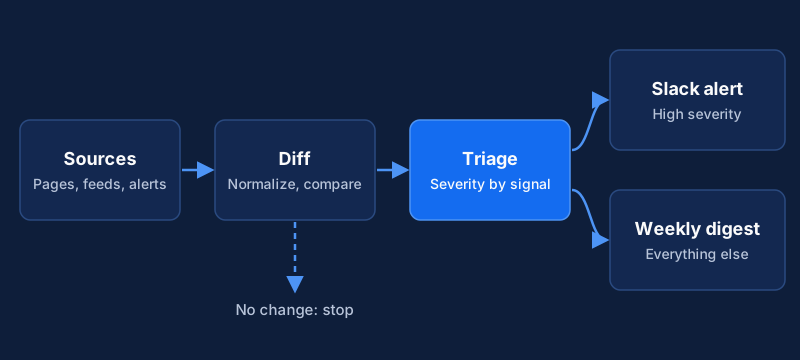
You will need a shared place for the source list and snapshots (a Git repository and a Postgres database, or a spreadsheet for a first version), a Slack workspace or another chat tool with incoming webhooks, someone who owns the weekly review, and basic Python and SQL.
What counts as a signal
Most feeds fail because they report everything. A page that changes a comma is not a signal, so Larkspur starts from the decisions the feed should support.
| Signal | Example | Who needs it | Severity |
|---|---|---|---|
| Pricing or packaging change | New tier, removed plan, changed limit | Sales, founder | High |
| Positioning change | New homepage headline, new target segment | Marketing, founder | High |
| Product launch or removal | Changelog entry, feature page added | Product, sales | Medium |
| Hiring pattern | A run of roles in a new function or region | Founder, product | Medium |
| Funding, leadership or partnership news | Press release, new executive | Founder | Medium |
| Customer sentiment shift | Pattern in new review pages | Sales, support | Low to medium |
For each row, write what you would do if it fired. If the answer is "nothing", drop the row.
Keep the competitor list short. Larkspur picks four companies, including the one that appears most often in its deals. Add the status quo if buyers compare you with it, such as a spreadsheet and a part-time bookkeeper. Positioning covers how to choose the real alternatives.
Match each signal to the cheapest source
Larkspur's choices follow one rule: use the cheapest reliable source for each signal.
- News and mentions. Google Alerts can send you emails when new results appear for a topic, with a frequency you set. Create one per competitor name and one per category phrase.
- Blogs and changelogs. Many have an RSS or Atom feed. A feed reader or a small script is more reliable than scraping the page.
- Pricing and feature pages. These usually have no feed, so monitor the page text with a page-change tool or a scraper.
- Job boards. Track the careers page, or a board's listings, for a few role keywords.
- Review pages. Check them by hand each month unless the site's terms allow automated access.
Read each site's terms of use and robots.txt before you automate collection, and keep the request rate low. A page that needs a daily check does not need a check every minute.
Record the choices in a config file in your repository, so changes are reviewed and you can see when and why a source was added:
competitors:
  - name: Acme
    sources:
      - key: pricing
        url: https://example.com/pricing
        type: page
        frequency: daily
        severity: high
      - key: changelog
        url: https://example.com/changelog.xml
        type: feed
        frequency: daily
        severity: medium
Collect on a schedule
Use alerts and feeds for news and changelogs. For pages, use a page-monitoring service or a scraping platform. If you use Apify, a webhook can run an action when a run finishes or fails, and the action is an HTTP POST to a URL you choose. Point it at a small endpoint you own that stores the result.
A daily check is enough for pricing pages and blogs alike.
Extract only the text that matters, not the whole page. For a pricing page that means plan names, prices and limits, and a narrow target keeps cosmetic changes out of your feed. Prefer stable selectors, such as data- attributes or headings, over auto-generated class names. Those class names change when the competitor ships a front-end update, and your collector then fails silently.
Store every snapshot
Keep each captured value with a timestamp. History lets you compare today with last month, and it helps in the review.
CREATE TABLE signal_snapshots (
    id            BIGINT GENERATED ALWAYS AS IDENTITY PRIMARY KEY,
    competitor    TEXT NOT NULL,
    signal_key    TEXT NOT NULL,
    source_url    TEXT NOT NULL,
    value         TEXT,
    captured_at   TIMESTAMPTZ NOT NULL DEFAULT NOW()
);

CREATE INDEX idx_snapshots_latest
    ON signal_snapshots (competitor, signal_key, captured_at DESC);
The index makes the "latest previous value" query cheap. Keep database credentials in a secrets manager or environment configuration, not in the repository.
Detect and classify changes
Compare the new value with the last stored one, after you normalize both. Normalization is where most of the quality comes from.
import re


def normalize(text: str) -> str:
    text = re.sub(r"\s+", " ", text).strip().lower()
    return re.sub(r"(\d)\s+(gb|mb|tb|%)", r"\1\2", text)


def numbers(text: str) -> list[str]:
    return re.findall(r"\d[\d,]*(?:\.\d+)?", normalize(text))


def plan_names(text: str) -> set[str]:
    # One plan per line, written as "Plan name: price and limits"
    names = set()
    for line in text.splitlines():
        name, separator, _ = line.partition(":")
        if separator:
            names.add(name.strip().lower())
    return names


def is_meaningful(signal_key: str, old: str, new: str) -> bool:
    if normalize(old) == normalize(new):
        return False
    if signal_key == "pricing":
        return numbers(old) != numbers(new) or plan_names(old) != plan_names(new)
    return True
This treats "16 GB" and "16GB" as the same. For pricing it fires when any number changes, or when a plan is added, removed or renamed. The collector must store the pricing value as one plan per line, in the form "Plan name: price and limits", so plan_names can read it. Expand the rules as you see false alerts. For longer text such as a homepage headline, a changed string is already meaningful, so report it with the old and new text side by side.
Take the severity from the config, then adjust: a removed plan is high even if its source is medium. Skip the alert on the first run for a new source. There is nothing to compare, so store the value as the baseline.
Route alerts to two places
High-severity changes go to a Slack channel at once through an incoming webhook. The webhook gives you a unique URL, and you send a JSON payload to it. Treat the URL as a secret, because anyone who has it can post to the channel. Do not commit it to a repository.
{
  "blocks": [
    {
      "type": "header",
      "text": { "type": "plain_text", "text": "Competitor change: pricing" }
    },
    {
      "type": "section",
      "fields": [
        { "type": "mrkdwn", "text": "*Competitor:*\nAcme" },
        { "type": "mrkdwn", "text": "*Signal:*\nPricing page" },
        { "type": "mrkdwn", "text": "*Before:*\nFrom $49 per seat" },
        { "type": "mrkdwn", "text": "*After:*\nFrom $59 per seat" }
      ]
    },
    {
      "type": "section",
      "text": { "type": "mrkdwn", "text": "<https://example.com/pricing|Open the page>" }
    }
  ]
}
import json
import os
import urllib.request
def post_to_slack(payload: dict) -> None:
request = urllib.request.Request(
os.environ["SLACK_WEBHOOK_URL"],
data=json.dumps(payload).encode(),
headers={"Content-Type": "application/json"},
)
urllib.request.urlopen(request, timeout=10)Everything else waits. Collect the medium and low items and post one digest before the weekly review.
Add a line to every message that names who should look and what the likely decision is, such as "Sales: check the objection handling for this plan". An alert without an owner is noise. Send collector failures to a separate channel for whoever maintains the system. If a source returns empty values several runs in a row, the selector has probably broken, and a selector that returns nothing looks exactly like "no change". Alert on empty values.
The weekly review
The feed only helps if someone reads it. Larkspur holds a 20-minute meeting each week with the founder or sales lead, someone from marketing, and someone from product if there is one. The agenda has four items:
- Read the high-severity items and the digest.
- Mark each as act, watch or ignore.
- For "act", name an owner and a date, such as updating the battlecard, changing the pitch or briefing the founder.
- Note anything the feed missed that someone heard elsewhere.
Keep a log of decisions next to the snapshots. When a deal is lost to that competitor, the log shows what you knew and when.
Feed findings belong where behavior changes. Sales playbook documentation is where objection handling and competitor responses should live, so reps see updates without reading Slack. If you want the same signals to reach content and outbound too, that is the connected-workflow idea behind pipeline automation.
Keeping the feed honest
Plan the upkeep from the start. Each week, look at failed collections and fix broken selectors. Each month, count the alerts that led to an action and the ones that were ignored, and tune the rules that produce noise. Each quarter, review the competitor list, sources and severity levels, add a source for any signal you learned about elsewhere, and retire any that has not produced an action.
Two measures are enough: the share of alerts the team acted on, and the number of collection failures. If the first falls, the feed is too noisy, so narrow the extraction, tighten normalization and move low-severity items into the digest. If the second rises, a competitor has redesigned a page.
On blocks and rate limits, slow down, shrink the list of pages and review the site's terms. Rotating around a block is a sign to stop and reconsider.
Our view: if nobody reads the feed, cut it back before you add sources. A feed the team acts on for four competitors beats one that covers twenty and gets muted.
Related Content
Rule-Based Audience Segments That Update Automatically
Define segments as rules, compute membership on a schedule or in real time, and sync entries and exits to your messaging tool without manual list uploads.
How to Run a Win/Loss Program for a B2B Sales Team
A practical win/loss program for founder-led B2B teams: who to interview, what to ask, how to code reasons, and how to act on what you learn.
Build an Account Health Score Pipeline With Alerts
An implementation guide for small CS teams: model health signals in a warehouse, calculate a daily score, and send alerts to Slack and your CRM.