Email List Hygiene: Verification, Bounces and Suppression
By Andrew Mark, Co-founder, Mir Tech
Published Updated 7 min read
On this page
Nobody ruins a sender reputation with one bad send. It wears away through mail to dead addresses, mail that people report and mail that nobody reads. Each one tells a mailbox provider the same thing: this sender does not look after its list.
Hygiene is the routine that prevents that. It has three jobs: keep bad addresses out, remove failing addresses fast, and stop mailing people who have stopped caring. This guide owns verification, bounces and suppression, and it is the list-side companion to warming up a new sending domain. Warmup builds a reputation and hygiene keeps it. If you have a problem and do not know where it starts, diagnose it first with the cold email deliverability guide.
What the providers ask for
Google's email sender guidelines say to confirm each recipient's email address before subscribing them. They also say to automatically unsubscribe recipients who have multiple bounced messages, and to consider unsubscribing recipients who do not open or read your messages.
Yahoo's sender best practices say to remove invalid recipients from your list promptly. They recommend monitoring hard and soft bounces and inactive recipients, and using double or confirmed opt-in.
Neither provider publishes a bounce-rate figure you must stay under, so the thresholds below are yours to set. Both do publish spam-rate limits, which the deliverability guide covers.
What you are building
Four parts make up the system. A suppression table holds every address you must not email, and why. A webhook receiver turns provider events into rows in that table. A scheduled job finds unengaged contacts and adds them. A sync job pushes the table into every tool that sends mail.
The table is the single source of truth. Your sending tool keeps its own suppression list too, which is fine, but yours must be able to override it. You need admin access to your sending tool's webhook settings, a database you can write to, and a small service or automation tool that can receive an HTTPS request. Any ESP with event webhooks works. Check its documentation for current event names and payloads, because they differ and change.
Step 1: Verify addresses at the point of entry
The cheapest bounce is the one that never happens. Check an address when it enters a list, whether it came from a form, an import or an enrichment tool.
Verification has layers. Syntax comes first: reject malformed addresses, then trim whitespace and lowercase the rest. Next check that the domain exists and has mail records. Then ask a verification service whether the mailbox exists. Results are probabilistic, and some domains accept all mail and reject it later, which verifiers report as "catch-all" or "unknown". Finally, flag role addresses such as info@ or sales@, which often reach groups and generate complaints, and flag disposable domains.
Store the result on the contact with the date. Then decide a rule for each result. A common approach sends to valid addresses, holds unknown ones for review and excludes invalid ones.
Verification is not permission. A valid address still belongs to someone who may not want your mail, and the compliance automation guide covers consent and unsubscribes. Be careful with purchased or scraped lists too. They tend to contain stale addresses, and verification cannot tell you whether anyone agreed to hear from you.
Step 2: Create one suppression table
Create a single table. The unique constraint matters, because webhooks can arrive more than once and scheduled jobs can overlap.
CREATE TABLE suppression_list (
    id            BIGSERIAL PRIMARY KEY,
    email_address TEXT NOT NULL UNIQUE,
    reason        TEXT NOT NULL,       -- hard_bounce, complaint, unsubscribe, soft_bounce_limit, unengaged, manual
    source        TEXT NOT NULL,       -- provider name, job name, or person
    occurred_at   TIMESTAMPTZ NOT NULL,
    inserted_at   TIMESTAMPTZ NOT NULL DEFAULT now(),
    synced_at     TIMESTAMPTZ          -- set when pushed to the sending tool
);

CREATE INDEX suppression_unsynced ON suppression_list (inserted_at) WHERE synced_at IS NULL;
This is PostgreSQL syntax, so adapt it to your database. One address can collect several reasons over time, and the table keeps the strongest. The diagram below shows the ranking, and the webhook write in Step 3 enforces it. A manual row is never changed by an event.
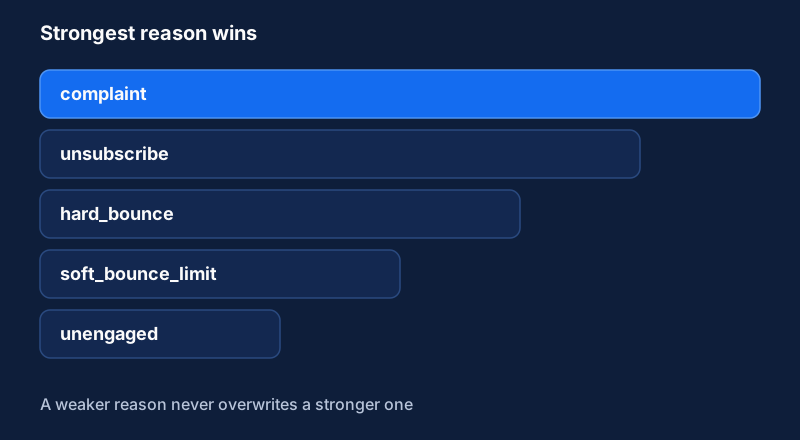
Normalize every address before you insert or compare it. One address stored in two casings becomes two rows, and the second row is how a suppressed contact gets mailed.
Step 3: Capture provider events by webhook
Configure your sending tool to post bounces, spam complaints and unsubscribes to your receiver. Add deferred or dropped events if your provider offers them, because they show early trouble.
Four rules shape the receiver. Verify the sender, using a signed request or shared secret, before you trust a payload. Respond fast: accept the request, store it and process it afterward, because slow responses cause retries and sometimes disabled webhooks. Make the write idempotent with INSERT ... ON CONFLICT, so a repeated event changes nothing and a stronger reason replaces a weaker one. And convert provider event names to your own early, because providers name events differently.
Your internal event looks like this, whatever the provider sent:
{
  "email_address": "user@example.com",
  "event_type": "hard_bounce",
  "occurred_at": "2026-03-15T12:00:00Z",
  "source": "esp-name"
}
The write:
INSERT INTO suppression_list (email_address, reason, source, occurred_at)
VALUES (lower(trim($1)), $2, $3, $4)
ON CONFLICT (email_address) DO UPDATE
SET reason = EXCLUDED.reason, source = EXCLUDED.source, occurred_at = EXCLUDED.occurred_at
WHERE array_position(ARRAY['unengaged','soft_bounce_limit','hard_bounce','unsubscribe','complaint'], EXCLUDED.reason)
    > array_position(ARRAY['unengaged','soft_bounce_limit','hard_bounce','unsubscribe','complaint'], suppression_list.reason);
Keep the raw payloads for a while in a separate log. When a mapping looks wrong, you will want the original.
Step 4: Classify bounces
SMTP replies carry a status class defined in RFC 3463. A permanent failure is "one which is not likely to be resolved by resending the message in the current form". A persistent transient failure is one where the message as sent is valid and a later attempt may succeed. Treat them differently:
| Bounce type | Typical cause | Action |
|---|---|---|
| Hard (permanent) | Mailbox or domain does not exist | Suppress at once |
| Soft (transient) | Full mailbox, server busy, temporary block | Count it. Suppress after repeated failures |
| Block or policy | Provider rejects you for reputation or content | Do not suppress the recipient. Investigate your own sending |
The third row matters most. A burst of blocks says something about you and nothing about your list. Suppressing those recipients hides the problem and shrinks the list for no gain. Check authentication, volume and content, and use the warmup guide's throttling steps.
For soft bounces, pick a limit that suits your volume, such as several consecutive failed sends, and reset the counter on a successful delivery. Google's own wording, to "automatically unsubscribe recipients who have multiple bounced messages", supports the principle without giving a number.
We would suppress on the first spam complaint with no review. A person who reported you will not become a customer because you wrote again.
Step 5: Sunset unengaged contacts
Contacts who never engage are a quiet risk, and the simplest policy is to stop mailing them. We would rather suppress a quiet contact too early than keep mailing them too long, because you can always add them back when a real reason appears.
Define engagement with care. Open rates are unreliable now, because Apple's Mail Privacy Protection preloads messages through proxy servers. As Postmark explains, that triggers the tracking pixel for every email it processes, so some opens are not real. Prefer signals that need a human action: a reply, a click, a site visit, a booking, a form fill, or a CRM change such as a meeting or a stage change.
Choose a window that fits your rhythm, since a monthly newsletter and a weekly sequence need different ones. Then run a scheduled job. This example uses a table of contact events:
INSERT INTO suppression_list (email_address, reason, source, occurred_at)
SELECT c.email_address, 'unengaged', 'sunset_job', now()
FROM contacts c
WHERE c.last_sent_at IS NOT NULL
  AND c.first_sent_at < now() - INTERVAL '180 days'
  AND NOT EXISTS (
        SELECT 1 FROM contact_events e
        WHERE e.email_address = c.email_address
          AND e.event_type IN ('reply', 'click', 'site_visit', 'meeting_booked')
          AND e.occurred_at >= now() - INTERVAL '180 days')
ON CONFLICT (email_address) DO NOTHING;
The 180 days is a placeholder. Use your own window and your own table and column names. The job keeps DO NOTHING on purpose, so an unengaged flag never replaces a stronger reason already on file.
Before the job suppresses anyone, send the group one last message with a clear subject and a single button or reply to stay on the list. Anyone who responds stays. Everyone else moves to the table with the reason unengaged. This is housekeeping, not punishment, and these contacts can be mailed again when something real changes at their company, provided you have a lawful basis. Keep them in a separate state from complaints and unsubscribes.
Step 6: Sync suppression back to every sending tool
The table does nothing if your tools do not know about it. Run a sync job on a regular interval, such as every hour. It selects rows where synced_at IS NULL, pushes them to your email provider's suppression or blocklist API and to any other tool that sends, such as a sequencer or a CRM, then sets synced_at for the rows that succeeded. Batch the calls and back off on rate-limit errors. If a call fails, leave synced_at empty so the next run retries.
One more check is easy to skip. Before any campaign sends, filter the audience against your own table, not only the provider's. Provider suppression covers one tool, and your table covers all of them.
What to watch weekly
Look at hard bounces per send as a trend against your own baseline, complaints per send (which should sit near zero), rows added by reason, unsynced rows and webhook failures. When hard bounces rise, the cause is usually upstream: a new list, a changed form or a data tool returning poor addresses. Trace the bounced addresses back to where they entered and fix the source. The sales automation pitfalls article describes how quickly a sequence amplifies a poor list.
Review manual suppressions, such as a customer asking to be removed, as a person, and keep a record of who added them and why. Never delete suppression rows to inflate a list.
If you build only one habit from this guide, make it a weekly check that the unsynced count is zero. A suppression table that never reaches your sending tools protects nobody.
Implementation steps
- Verify addresses at the point of entryCheck syntax, domain and mailbox status before an address joins a sending list, and keep the verification result on the contact record.
- Create one suppression tableStore every address you must not email in a single table with a unique constraint, a reason and a source, and normalize addresses before storing them.
- Capture provider events by webhookReceive bounce, complaint and unsubscribe events from your sending tool, verify and map them to your own event names, and write them to the suppression table.
- Classify bouncesSuppress hard bounces and complaints at once. Count soft bounces and suppress an address that keeps failing.
- Sunset unengaged contactsRun a scheduled query that finds contacts with no meaningful engagement over a set period, send a last re-engagement message, then suppress them.
- Sync suppression back to every sending toolPush new suppressions to your email provider and any other tool that sends, and check that no suppressed address appears in a campaign audience.
Related Content
Cold Email Deliverability: Provider Rules and Diagnosis
What Google, Yahoo and Microsoft require from cold senders, how to diagnose spam-folder placement layer by layer, and which signals to check weekly.
Warm Up a New Sending Domain and Monitor Reputation
How to authenticate, ramp up and monitor new sending domains and inboxes so outbound email reaches the inbox. For founder-led B2B teams.
Build Event-Triggered Emails and Alerts from User Behavior
Turn product and website events into timely emails and sales alerts. A tool-agnostic note on events, identity, trigger rules and guardrails.