Contact Enrichment Waterfall: Quality and Privacy
By Shuk Huay Koh, Founder, Mir Tech
Published Updated 6 min read
On this page
Enrichment fills gaps in your CRM: company size, industry, job title, location. Done well, it makes scoring, routing and outreach more accurate. Done badly, it buries good data under wrong data and creates a privacy problem you did not have before.
This page is a reference for the whole loop: the CRM triggers enrichment, a warehouse holds the working data, a waterfall of providers fills the gaps, and validated values go back. You need CRM admin access, a warehouse, a scheduler or serverless function, and an account with at least one data provider.
Enrich fewer fields than you think you need
Every extra field adds cost, a chance of error and personal data you must justify holding. Work backward from use. If routing needs country and company size, and scoring needs job level, those three are your fields. The lead routing guide and the lead scoring pipeline show what each system reads.
Give every field a one-line standard before you buy anything.
| Decide | Example |
|---|---|
| Format | ISO country codes; a fixed list of job levels |
| Winner when providers disagree | Provider A for title, provider B for company size |
| Maximum age before refresh | Title: 6 months. Country: 2 years |
| Human edits | Never overwritten |
The last row prevents a common failure. A rep corrects a title, and the next batch job silently puts the old one back.
Privacy rules by region
Enrichment means collecting personal data about people who did not give it to you directly. The rules depend on where your contacts live.
| Region | What applies | Source |
|---|---|---|
| EU and UK (GDPR) | You need a lawful basis. Legitimate interests applies only where the individual's rights do not override it, so weigh the two and write down the result. Because the data does not come from the person, you must tell them who you are, why you hold the data, where it came from and what rights they have. The deadline is a reasonable period and at most one month, or your first contact if that comes sooner. | Article 6, Article 14 |
| Malaysia (PDPA) | The 2024 amendments bind data processors directly to the security principle, make breach notification to the Commissioner mandatory, and require controllers and processors to appoint a data protection officer. | DFDL summary |
Mir Tech is based in Malaysia, so we watch the PDPA closely. Check it with your own counsel for your situation. This is general guidance, not legal advice.
Four rules hold in every region. Record which provider supplied which value and when. Set a retention period and delete what you no longer need. Honor opt-outs everywhere, including the warehouse copy, with a suppression list that the pipeline checks before each call. And do not enrich contacts in regions where you have no lawful basis and no plan to contact them. Ask providers how they source their data and whether individuals were informed.
A lighter setup for small teams
If you enrich a few hundred contacts a month, skip the warehouse. A CRM-native enrichment feature, or one provider connected through Zapier or Make, covers most of the value. Keep the rules: enrich only the fields you use, record the source of each value, check the suppression list first, and never overwrite a human edit. Move to the pipeline below when volume, cost or audit needs grow.
Components
You need a data provider, or several, with documented REST APIs and clear terms on how they source data. Product lineups change often, so confirm current availability before you commit. You also need a warehouse such as Snowflake, BigQuery or Redshift with a dedicated schema, CRM API access (a connected app with OAuth scopes in Salesforce, or a private app with contact scopes in HubSpot), a scheduler or serverless function such as AWS Lambda on a schedule, and a secrets manager.
Never put API keys in code or in the repository. AWS Secrets Manager replaces hard-coded credentials with a run-time lookup and supports automatic rotation. Google Secret Manager does the same on Google Cloud. Give the job a role that can read only the secrets it needs.
Staging table
Create a schema just for enrichment. A staging table holds contacts waiting to be processed:
create table enrichment_staging (
  record_id     varchar,
  crm_id        varchar not null,
  email_address varchar,
  status        varchar default 'pending',
  attempts      int default 0,
  processed_at  timestamp_ntz
);
Keep a status column and do not delete rows after success. It gives you a retry queue and an audit trail. For cheap, short-lived storage, Snowflake transient tables have no Fail-safe period and a Time Travel window of zero or one day, so deleted data cannot be recovered after that. That helps privacy and hurts recovery.
To fill the table, you need a signal when a contact is created or a key field changes. Salesforce Platform Events or Change Data Capture publish record changes. HubSpot webhook subscriptions cover contact creation. A scheduled query for records created or modified since the last run is simpler and often enough. Use it unless you need enrichment within minutes.
The waterfall
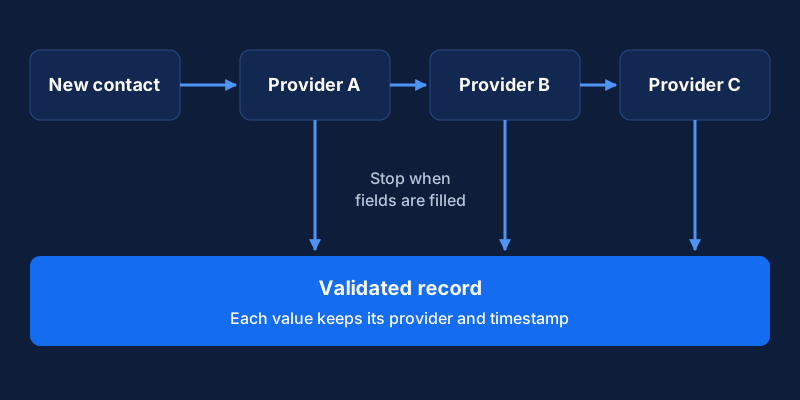
A waterfall calls providers one after another and stops when the required fields are filled. Order them by a mix of cost and accuracy for your market, not alphabetically.
for each pending record:
    skip if email is on the suppression list
    required = fields still empty
    for provider in [provider_a, provider_b, provider_c]:
        result = provider.lookup(email)
        fill required fields from result, tagging provider and timestamp
        if no required fields remain: break
    mark record complete, partial or unmatched
Three properties keep it safe. Running the job twice must not create duplicates or double charges, so check the status column first. When a provider returns HTTP 429, honor the Retry-After header when present, as MDN describes, and use exponential backoff when it is absent. And store the provider name beside every value, so you can see which source to trust when two disagree.
Validate before you write back
Treat provider output as untrusted.
| Check | Example |
|---|---|
| Format | Valid country code, plausible employee count, LinkedIn URL in the expected pattern |
| Conflict | The enriched company domain matches the email domain |
| Freshness | The value is newer than what the CRM holds |
| Personal domains | Never set a company name from a Gmail address |
Rows that fail go to a review table, not the CRM. Persist the validated result in a permanent warehouse table for analytics, and keep personal fields only as long as your retention rule allows.
Write back in batches to stay inside API limits. In HubSpot, the batch upsert endpoint identifies contacts by email or a custom unique property. In Salesforce, update by record ID instead of looking up by email, so you never touch the wrong record. Write only the fields you decided to enrich, and stamp each record with an enrichment date so you can find stale ones.
What to watch each week
| Check | Why it matters |
|---|---|
| Match rate by provider | Shows which provider earns its place in the waterfall |
| Share of fields filled | Tells you whether the waterfall closes gaps |
| Failures and retries | Catches expired keys and schema changes early |
| Rows in review | A growing pile means a rule or a provider has drifted |
| Email bounce rate on enriched contacts | A direct test of accuracy; see the email list hygiene system |
No dashboard replaces a manual sample. Each quarter, check 50 records by hand against LinkedIn or the company website. Refresh each field at its own pace, because titles and employers change faster than industry or country. A high no-match rate points to bad source emails, so fix capture forms before you buy another provider. The enriched fields also feed intent signals beyond firmographics, and a missing opt-out in any downstream copy is the failure to guard against first.
Related Content
Sales to Customer Success Handoff: Workflow and Data
A practical guide for small B2B teams to hand a closed deal from sales to customer success with a clear trigger, shared data and a checklist.
Lead Routing by Fit, Territory and Capacity
How RevOps leads and founders can route new leads by existing owner, territory, segment and capacity in the CRM, and when a predictive score is worth adding.
Practical B2B Attribution: UTMs and Self-Reported Data
A practical attribution setup for B2B teams with long sales cycles and few deals: UTMs, self-reported source, CRM fields and where multi-touch stops helping.