Lead Routing by Fit, Territory and Capacity
By Andrew Mark, Co-founder, Mir Tech
Published Updated 6 min read
On this page
"Whoever is next" works for two reps and one product. It stops working the week a territory splits, a rep goes on leave, or a lead from an existing customer lands with a stranger. The lead is not lost. It sits, and nobody notices until the prospect has moved on.
Fix that with rules before you reach for a model. Rules solve most routing problems, and a model needs them as a fallback anyway.
Routing is a list of questions asked in order
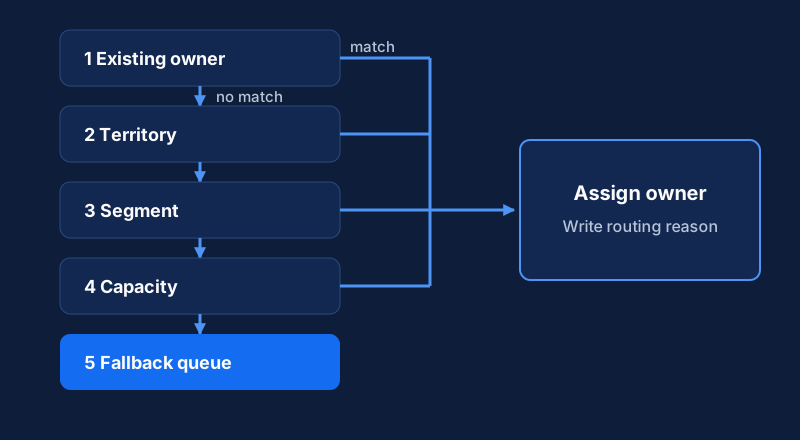
Write the questions down before you open any tool. Is there already an owner? A lead from a company with an account owner or an open opportunity usually belongs to that person. Does the lead fit a named-account list or a territory, whether country, region, state or something else? Does it fit a segment, such as company size, industry or language, that decides which rep has the right experience? Does that rep have capacity, since a perfect match who is full or on leave is not a match today? And what happens when nothing matches?
Each question needs a clean field in the CRM. If "country" is free text and "industry" has forty spellings, fix the data first. The data enrichment workflow covers how to standardize the fields that routing depends on.
The order matters more than any single rule
A common sequence:
- Existing account owner or open opportunity owner
- Named-account list
- Territory
- Segment or specialty (language, vertical, product line)
- Capacity check within the matching group
- Tie-break: rotate, or pick the rep with the fewest open leads
- Fallback queue, owned by a named person
Put the sequence on one page and share it with every rep. People accept routing they can read and predict, and resent routing that feels random.
Keep it proportionate. Two reps and a founder might need only steps 1, 4 and 7. If the founder is the one catching every lead, the founder-led scale approach shows how to hand them over without the founder staying the bottleneck.
Where to implement the rules
You have three realistic options.
| Option | Good for | Watch out for |
|---|---|---|
| CRM assignment rules | Simple criteria-to-owner or criteria-to-queue mapping | Rotation across a group usually needs extra work |
| Record-triggered Flow | Ordered rules, capacity checks, custom fields | Needs an admin who can maintain it |
| Routing app or automation platform | Many teams, complex rules, audit trails | Extra cost and another system to own |
For most teams the Flow is enough. Trigger it when a Lead is created and run the decision order as a series of checks. When a rule matches, set the owner, stop, and write the reason to a text field such as Routing_Reason__c ("Territory: DACH, segment: mid-market, lowest open count"). When a rep asks why they got a lead, or you audit the system a month later, the answer is on the record.
If an automation platform orchestrates this, check how its trigger works. Workato's Salesforce connector, for example, offers a New record trigger that polls every five minutes and separate real-time triggers. Five minutes may be fine for routing and too slow for a hot inbound lead. Its real-time triggers rely on Salesforce Workflow rules, which Salesforce is retiring, and Workato recommends Flows for new recipes. Check the current guidance before you design around a real-time trigger.
Capacity needs three fields
Capacity stops one rep from receiving every good lead, and it does not need to be clever. Add three fields to the user or to a custom rep-settings object: a yes/no switch for accepting leads, turned off for leave or onboarding; a maximum number of open leads that the sales manager owns; and a count of current open leads that a Flow or scheduled job keeps up to date.
The rule filters the matching group to reps who are accepting and below their maximum, then picks the lowest count. If the group is empty, the lead falls through to the next rule or to the queue.
Define "open" strictly: a lead in an active status with no completed first touch. If it means every lead a rep has ever owned, capacity fills with old records and nobody gets new ones. Keep these counts inside the CRM where you can. Salesforce limits API requests per 24 hours by edition, and an external tool that queries every rep for every new lead can burn through the allowance.
The fallback queue is a process, not a status
A queue works only if someone owns it. Set a service level, such as "unassigned leads are claimed or reassigned within one business day", and alert when a lead waits longer. Make sure a failed automation still drops the lead in the queue, and route errors to a person.
Speed matters as much as accuracy. A good-enough owner who replies in an hour beats the perfect owner who replies in three days. The lead scoring pipeline shows how to flag the leads that cannot wait.
When a predictive score is worth adding
We would recommend against a model that scores every lead against every rep and picks the highest. With a small team, the result mostly reflects who happened to work which deals. It can send every strong lead to one person and starve newer reps of the practice they need. A lead-level model, which estimates how likely a lead is to convert, is safer. Use it to order the queue or to choose a segment, and let the rules choose the person.
You also need history. There is no magic number of deals, but you need enough won and lost outcomes, with consistent fields, that a held-back test set gives stable results. If the data is thin or messy, improve the rules instead.
Gradient-boosted trees suit this kind of structured data. Amazon SageMaker offers XGBoost as a built-in algorithm for binary classification, and open-source libraries do the same job. The outline is short:
- Export closed leads with attributes such as source, company size, industry, region and product interest.
- Encode the categories and split the data, keeping the won/lost ratio the same in the training and test sets.
- Train, then evaluate on the held-out set with a metric such as AUC. A score near 0.5 means the model is no better than guessing, so do not deploy it.
- Serve the score through an endpoint or batch job and write it to a field on the lead.
Compare the model with a plain baseline, such as scoring by source alone. If it does not clearly beat the baseline, it is not paying for itself.
Plan your own monitoring. AWS documents SageMaker Model Monitor but says it is no longer open to new customers. A monthly comparison of score distributions and conversion by score band will show most drift.
Pilot on one lead source
Do not move every lead at once. Pick one source, such as webinar registrations, run the new routing on it while the rest keep the old method, and mark routed leads with a field so you can compare the groups. Track the time from creation to first touch, the share of leads accepted versus reassigned, the number sitting in the queue, and conversion from lead to opportunity by cohort. Small cohorts swing wildly, so treat early numbers as signals. Pipeline velocity metrics explains how to read them together.
The symptoms tell you where the rules are weak. Ownerless leads mean a gap: check the routing reason field and the queue for patterns. One rep with most of the leads means capacity or the tie-break is missing. Frequent reassignment means the segment rules do not match how the team actually sells, so ask the reps. Split ownership usually means weak matching of leads to existing accounts, which you fix with deduplication before routing.
Related Content
Build an Account Health Score Pipeline With Alerts
An implementation guide for small CS teams: model health signals in a warehouse, calculate a daily score, and send alerts to Slack and your CRM.
Build Event-Triggered Emails and Alerts from User Behavior
Turn product and website events into timely emails and sales alerts. A tool-agnostic note on events, identity, trigger rules and guardrails.
Build a Competitor Signal Feed with Alerts and Review
Implementation guide for a monitored competitor signal feed: choose sources, detect meaningful changes, route alerts to Slack, and run a weekly review.