Near-Real-Time Lead Scoring: CDP to Warehouse to CRM
By Shuk Huay Koh, Founder, Mir Tech
Published Updated 8 min read
On this page
A lead score earns its keep only if it reaches the rep while the prospect is still looking. In many teams the score is a nightly batch, so a pricing-page visit on Tuesday morning shows up in the CRM on Wednesday. By then the prospect has read three competitors.
The pipeline below shortens that gap. Segment collects behavior, Snowflake calculates the score, a reverse ETL tool writes it to Salesforce, and a Flow tells the owner. You need admin access to each tool and a little SQL. "Near real time" here means minutes to hours, and the slowest hop sets the pace. That hop is usually the warehouse load, covered in step 3.
What has to exist before you build
Five things must be in place, because every later step leans on them. You need admin access to Segment, Snowflake and Salesforce so you can create credentials, schemas and custom fields. You need a written scoring model that sales and marketing have agreed to, or you will rewrite the SQL each time someone disputes a point value. High-value actions such as a pricing page view or a demo request must arrive as their own events, never buried in generic page views.
Create a dedicated Snowflake user and role for Segment, and a dedicated Salesforce integration user for the reverse ETL tool. Separate accounts make permissions and failures easy to trace. Finally, pick one identifier that joins web activity to CRM records and pass it everywhere. A lowercased email address is common, but any stable ID works.
If your ideal customer profile is still vague, settle that first. A score built on a vague profile only automates the vagueness.
A lighter setup without a warehouse
We would not start with Snowflake and dbt. If you have a few thousand leads, build the score inside your CRM first, and move to the warehouse only when you can name something the CRM cannot do. Use the same points table, let CRM workflows add points when a form is submitted or a tracked page is viewed, and store the total in a score field. A spreadsheet, Zapier or Make can fill gaps while you learn which signals matter.
The warehouse earns its cost when you need event history across several tools, or a rolling window that CRM workflows cannot calculate. Until then, the extra moving parts mostly give you more things to break.
The pipeline in one view
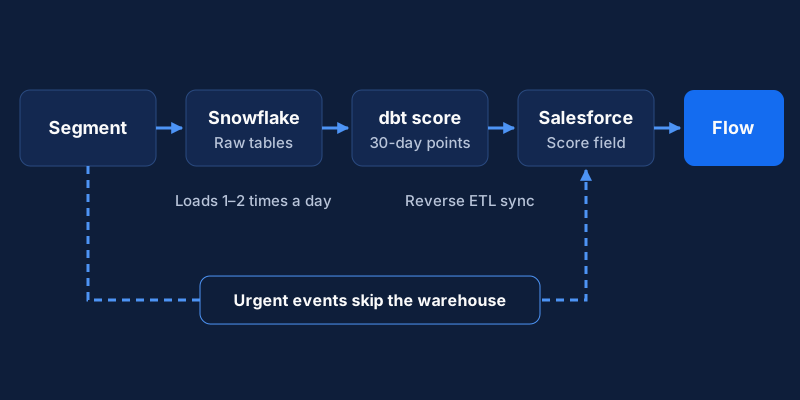
Each stage has a single job.
| Stage | Tool in this guide | Job |
|---|---|---|
| Collect | Segment | Capture web and email events, tie them to a known person |
| Store and calculate | Snowflake with dbt | Turn raw events into a score per lead |
| Activate | Reverse ETL (Hightouch, or Segment's own Reverse ETL) | Write the score into the CRM on a schedule |
| Act | Salesforce Flow | Create a task or alert when the score crosses a threshold |
You can swap any layer. BigQuery for Snowflake, or HubSpot for Salesforce, changes the details but not the shape.
Step 1: Agree the scoring rules
Score what predicts a conversation, not what is easy to count. Begin with a short list of actions and weights, then test it against your own history.
| Signal | Example points |
|---|---|
| Demo or contact request | +40 |
| Pricing page view | +15 |
| Comparison page view | +15 |
| Case study or integration guide downloaded | +10 |
| Webinar attended | +10 |
| Blog visit | +2 |
These are the same event points as in intent signals beyond firmographics, which also adds fit and account-level points, such as an ICP match or a second visitor from the same company. Add those as separate columns or as a second model.
The numbers are illustrative. To set your own, pull your last 20 to 30 closed-won deals, list what each account did before the first sales conversation, and weight the actions that show up most often.
Decide on decay now. Instead of subtracting points after a quiet period, count only the last 30 days of activity. Old interest then ages out with no extra logic.
Step 2: Audit CDP tracking
Open Segment's debugger and watch live events while you click through your site. For each scored action, confirm that the event name is stable, the properties you need are present and the user is identified.
Be deliberate about identity. Analytics.js assigns an anonymous ID to every visitor, and Segment recommends against calling identify for anonymous visitors. Call identify when you learn who the visitor is, for example on a form submit, and keep the userId stable. Changing it mid-session can split a person's history in two.
Email engagement usually arrives through a separate connection from your email tool. Check that those events carry the same identifier.
Step 3: Load events into the warehouse
Create a dedicated Snowflake role and user for Segment, then connect the Snowflake destination. Segment's Snowflake documentation lists the exact grants. The role needs usage on the warehouse and database, plus permission to create schemas.
Two details from that page matter in practice. Segment needs key-pair authentication, and MFA and SSO must be disabled for that service user. If you enable AUTO_SUSPEND on the warehouse, enable AUTO_RESUME too, or loads fail until someone resumes it by hand.
Now check the sync schedule. Segment states that the warehouse syncs once or twice a day depending on your plan, and that Business tier customers can set the time and frequency. If your plan syncs twice a day, a score computed from warehouse data cannot be fresher than that.
You have two honest options. Accept the lag for the slow-moving part of the score, and send the highest-intent events (a demo request, a pricing view from a known contact) straight to the CRM or Slack through an event destination that bypasses the warehouse. Or raise the sync frequency if your plan allows it, or load events with a streaming method from your warehouse vendor.
We would pick the first. The warehouse score ranks the queue, and the direct alert covers the moments that cannot wait.
Step 4: Model the score
Build the score in dbt as two layers. The first layer turns events into points. An incremental model reads new track events and assigns points from a mapping table. dbt's incremental models transform all rows on the first run and only the rows you filter for afterward, which keeps compute low. Set a unique_key so a reprocessed event updates its row instead of duplicating it.
The second layer is the rolling score, a table or view that sums the last 30 days of points per lead:
select
  lower(lead_email)           as lead_email,
  sum(points)                 as calculated_score,
  max(event_at)               as last_activity_at
from analytics.lead_event_points
where event_at >= dateadd(day, -30, current_timestamp())
group by 1
Adjust table and column names to your schema. Keep the mapping of event name to points in a seed file, so a point change is a one-line pull request and not a code rewrite. Add dbt tests for the basics: the key is unique and not null, and no score is negative.
Step 5: Sync scores to the CRM
Connect a reverse ETL tool to Snowflake with a read-only role limited to the scoring table. Hightouch is one option. Segment's Reverse ETL is another, since it syncs the result of a warehouse query to your destinations.
Create the custom fields in Salesforce first, for example a number field for the score and a date field for last activity. Then decide how records are matched, because this is where most duplicate-record problems start. An upsert creates records that do not exist. In Hightouch it needs a field defined in Salesforce as an external ID, and it does not match on the Salesforce ID. An update only changes existing records and can match on the Salesforce ID.
For scoring you want Update. You are enriching leads that already exist, so you do not want to create new ones. Carry the Salesforce Lead or Contact ID into your warehouse model so the join is exact.
Match the sync schedule to the freshness your warehouse can deliver. The smallest interval Hightouch supports is one minute, but syncing every minute from a table that refreshes twice a day only burns API calls. Salesforce also caps daily API requests by edition, so check the API limits for your org. Hightouch's upsert mode sends one API request per batch, and you can opt into Bulk API 2.0 for large syncs.
Step 6: Automate the follow-up
Build a record-triggered Flow on Lead and Contact. Run it when the score field changes, and let it continue only if the new score is at or above your threshold and the prior value was below it. Salesforce exposes the previous record values to the Flow for exactly this check. Without that condition, every sync that nudges a score from 80 to 82 creates another task.
A Flow that creates a Task must run after the record is saved, because the Task needs the saved record's ID. In Flow Builder this is the "Actions and Related Records" option. Assign the task to the record owner and set a due date of one business day or less. Put the top contributing events in the description, so the rep sees why the lead surfaced.
If the owner field is empty or wrong, the alert lands nowhere. Lead routing by fit, territory and capacity shows how to assign owners before the score arrives.
Step 7: Monitor and tune
For the first month, check four things each week. Look at sync history for failed batches or API limit errors. Check the dbt run history to see whether the model ran on time. Measure the match rate, meaning the share of scored leads that found a CRM record. Then look at the score distribution: a handful of leads should reach the threshold. If half the database does, the threshold is too low.
When something is wrong, follow the data backward. A stale score in Salesforce points first to the sync log, then to the dbt run, then to the warehouse load. A score on the wrong record usually means an identifier mismatch, such as email casing or a missing ID. For one suspicious score, take a single user, list their raw events, add up the expected points by hand and compare with the model output.
Review the weights each quarter against closed-won and closed-lost deals. A threshold that sends too many leads to sales does as much harm as one that sends none.
Two numbers show whether the pipeline paid off: the time from threshold crossing to first sales touch, and the conversion from scored lead to opportunity compared with unscored leads. Pipeline velocity metrics explains how to read these alongside deal size and cycle length. If the scoring is right but nobody acts on the tasks, the fix lies in your process. For richer triggers than a single score, see the behavioral trigger system.
Implementation steps
- Agree the scoring rulesWrite down which events earn points, how many, and which score means sales-ready. Get sales and marketing to sign it off before any build work.
- Audit CDP trackingCheck that Segment captures the high-intent events as distinct track calls, and that identify calls carry one stable identifier.
- Load events into the warehouseConnect Segment to Snowflake with a dedicated user and role, and note how often the warehouse sync runs on your plan.
- Model the scoreBuild an incremental dbt model that turns raw events into points, then a rolling 30-day total per lead.
- Sync scores to the CRMUse a reverse ETL tool to write the score to a custom field on Lead and Contact, matching on the Salesforce record ID or an external ID.
- Automate the follow-upBuild a record-triggered Flow that creates a task for the owner when the score first crosses the sales-ready threshold.
- Monitor and tuneWatch sync errors, API usage and score drift, and review the point values against closed-won deals each quarter.
Related Content
Intent Signals Beyond Firmographics: A Reference
A lookup guide to first-, second- and third-party intent signals for B2B teams: what each means, how to weight it, and what to do when an account acts.
Build an Account Health Score Pipeline With Alerts
An implementation guide for small CS teams: model health signals in a warehouse, calculate a daily score, and send alerts to Slack and your CRM.
Lead Routing by Fit, Territory and Capacity
How RevOps leads and founders can route new leads by existing owner, territory, segment and capacity in the CRM, and when a predictive score is worth adding.