Practical B2B Attribution: UTMs and Self-Reported Data
By Shuk Huay Koh, Founder, Mir Tech
Published Updated 6 min read
On this page
A B2B team that closes a handful of deals a quarter does not have an attribution-model problem. It has a capture problem. Cycles run for months, a buying committee has several people with their own browsers, and the touches that matter most, such as a recommendation in a private group or a podcast episode, leave no click behind.
So aim for answers that are good enough to guide a budget decision, and say plainly what they cannot show. The order we would build in for a founder-led team is clean tracking first, self-reported attribution second, multi-touch models last.
What each method can tell you
| Method | Answers | Blind spots |
|---|---|---|
| UTMs and click IDs | Which campaign or link brought this visit | Anything without a trackable click; dark social; offline |
| Self-reported ("How did you hear about us?") | What made the buyer decide to get in touch | Memory is fuzzy; people name the last thing they remember |
| CRM stage data | Which sources turn into opportunities and revenue | Needs consistent fields and enough volume |
| Multi-touch models | How credit might be divided across tracked touches | Cannot see untracked touches; credit rules are a choice, not a fact |
The tracked view shows where people clicked. The self-reported view shows what they credit. The two often disagree, and that gap is the useful part.
Decide what the numbers are for
List the decisions the numbers should inform before you touch a tag: whether to keep paying for a newsletter sponsorship, whether LinkedIn ads or outbound produce better opportunities, whether a webinar series is worth the effort. If a question cannot change a decision, do not build reporting for it. For how fast deals move after they enter the pipeline, see pipeline velocity metrics.
UTM convention
UTM parameters are the base layer. Google's URL builder documentation explains how they feed campaign reports in Google Analytics. They only help if everyone uses them the same way, so put the convention in a shared sheet.
utm_source   = where the link lives        linkedin, newsletter-acme, google, partner-name
utm_medium   = type of placement           paid-social, cpc, email, referral, organic-social
utm_campaign = the initiative              q4-pricing-launch, webinar-onboarding
utm_content  = the variant (optional)      carousel-a, headline-b
Lowercase every UTM value and use hyphens, because LinkedIn and linkedin are two sources to a report. Leave click IDs such as gclid and li_fat_id alone, since they are case-sensitive. Fix the vocabulary once, and prefer a fixed list of mediums to free text. Never add UTMs to links between pages on your own site, because they overwrite the original source. Tag every link you control, and generate links from a template or small script instead of typing them.
Capture into the CRM
Analytics tools show traffic. Your CRM needs the source on the person at the moment they raise a hand. Store the parameters on arrival, then write them into hidden form fields on submit.
const KEYS = ["utm_source", "utm_medium", "utm_campaign", "utm_content", "gclid", "li_fat_id"];

function readParams() {
  const url = new URL(window.location.href);
  const found = {};
  for (const key of KEYS) {
    const value = url.searchParams.get(key);
    if (value) found[key] = key.startsWith("utm_") ? value.toLowerCase() : value;
  }
  return found;
}

function saveTouches() {
  const params = readParams();
  if (Object.keys(params).length === 0) return;
  try {
    const first = localStorage.getItem("first_touch");
    if (!first) localStorage.setItem("first_touch", JSON.stringify(params));
    localStorage.setItem("latest_touch", JSON.stringify(params));
  } catch (_) {
    /* storage can be blocked; the form still works without it */
  }
}

function fillHiddenFields(form) {
  let first = {};
  let latest = {};
  try {
    first = JSON.parse(localStorage.getItem("first_touch") || "{}");
    latest = JSON.parse(localStorage.getItem("latest_touch") || "{}");
  } catch (_) {}
  for (const [key, value] of Object.entries(first)) {
    const field = form.querySelector(`[name="first_${key}"]`);
    if (field) field.value = value;
  }
  for (const [key, value] of Object.entries(latest)) {
    const field = form.querySelector(`[name="latest_${key}"]`);
    if (field) field.value = value;
  }
}

saveTouches();
document.querySelectorAll("form").forEach((form) => {
  form.addEventListener("submit", () => fillHiddenFields(form));
});
Create matching CRM properties (first_utm_source, latest_utm_source and so on) and map the form fields to them. Check your consent setup before you store anything, because depending on where visitors live, storing identifiers may need consent first. Linking anonymous visits to the person who later fills in a form is a separate problem, covered in customer journey tracking.
Add one open question to demo and contact forms: "How did you hear about us?" Make it free text. A dropdown limits people to the channels you already know. Ask the same question on the first sales call and store that answer in its own property. It must never overwrite the tracked source.
Then copy both views onto the opportunity when it is created and lock them: tracked first-touch and latest-touch source and campaign, self-reported source (raw and categorized), the contact roles, and whether the deal came from outbound, inbound or a referral. If you use HubSpot, its attribution reporting documentation lists the built-in models and which reports support them. In another CRM, a few custom fields and a report get you most of the way.
Reconcile both views monthly
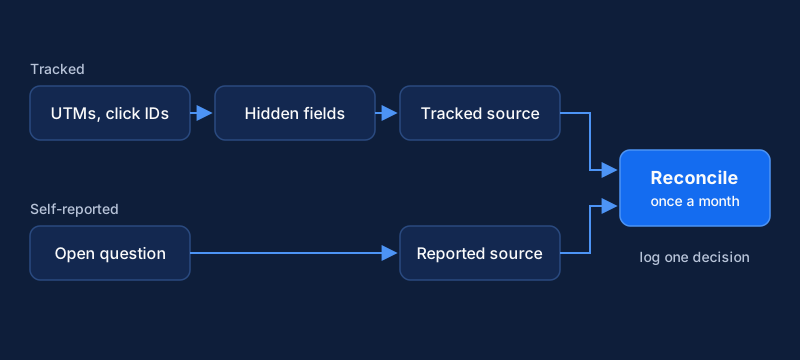
One query, run monthly, shows how they line up. It assumes an opportunities table with the fields above.
SELECT
  coalesce(o.self_reported_category, 'unknown') AS self_reported,
  coalesce(o.first_utm_source, 'untracked')     AS tracked_first_touch,
  count(*)                                      AS opportunities,
  count(*) FILTER (WHERE o.stage = 'closed_won') AS won,
  sum(o.amount) FILTER (WHERE o.stage = 'closed_won') AS won_amount
FROM opportunities o
WHERE o.created_at >= date_trunc('quarter', now()) - interval '1 quarter'
GROUP BY 1, 2
ORDER BY opportunities DESC;
Read it for patterns and not for exact figures. A large group that is "untracked" in one column and named a podcast in the other tells you the podcast works and your tracking cannot see it. A channel with many tracked clicks and no self-reported mentions may be collecting credit for demand created elsewhere. Keep a short decision log next to the report: what you saw, what you decided, what to check next time.
Where multi-touch stops helping
Multi-touch models divide credit across the touches you have recorded. HubSpot's position-based model, which it calls U-shaped, gives 40% of credit to the first interaction and 40% to the lead conversion interaction, with the rest spread over the others. Forty-forty-twenty is a convention, and a different convention gives different answers from the same data. A model also divides only the touches you can see. If the deciding touch was a conversation, no model finds it. With a few deals a month, one unusual deal can swing a channel's number.
Platform defaults have narrowed as well. Google Analytics 4 now offers data-driven, paid and organic last click, and Google paid channels last click. The first click, linear, time decay and position-based models have been unavailable there since November 2023, so other models mean building them from exported data. That export has its own limit: standard properties are capped at 1 million events per day in the BigQuery export.
We would not move budget on a multi-touch model at this volume. Use it as a second opinion: if a spreadsheet model on closed-won deals agrees with first-touch and self-reported views, you can be more confident. For a bigger decision, pause a channel in one region or segment for a few weeks and watch pipeline, which tells you more than any model.
When the numbers look off
| Symptom | Likely cause | Fix |
|---|---|---|
| Direct and unknown dominate | Missing UTMs on email and newsletters, links shared in messaging apps, redirects that strip parameters | Audit untagged links; test redirects |
| Source changes after the fact | A form fill overwrites the original source | Separate first-touch and latest-touch fields; lock the first |
| Sales distrusts the numbers | The report hides what reps hear on calls | Show reps the self-reported column |
| Nobody acts on the report | It does not map to a decision | Cut every chart that supports no decision |
Once source data is clean, you can use it for routing and follow-up. Pipeline automation covers how, and the lead scoring pipeline covers scoring the leads that come through.
Related Content
Build a Competitor Signal Feed with Alerts and Review
Implementation guide for a monitored competitor signal feed: choose sources, detect meaningful changes, route alerts to Slack, and run a weekly review.
Track the Customer Journey: Events, Identity and Consent
A guide for small B2B teams to track customer touchpoints with a tracking plan, identity resolution and consent handling across web, CRM and email.
Sales to Customer Success Handoff: Workflow and Data
A practical guide for small B2B teams to hand a closed deal from sales to customer success with a clear trigger, shared data and a checklist.