AI in B2B Outbound: Where It Helps and Where It Hurts
By Shuk Huay Koh, Founder, Mir Tech
Published Updated 5 min read
On this page
Writing is no longer the slow part of outbound. Checking is. A model drafts a cold email in seconds, but someone still has to confirm that every fact in it is true, and that step does not get faster on its own.
Our position is simple. Use AI for the work a person can verify in seconds, and keep a person on the steps where a wrong output reaches a prospect. The rest of this page explains where that line falls and why.
Three questions decide whether a task is safe to hand over
Ask these before you give a task to AI. Can a person catch a wrong output before it reaches a prospect? Is the task about patterns, such as summarizing and rephrasing, or about facts the model does not have? And what does a mistake cost?
A clumsy line to a low-value contact costs almost nothing. A confident wrong claim to a key account can cost the relationship. If all three answers are comfortable, automate freely. If one is not, keep a person in that step until you have evidence that the output is reliable.
Research works when you supply the text
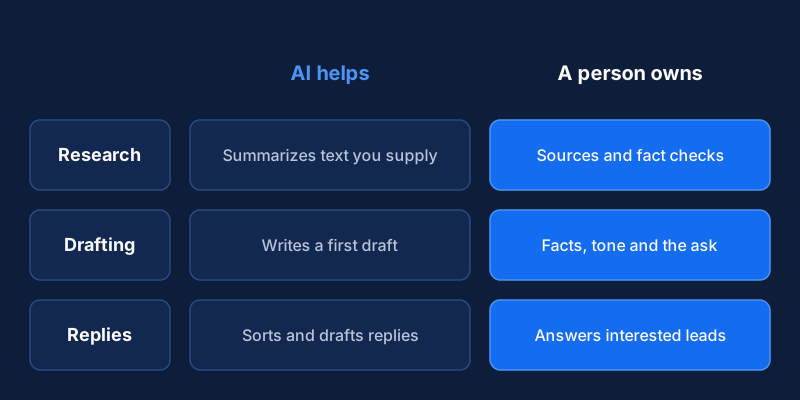
AI compresses a company page, a podcast transcript or a job ad into a few lines very well, and a person can check the result against the source in seconds. The trouble starts when you ask it to "research this company" with no source. It fills the gaps with plausible guesses, and those guesses become claims about the prospect in an email.
The fix is mechanical. Give the model the actual text and ask it to summarize only that. Ask for the passage behind each point. Store the source link and date next to the summary. Treat anything without a source as unverified.
Targeting is a business decision that AI can only apply
A model can sort a list by fit if your criteria are clear, and it can classify accounts by industry or stage from short descriptions. It cannot decide who your ideal customer is. If that profile is vague, the model produces confident, polished and wrong lists. Define the profile first, then use AI to apply it, and spot-check a sample by hand.
Drafts need a brief and a second reader
Unreviewed AI drafts sound alike, and recipients see the same phrases from many senders. Models also add claims the brief never contained, such as results, customer names or numbers.
Control this in the brief, not in later edits. The brief carries the signal and the angle from your research. The rules carry what the model must not do. For how to find the signal and the angle, see cold email personalization at scale.
Verified signal: {{signal}} (source: {{source_url}}, date: {{date}})
Angle: {{angle_in_one_sentence}}
Rules: use only the facts above. No invented results, customers or numbers.
       No flattery. Under 90 words. One small ask.
Then use a model as a second reader against a fixed list:
1. Is every fact about the prospect in the brief, with a source?
2. Does the message claim any result, customer or number that is not in the brief?
3. Is the tone plain, with no flattery and no stock phrases?
4. Is there exactly one ask, and is it small?
5. Does the opt-out line appear?
Here is how the list catches a real failure. Suppose a draft opens with "Congratulations on your recent funding round" and the brief contains no funding fact. Question 1 fails on the spot, and the line is cut or the claim is sourced. A model asked only to "improve the email" would probably have kept it, because the line sounds plausible.
An AI checker shares the blind spots of the AI writer and can approve a false claim because it sounds reasonable. Only a person can compare a fact with the stored source. Keep that step manual for anything personalized.
Match the review effort to the account. A person reads and edits every message to top-tier accounts and warm leads. For mid-tier accounts, a person checks the personalized line and its facts. For wide, role-based outreach, approve the template once and sample weekly. Write the policy down before volume grows, because teams that decide review rules afterward tend to drop them under time pressure.
Let tools run the mechanics and people run the replies
Scheduling, reply detection and pausing a sequence when someone answers are mechanical, and tools handle them well. The risk is that automation lets you send at a volume that magnifies every weakness in targeting and copy. Complaints and bounces damage reputation for all your mail, and the cold email deliverability guide covers the provider rules.
On replies, let a model classify them as interested, not now, wrong person or opt-out. Let it summarize long threads. Let a person write every reply that goes to an interested prospect, because someone who asks a careful question expects a careful answer. Handle opt-outs by rule rather than judgment. A misclassified opt-out that gets another email becomes a complaint.
Two input risks that have nothing to do with writing quality
Prospect names, emails and notes are personal data. Before you paste a list into any AI tool, check what the vendor does with the input: whether it trains on it, where it stores it and for how long. Send only the fields the task needs. A summary task needs a company page, not a contact export. If you sell into the EU or UK, ask a lawyer how data protection rules apply, and see the email compliance automation guide for the consent side.
The second risk is untrusted text. A web page, a post or an inbound email can contain instructions written to steer a model, which is called prompt injection. If the same model can also send email or edit your CRM, a page can trick it into acting. Keep the summarizing step apart from any step that can send or write. Give the summarizer no tools, and treat its output as text for a person to read.
What we would skip
For a small team, four uses add more risk than value: fully automated first-touch emails to important accounts, unsourced "research" pasted into copy, invented social proof, and AI-written replies to interested prospects with no review. We would rather lose some speed than send one of these to an account we want.
Prove it against your manual baseline
AI looks cheap per message, so teams stop counting. Count the whole step: the tool, the prompt upkeep, the review time and the cost of errors that get through. A research summary that takes two minutes to check and saves ten is a good trade. A draft that takes five minutes to repair is not.
Write one small batch by hand and a comparable batch with AI drafting. Compare the quality of replies and the total time, review included. If the AI batch does not win on both, keep the manual step. If you want a repeatable version of this, our repeatable workflows work covers designing AI-assisted steps a team can run. Add automation one stage at a time, starting with research summaries because they are the fastest to check, and stop adding when the error log starts to grow.
Related Content
Build an AI-Assisted Content Workflow With Editorial Review
A step-by-step guide for B2B teams to set up an AI-assisted content workflow where every draft passes human editorial review before it publishes.
A LinkedIn Outreach Workflow Within LinkedIn's Terms
Build a LinkedIn prospecting workflow that stays within LinkedIn's User Agreement: what you cannot automate, what you can, and how a small team runs it.