A LinkedIn Outreach Workflow Within LinkedIn's Terms
By Shuk Huay Koh, Founder, Mir Tech
Published Updated 6 min read
On this page
LinkedIn's User Agreement prohibits bots, scrapers and other unauthorized automation, so a workflow that stays inside the rules keeps every action on the platform in a person's hands. What you can build is everything around those actions: targeting, templates, tracking and review. That is where a small team saves its time.
It is written for founders and small sales or marketing teams who already know who they want to reach. If you do not, work through the positioning framework first.
What the rules say
Read the primary sources yourself, because the rules change and you carry the risk. LinkedIn's User Agreement, in the section on things you must not do, prohibits developing, supporting or using software, scripts, robots or other means, such as crawlers and browser plugins or add-ons, to scrape or copy the services. It also prohibits using bots or other unauthorized automated methods to access the services, add or download contacts, send or redirect messages, create, comment on, like, share or re-share posts, or otherwise drive inauthentic engagement.
The help page on prohibited software and extensions goes further. It says LinkedIn does not permit third-party software that scrapes or automates activity, that members who use such tools are in violation of the User Agreement, and that the tools may stop working without notice. It adds that LinkedIn keeps improving its technical measures against scraping and automation.
In plain terms, four things are off the table: tools that send connection requests or messages on a schedule, tools that like or comment automatically, extensions that scrape profiles, search results or contact details, and engagement pods or scripts that fake interaction.
We are not lawyers, and this is not legal advice. If a vendor says its tool is safe or approved, ask for the evidence and check it against the two pages above. Our view is that for a small team whose people are the brand, the speed gain is rarely worth the risk to the account.
Where the line falls
Staying within the rules does not mean working by hand with no structure. The parts of outreach that involve thinking can all be systematized. Only the clicking has to stay human.
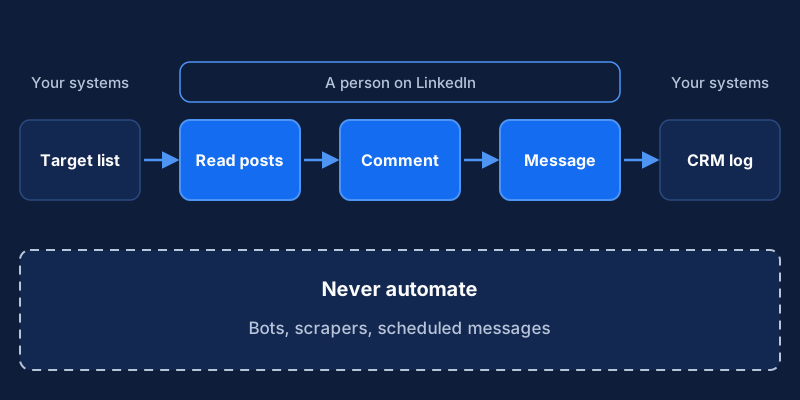
| Part of the process | Systematize it? | How |
|---|---|---|
| Choosing who to reach | Yes | ICP definition, account lists, scoring rules in a spreadsheet or CRM |
| Writing the message | Yes | Message brief, templates with placeholders, examples of good replies |
| Sending requests and DMs | No automation | A person sends each one, with a real reason to contact |
| Commenting and engaging | No automation | A person reads and writes, in a time-boxed routine |
| Recording what happened | Yes | CRM fields, a simple log, a weekly review |
| Following up | Partly | Reminders and tasks in your CRM, sent by a person |
You will need a clear ICP and message brief, a CRM or well-kept spreadsheet, and one LinkedIn account per person doing outreach, used only by that person. Sales Navigator is optional. Its product page describes lead search with filters, saved searches, custom lead and account lists, alerts and CRM integration, though some features depend on the plan, so check the current details before you buy.
1. Define the audience and the message
Before any tooling, write one page covering the roles and company types you want to reach, the problem you solve for them in their words, two or three proof points you can defend, and what counts as a good conversation. A reply that describes a current problem is a good example.
If this page is vague, no workflow will rescue it. Outreach without a clear message is the usual reason LinkedIn produces nothing.
2. Build a target list with permitted tools
Use LinkedIn's own search to find people, or Sales Navigator if you have it. Both are the intended way to find prospects on the platform. Save the searches and build lists of the accounts you want to follow.
Record each person you plan to contact in your CRM or spreadsheet with a name, role and company, why they match your ICP, the trigger for reaching out now (a post, a job change, a company event), where you found them and a status from "not contacted" to "meeting booked" or "not a fit". Enter the data yourself, or use an integration that both the CRM and LinkedIn support. An extension that scrapes profiles or exports lists from search results is exactly what the User Agreement prohibits. To export your own connections, LinkedIn's help page on exporting connections describes the supported route through the "Get a copy of your data" setting.
3. Set up a manual engagement routine
Engagement works because it is real, and a short daily block beats a burst. Open your saved lists, read recent posts from a handful of target accounts and comment only where you have something to add: an experience, a question, a useful link. Reply to comments on your own posts. Log anyone you engaged with in the CRM, with a one-line note.
Keep the limit firm. Fifteen to thirty minutes a day is enough for most people, and a limit stops outreach from taking over the working day.
4. Write connection and follow-up templates
Templates are fine when a person edits them. The test is whether the recipient would believe a real person wrote this to them specifically.
Connection note:
Hi {{first_name}}, I read your post about {{topic}}. We work on the same problem from the {{your_angle}} side. Would be good to connect.

After they accept:
Thanks for connecting, {{first_name}}. I noticed {{specific_observation}}. We wrote a short piece on {{related_topic}} that might be useful: {{link}}. No need to reply, just thought of you.

After they engage:
{{first_name}}, you mentioned {{their_comment}}. How is your team handling {{problem}} at the moment?
Every placeholder needs a real value. If you cannot fill {{specific_observation}} honestly, do not send the message. Keep requests and first messages short, leave the pitch out of the connection request and give people an easy way to decline. Store the templates in a shared document with notes on when to use each, and examples of replies that worked.
5. Track conversations in the CRM
Treat LinkedIn as a source, and not as a silo. After each reply or meeting request, update the contact status, add a note on what they said, set a dated follow-up task and tag the source as LinkedIn with a sub-source such as comment, connection or post.
This answers questions later: which topics draw replies, which roles respond, how many conversations become meetings. It also stops two colleagues from contacting the same person. If your CRM supports notifications, use them for reminders. A reminder to a person who then sends a message stays within LinkedIn's terms, and a script that sends the message does not.
6. Review weekly and audit your tools
Spend thirty minutes a week with the people doing outreach. Look at conversations started instead of messages sent, whether people are describing real problems, which templates and topics get responses and how much time the routine takes. Change one thing at a time so you can see what helped. Retire templates nobody answers.
Every few months, list every tool anyone on the team has connected to LinkedIn: browser extensions, CRM add-ons, scheduling tools and any AI assistant with access to the account. For each, ask whether it sends messages, requests or reactions on a person's behalf, whether it reads or copies profile or search data automatically, and whether it runs in the browser while someone is logged in. If any answer is yes or unclear, remove it or check it against the User Agreement.
Some tools do allowed things, such as saving notes in your own CRM. Others cross the line, and the category matters more than the vendor's marketing. The same applies to AI. It can summarize public posts you paste in, suggest angles for a first message or turn call notes into CRM entries, and a person should review all of it. Do not connect an AI agent that browses LinkedIn or acts in your account, because it falls under the same restrictions as any other bot.
Pair it with content
Outreach works better when the recipient can see who you are. A prospect who checks your profile and finds relevant posts is more likely to reply than one who finds nothing, so read LinkedIn strategy for founders alongside this workflow. If you want website, content and outreach connected into one pipeline, see pipeline automation. The automation there happens in your own systems, such as forms, CRM and email.
The workflow is slower than a bot at the start. It is also easier to defend, and it tends to produce conversations with people who want to talk.
Implementation steps
- Define the audience and the messageWrite one page with the roles you want to reach, the problem you solve in their words, two or three proof points and what counts as a good conversation.
- Build a target list with permitted toolsUse LinkedIn's own search and, if your plan includes it, Sales Navigator saved searches and lists. Record accounts and contacts in your CRM by hand or through approved integrations.
- Set up a manual engagement routineSchedule a short daily block for reading target accounts' posts, writing real comments and replying to your own comments. Log who you engaged with and why.
- Write connection and follow-up templatesDraft a few short templates with clearly marked placeholders. A person edits each one for the recipient before sending, and does not send it when a placeholder has no honest value.
- Track conversations in the CRMLog each reply, meeting request and outcome against the contact record, with a source field so you can see which LinkedIn activity led to conversations.
- Review weekly and audit your toolsLook at conversations started and quality of replies each week. Every few months, check every connected tool against LinkedIn's User Agreement and prohibited software page, and remove anything that automates activity or scrapes data.
Related Content
LinkedIn Strategy for B2B Founders: Profile, Posts, DMs
A practical LinkedIn guide for B2B founders: position your profile, build a sustainable posting routine and turn replies into real sales conversations.
Proposal to Signature: How to Close Deals Faster
For founder-led B2B teams: how mutual action plans, early legal and procurement steps, and e-signature shorten the gap between proposal and signature.
Personalize Website and Email Content by Segment
A practical guide for B2B teams to personalize web and email content by segment: plan variants, add fallbacks and test against a control group.